1320200506Installation Instructions DualGig-2.5
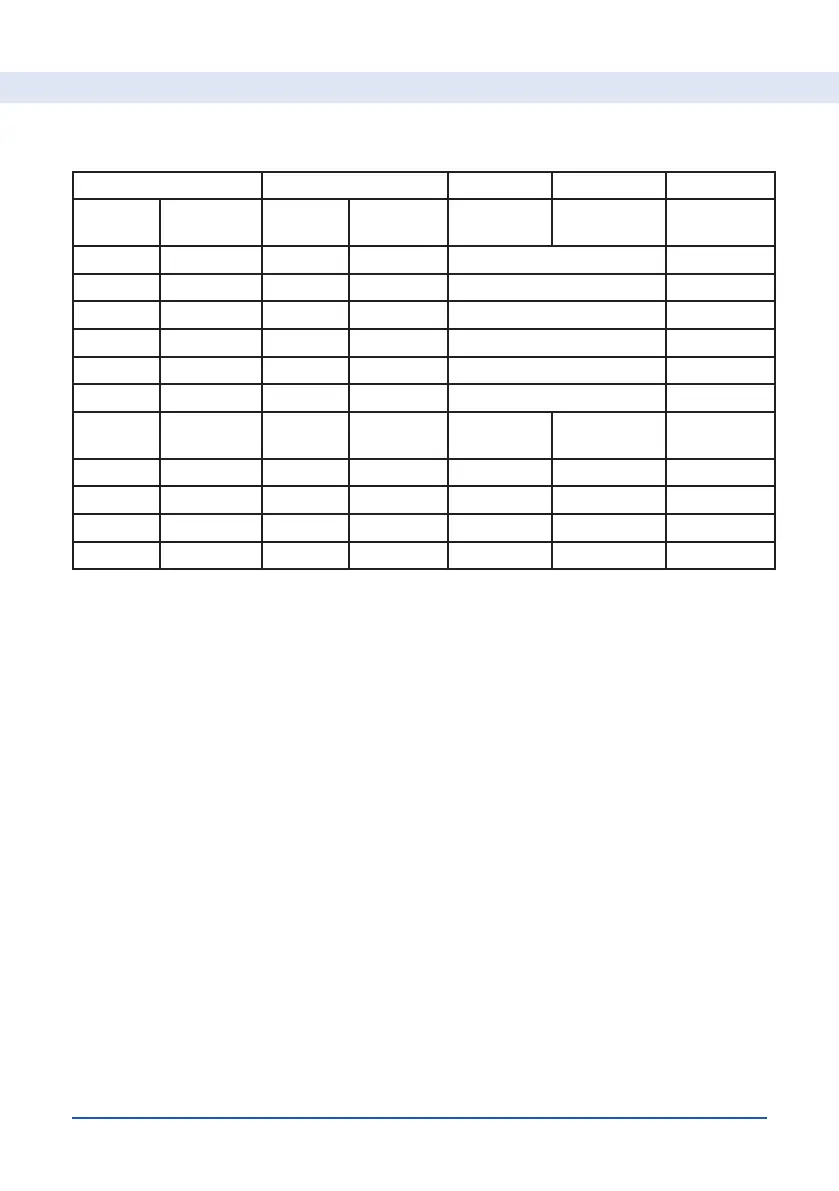
See the table below for the possible combinations
MoCA-2.5 (A) MoCA-2.5 (B) A and B A and B MPS yes/no
Security
Enabled
Enhanced
Privacy
Security
Enabled
Enhanced
Privacy
Privacy
password
Security
password
Disable Enable Disable Enable different or equal No
Disable Disable Disable Enable different or equal No
Disable Disable Enable Disable different or equal Yes
Disable Enable Enable Enable different Yes
Enable Disable Enable Disable different Yes
Enable Disable Disable Enable different or equal of gelijk Yes
Privacy
password
Security
password
Enable Enable Enable Enable equal different Yes
equal equal No
different different Yes Yes
different equal ja
If you make changes manually, click on “Save” and “Reboot” to keep the
changes.
By pressing “reset” (on the bottom of the adapter) for 20 seconds, you can
return to the factory settings.
MPS (MoCA
®
Protected Setup)


 To Next Page