1520200506Installation Instructions DualGig-2.5
MoCA Settings
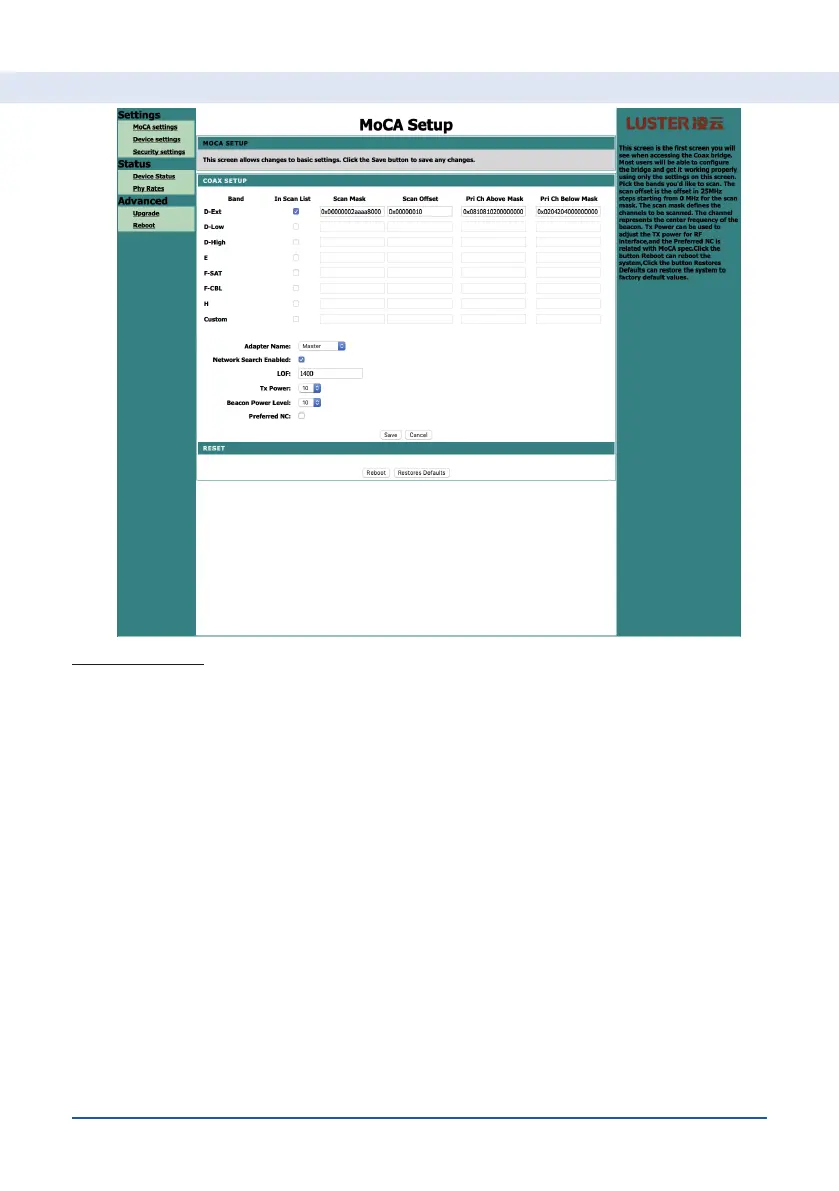
You can set the following here:
1. Adapter name. You can assign a local name to the adapter via a
dropdown list. You need at least 2 MoCA® adapters in your network. By
giving each adapter its own name, you can recognize them more easily if
you log in via the IP address.
2. Network search enabled. If you have these active, the MoCA® adapter
will start to search for other MoCA® adapters when booting from the LOF
(lowest frequency). If no MoCA® adapters are found (or a connection
cannot be established), the other bands are searched.
3. LOF (lowest frequency). This is set by the manufacturer at 1400 MHz.
Attention! If you reset the adapter or return it to factory settings, the LOF
is set to 1125 MHz. Setting the LOF: choose the frequency, click Save and
Reboot the MoCA® adapter. To make the LOF effective in the network, all
MoCA® adapters must have the same LOF.
4. Tx Power. The transmission power of the MoCA® adapter. Default:
position 10 (2 dBm).
5. Beacon Power Level. The signal power that the MoCA® adapter transmits
to contact other MoCA® adapters in the network.
Setting up your MoCA® adapter


 To Next Page