Installation Instructions DualGig-2.5 20200506 16
Setting up your MoCA® adapter
6. Preferred NC. NC stands for Network Coordinator. One of the MoCA®
adapters is the “preferred NC” that starts the network between the MoCA®
adapters. This is often the rst MoCA® adapter to start up. If there is
no “preferred NC”, all MoCA® adapters will mutually determine an “NC”
which will take more time. To speed up start-up, make one of the MoCA®
adapters an “NC” and prevent multiple “NCs” from being present in the
network.
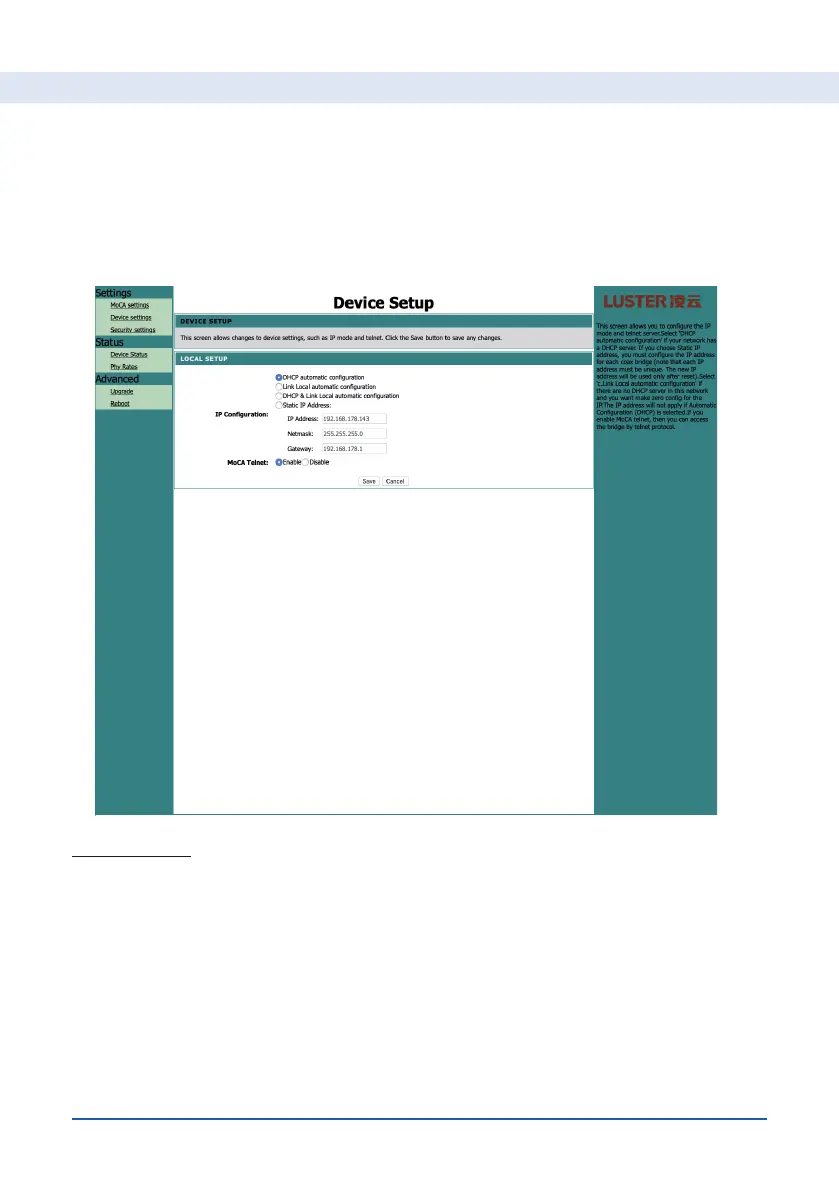
Device Setup
You can set the following here:
1. DHCP automatic conuration, Link local automatic conguration, DHCP
& Link local automatic conguration en Static IP address. If you want the
router of your cable modem to assign an IP address to the MoCA® adapt-
er, choose DHCP automatic conguration.
2. IP conguration. You can adjust the data here so that the menu can be
read in a different domain or set a different IP address in the existing do-
main. The network mask and gateway can also be adjusted.
3. MoCA Telnet. We advise not to change the default value “Enable”.


 To Next Page