1720200506Installation Instructions DualGig-2.5
Security
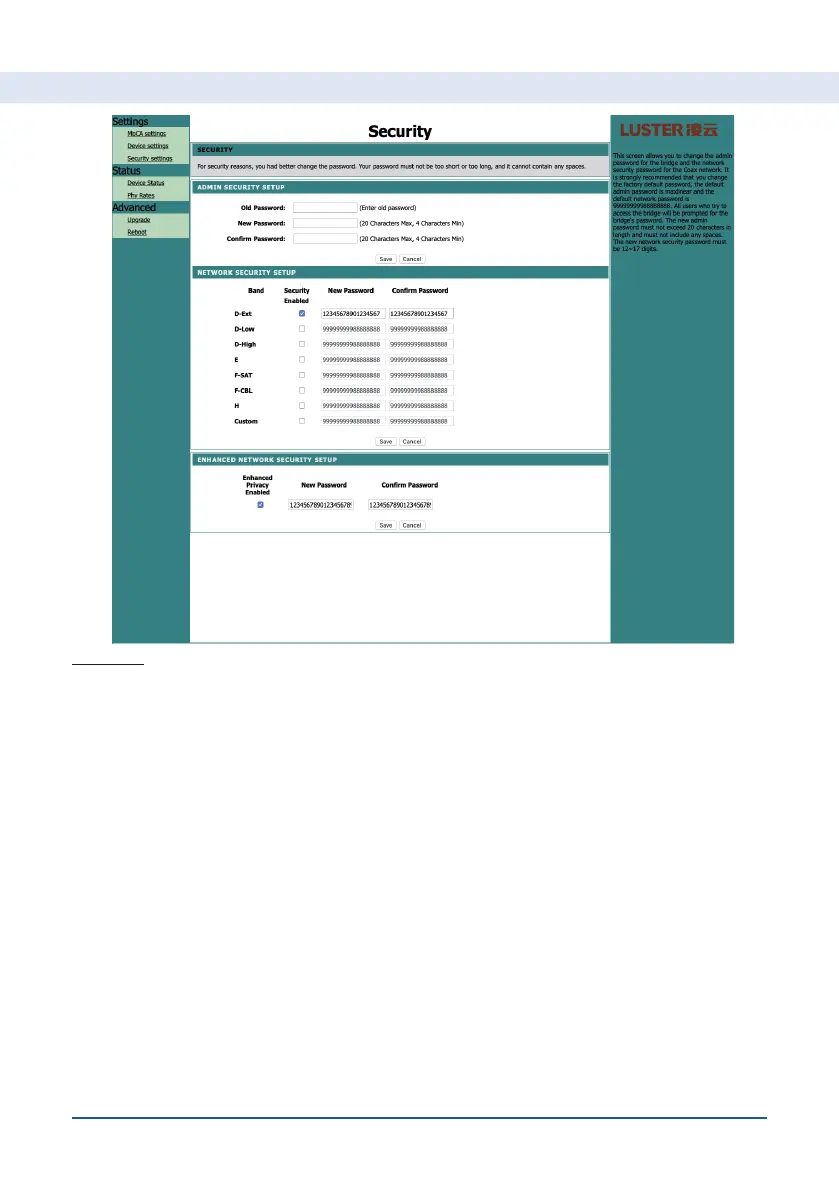
You can set the following here:
4. Admin security setup, Old Password, New Password, Conrm Password.
The default login details are on the back of the adapter. You can adjust
this information here
5. Network security setup. Here you indicate whether you want to provide
a password to the band in which you work. Each band can have its own
password and only MoCA® adapters with the same password can connect
to each other. Note, all MoCA® adapters working together must have
the same password for that band. You do this manually or with the MPS
function.
6. Enhanced Privacy Enabled. An extra security of your data trafc.
Please note, all MoCA® adapters working together must have the same
password. You do this manually or with the MPS function.
Setting up your MoCA® adapter


 To Next Page