720200506Installation Instructions DualGig-2.5
As soon as data is sent LAN1 LED or LAN2 LED ashes irregularly.
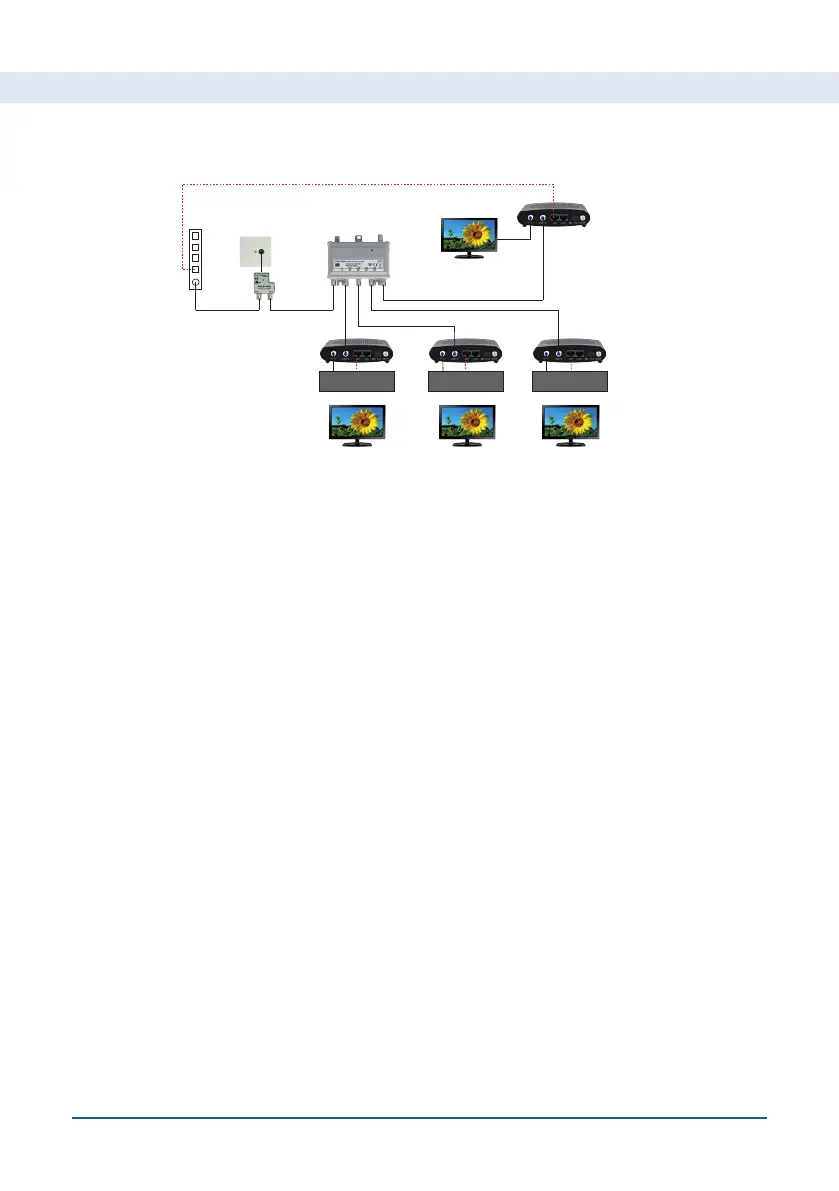
Mounting MoCA® adapter(s) in combination with a TV amplier.
• The diagram above gives an example of an indoor installation with a TV
amplier. MoCA® communication is only possible via the amplier outputs.
So all MoCA® adapters are connected behind the amplier of the coax
network.
The way of connecting the MoCA® adapters as described earlier does not
change.
Test your connection
The MoCA® adapters are already paired. To check whether they also send
and receive data, you can perform the following test.
• Connect one of the MoCA® adapters via its LAN1 or LAN2 to a LAN port
of your cable modem
• Connect a laptop to LAN1 or LAN2 from your other MoCA® adapter.
• Do a speed test and compare the result with the speed of your internet
subscription
For Subscribers connected to a Coax network


 To Next Page