21
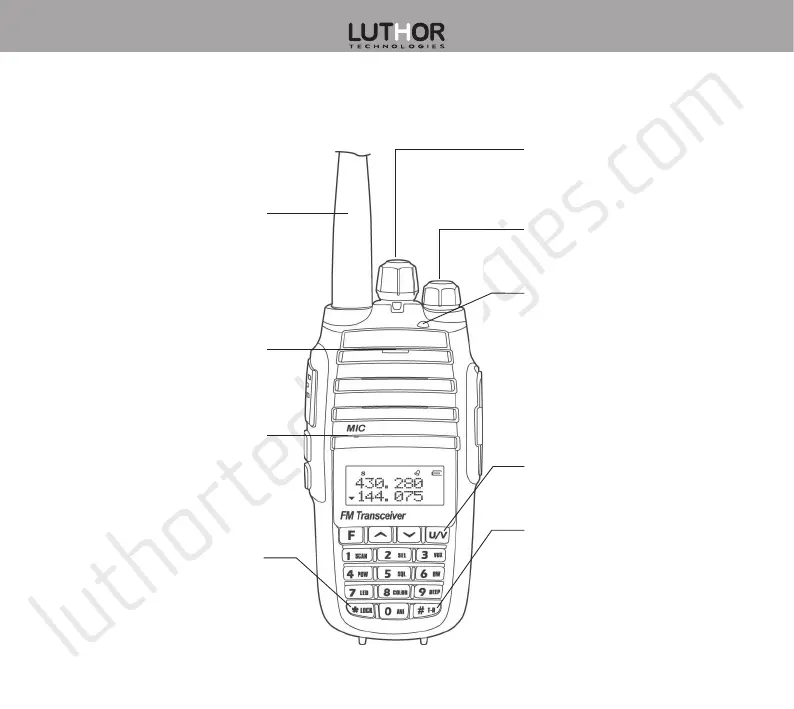
Transceiver’s description
MICROPHONE
CHANNEL SELECTOR
Use it to adjust the channel
and the frequency.
ANTENNA
Connect here the supplied
antenna.
SPEAKER
Internal speaker.
LOCK KEY
Keeping this key pressed
in standby mode, locks or
unlocks the keyboard.
#T-R KEY
Quick press in standby mode
to toggle between VFO and
MR modes. Keep pressed
to exchange Rx and Tx
frequencies.
VOLUME KNOB
Power on / off the radio,
and adjust the volume level.
LED INDICATOR
Lights red during
transmission and green
during reception.
Flickers red if the battery
is exhausted, and flickers
green during the search.
U/V KEY
Toggles between A and B
bands and exits menu.


 To Next Page