29
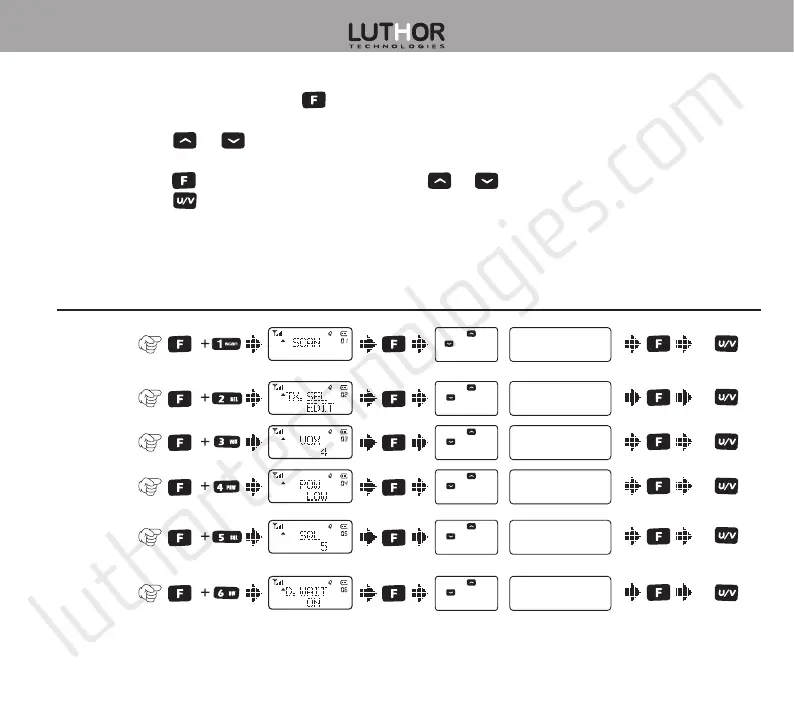
Menu operation
1. In standby mode, press the
key to enter into menu setting, “MENU” will be shown on
the display.
2. Press the
or keys to select the wished menu’s item, the item’s current setting will
be shown on the display.
3. Press the
key to enter and then press the or keys to select the wished setting.
4. Press the
key to exit menu mode and return to standby mode.
Item Nº
and name How to enter Display text
Parameter
selection Parameter settings Confirm
Return to
standby
mode
1.Frequency/
Channel
search
2.Priority
channel
3.VOX level
setting
4.Transmis-
sion power
5.Squelch
level
6.Dual watch
/ Standby
Press or
to change
search direction
Press or
to select
available values
Press or
to select
available values
Press or
to select
available values
Press or
to select
available values
Press or
to select
available values



 To Next Page