EasyManua.ls Logo

Luthor TL-60 - Page 33

Luthor TL-60
56 pages
Print Icon
To Next Page IconTo Next Page
To Previous Page IconTo Previous Page
Loading...
33
luthortechnologies.com
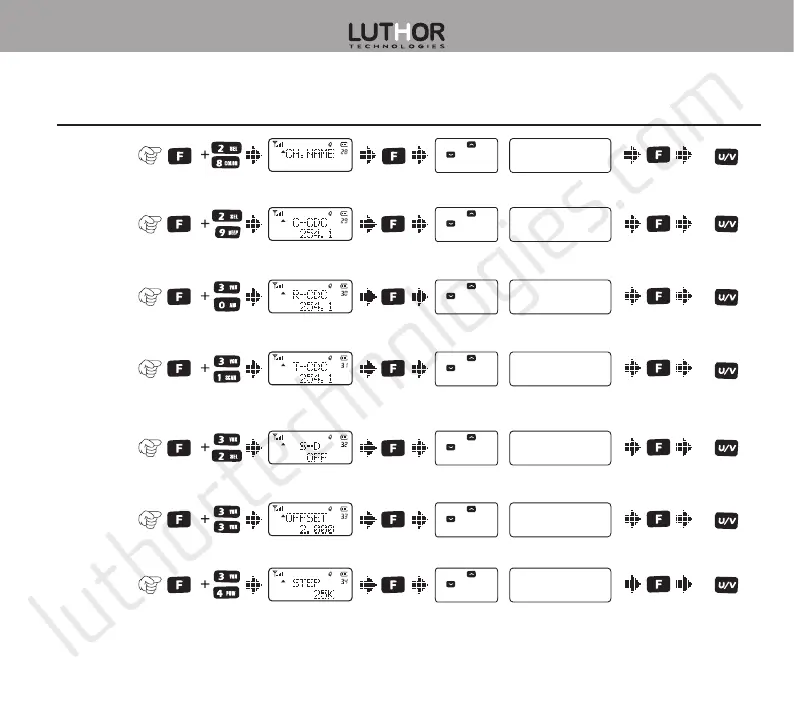
Item Nº
and name How to enter Display text
Parameter
selection Parameter settings Confirm
Return to
standby
mode
28.Edition
of channel
name
29.CTCSS/
DCS tones in
TX/RX
30.CTCSS/DCS
tones in RX
31.CTCSS/DCS
tones in TX
32.Frequency
shi
direction
33.Frequency
shi value
34.Frequency
steps
OFF / QT / DCS
OFF / QT / DCS
OFF / QT / DCS
OFF / + / -
0.0000 - 99.975MHz
0.5K / 2.5K /
5k ...100K
Press or
to select
available values
Press or
to select
available values
Press or
to select
available values
Press or
to select
available values
Press or
to select
available values
Press or
to select
available values
*Lock / #T-R / U/V
Press or
to select
available values