
 Need help?
Do you have a question about the Lutron Electronics AM-4201 and is the answer not in the manual?
Outlines general specifications including display type, measurement units, operating conditions, sensor, power, weight, and dimensions.
Details measurement ranges, resolution, and accuracy for various air velocity units (m/s, km/h, knots, ft/min).
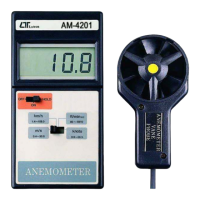
Describes the anemometer's display, off/on/hold switch, and function switch for selecting measurement units.
Details the vane probe handle, probe head, and the battery compartment/cover for the instrument.
Step-by-step guide on how to operate the anemometer, including selecting modes and positioning the probe.
Important note about the sensor head's yellow dot indicating the direction of airflow for accurate readings.
This document describes the Lutron AM-4201 Anemometer, a portable and precise instrument designed for measuring air flow and wind speeds. It is a sophisticated yet durable device, engineered for accuracy in various applications, from checking air conditioning and heating systems to general wind speed measurements.
The AM-4201 Anemometer's primary function is to provide fast and accurate readings of air velocity. It offers multi-functional measurement capabilities, allowing users to obtain readings in several common units: meters per second (m/s), kilometers per hour (km/h), feet per minute (ft/min), and knots (nautical miles per hour). This versatility makes it suitable for a wide range of professional and recreational uses where air movement needs to be quantified.
The device operates by utilizing a remote sensor, specifically a vane probe, which is connected to the main instrument. This design allows for flexible positioning of the sensor in the air flow while the user can comfortably hold and read the main display unit. The vane probe itself incorporates a low-friction ball-bearing design, which is crucial for achieving accurate measurements across both high and low air velocities. This design ensures that the vane wheel rotates freely and responsively to even subtle air movements, eliminating the unreliability often associated with conventional twisted vane arms.
A key feature of the AM-4201 is its DATA HOLD function. This allows the user to freeze the current reading on the display, which is particularly useful when taking measurements in hard-to-reach areas or when needing to record a specific value for later analysis. The large LCD display is designed for easy readability, even in bright ambient light conditions, and is also optimized for low power consumption, extending battery life.
Operating the AM-4201 Anemometer is straightforward, designed for user convenience and efficiency. To begin a measurement, the user simply switches the device to the "On" position using the Off/On/Hold switch. Next, the desired unit of measurement (m/s, km/h, ft/min, or knots) is selected via the Function switch, tailoring the display to the specific application.
The core of the measurement process involves positioning the vane probe. The user holds the vane probe handle and directs the vane probe head into the air flow. A crucial detail for accurate readings is the yellow dot mark on the sensor head; this mark indicates the direction that needs to face directly against the air flow. Once correctly positioned, the main display unit will immediately show the air velocity readings.
The remote sensor design enhances usability by allowing the user to place the vane in the air stream while keeping the main unit, with its clear LCD display, in a comfortable viewing position. This is particularly advantageous in scenarios where the air flow source is in an awkward or elevated location.
The DATA HOLD function is easily activated by switching the Off/On/Hold switch to the "Hold" position during a measurement. This will lock the current value on the display, enabling the user to note down the reading without needing to continuously monitor the live measurement.
The compact and lightweight design, housed in a durable ABS-plastic casing, makes the AM-4201 highly portable and easy to carry. This robust construction ensures that the instrument can withstand the rigors of field use.
The AM-4201 Anemometer is designed with ease of maintenance in mind, primarily focusing on battery replacement. The device includes a built-in low battery indicator, which appears as "BAT" in the left corner of the LCD display. This visual cue alerts the user when the battery power is getting low, signaling that a replacement will soon be necessary.
Even after the low battery indicator appears, the instrument is designed to continue providing in-spec measurements for several hours, offering a grace period before accuracy might be compromised. This allows users to complete ongoing tasks before needing to replace the battery.
Replacing the battery is a simple process. The user needs to loosen the battery cover screw, slide the battery cover away from the instrument, and then remove the old battery. The device uses a standard 006P DC 9V heavy-duty battery. After inserting a new battery, the cover is reinstated and secured with the screw, ensuring the battery compartment is properly sealed. This straightforward procedure ensures minimal downtime and keeps the instrument ready for use.
The durable, long-lasting components and strong ABS-plastic housing contribute to the overall low maintenance requirements of the device, ensuring reliable performance over time with proper care.
 General
| Model | AM-4201 |
|---|---|
| Category | Measuring Instruments |
| Manufacturer | Lutron Electronics |
| Type | Anemometer |
| Air Velocity Range | 0.4 to 30.0 m/s |
| Resolution | 0.1 m/s |
| Air Temperature Range | 0 to 50°C |
| Display | LCD |
| Power Supply | 9V battery |
| Units | m/s, km/h, ft/min, knots, mph |
| Air Temperature Accuracy | ±1°C |











 To Next Page