UVC Light masurement
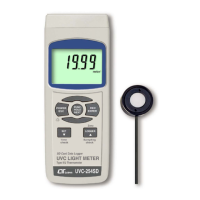
a.Set the function to the UVC light meter, refer to page 7.
b.Install the " UVC Probe Plug " ( 3-17, Fig. 1 ) into the
" Probe Input Socket " ( 3-7, Fig. 1 ).
c. Power on the meter by pressing the " Power Button "
( 3-2, Fig. 1 ). The display will show the " mW/cm^2 "
unit. Now the meter is ready for making the UVC
light measurement.
d.Use the fingers to hold the " UVC Sensor body " ( 3-18 ),
face the " UVC Sensor " ( 3-19, Fig. 1 ) against to the
measurement UVC light source directly. The display
will show the UVC light measurement value.
Zero adjustment :
During the UVC measurement, if blank the
UVC Sensor ( 3-19, Fig. 1 ) , the Display not
show zero value, press the " Zero Button,
Logger Button " ( 3-6, Fig. 1 ) > 3 seconds,
Display will show zero value.
8













 To Next Page