Lutron Electronics Co., Inc. 7200 Suter Road
Coopersburg, PA 18036-1299 USA
Customer Assistance | 1.844.LUTRON1 USA, Canada, and the Caribbean | +1.888.235.2910 Mexico | +1.610.282.3800 Others | www.lutron.com
Part of the Vive System
Vive Integral Fixture Controls
Required Components
For each fixture, you will need:
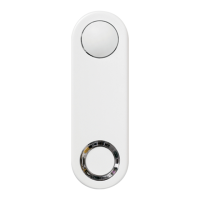
Vive Integral Fixture Control with Sensor
(DFCSJ-OEM-OCC)
Vive Integral Fixture Control (RF only)
(DFCSJ-OEM-RF)
Note: Neither Daylighting functionality nor occupancy
sensing is available in the DFCSJ-OEM-RF
Start Here
English
Important Notes:
• Usecopperconductorsonly.
• Checktoseethatthedevicetypeandratingissuitablefortheapplication.
• DO NOTinstallifproducthasanyvisibledamage.
• Ifmoistureorcondensationisevident,allowtheproducttodrycompletely
beforeinstallation.
• Operatebetween32°Fand131°F(0°Cand55°C),ambient.
• 0%to90%humidity,non-condensing.
• Forindooruseonly.
• Sensorshouldbemountedtoxtureinorientationthatmakesitparallelto
theoorwhenxtureisinstalledinceiling.
• Cleanonlywithsoft,dampcloth,nochemicalcleaners.
• DO NOTpaint.
• Intendedforinstallationinxturemanufacturer’sfacilityonly.
DFCSJ-OEM-OCC Vive Integral Fixture Control with Sensor
DFCSJ-OEM-RF Vive Integral Fixture Control (RF only)
2.InstallIntegralFixtureControl
• Ensureknockoutandadjacentsurfacesarefreefromburrs,oil,chemicals,debris,etc.
• DonotpushonthePIRlensorbuttontoinstalltheFixtureControl.PushonthecenteroftheFixtureControl.
• PushfirmlyontheFixtureControlaroundtheentireperimeteruntilitsitsflushagainsttheintendedfixturemountingsurface.
AspecialtoolfromLutroncanbeprovidedtofacilitateinstallation.
• Donotfullyenclosewithinthemetalfixture.
3.FixtureControlSelf-Test(REQUIRED)
TheViveintegralfixturecontrolsupportsaself-testmodeinordertoverifyproperRFcommunicationafter
beinginstalledinafixture.Incaseofself-testfailure,thefixturemustnotbereleasedtocustomersuntilthe
wiringand/orfixtureconstructionisadjustedtoimproveRFperformanceuntilthefixturepassestheself-test.
SeeWiring Best PracticessectionontheVive Integral Fixture Controls App Note(048642)at
www.lutron.comfordetails.
Untiloneormoreofthefollowingconditionsaremet,thefixturecontrolautomaticallyentersself-teston
power-up:
• Thefixturecontrolhaspreviouslybeenpoweredcontinuouslyformorethan60minutes.
• ThefixturecontrolisassociatedtoanyotherdevicesoraVivesystem.
Resettingthefixturecontroltofactorydefaultswillresettheaboveconditionsandre-enableautomatic
self-testentry.
TheFixtureControlSelf-Testisconductedasfollows:
1.Whilethetestisinprogress,thestatusLEDalternatesbetweengreenandred.Duringthetest,theVive
integralfixturecontrolwillnotrespondtobuttonpressesorcommandsfromotherLutron
ClearConnectdevices.
2.FixturewillturnONtofullintensityfor5secondsandthenwillturnOFFfor5seconds.
3.Oncetheself-testiscomplete:
a.Ifthefixturepasses,thestatusLEDblinksgreentwice,repeatingevery2seconds,andthefixturewill
turnON.
b.Ifthefixturefails,thestatusLEDblinksredtwice,repeatingevery2seconds,andthefixturewill
remainOFF.
4.Toexittheself-testmodeaftercompletion,pressthebuttonorwait5minutestoexitautomatically.
Note:DoNOTdisconnectpowertothefixtureuntilthepass/faildeterminationhasbeenmade.
4.BasicFunctionalityEnd-of-LineTest
1.Providepowertothexture.
2.Fixturewillgotothedriver’spreviouslightlevel.
3.Pressthebuttontotoggletheloadstate.LightwillfadetoON(orOFF)over1second.GreenLED
willstaylitfor2secondsafterreleasingthebutton.
4.Toggletheloadagain(ifnecessary)toensurethelightsareon.ThiswillmakesurethelightsturnONwhen
powerisappliedthenexttime(atjobsite).
5.Removepower.
1.ConnectWiresusingDiagramsBelow
• ViveIntegralFixturecontrolcontainstwo18AWG(0.75mm
2
),solidcopperwires.
Formoreinformation,see
www.lutron.com/TechnicalDocumentLibrary/3691039.pdf
www.lutron.com/TechnicalDocumentLibrary/048642.pdf
www.lutron.com/TechnicalDocumentLibrary/ApNote106.pdf
Please read before installing
+
One Fixture Control
At least one EcoSystem driver + Fixture Control digital link interface (DFC-OEM-DBI)
OR
+
At least one driver with self-powered DALI link
(see 3691039 or 048642 on www.lutron.com for list)
9.5 – 20.5 V-
250 mA max
041600
Rev. B
04/2018
*
For set-up, programming, and
troubleshooting with a Vive system,
please refer to the installation
instructions included with the Vive hub
or at www.lutron.com
Vive Integral Fixture Controls
Controlsupto4drivers(IEC60929AnnexE.2requireseachdrivertolimitthesink/
sourcecurrentdrawto2.0mAmaximum).Seewiringdiagramsformoredetails.
DefaultFunctionality
Fixture Controls
Auto On level: DFCSJ-OEM-OCC only
(notapplicableforDFCSJ-OEM-RF)
Varieswithambientlightlevelwhenoccupancyistriggered
(e.g.,100%foradarkroom,10%forabrightroom).
Timeout period:15minutes
Driverwithself-poweredDALIlink
EcoSystemdriver
OR
Fixture Control
digitallinkinterface
FCC information and IC information
Thisdevicecomplieswithpart15oftheFCCRulesandIndustryCanada
license-exemptRSSstandard(s).Operationissubjecttothefollowing
twoconditions:(1)Thisdevicemaynotcauseinterference,and(2)this
devicemustacceptanyinterference,includinginterferencethatmay
causeundesiredoperation.Modicationsnotexpresslyapprovedby
LutronElectronicsCo.,Inc.couldvoidtheuser’sauthoritytooperatethis
equipment.
NOTE:Thisequipmenthasbeentestedandfoundtocomplywith
thelimitsforaClassBdigitaldevice,pursuanttopart15oftheFCC
Rules.Theselimitsaredesignedtoprovidereasonableprotection
againstharmfulinterferenceinaresidentialinstallation.Thisequipment
generates,usesandcanradiateradiofrequencyenergyand,ifnot
installedandusedinaccordancewiththeinstructions,maycause
harmfulinterferencetoradiocommunications.However,thereisno
guaranteethatinterferencewillnotoccurinaparticularinstallation.If
thisequipmentdoescauseharmfulinterferencetoradioortelevision
reception,whichcanbedeterminedbyturningtheequipmentoffandon,
theuserisencouragedtotrytocorrecttheinterferencebyoneormore
ofthefollowingmeasures:
•Re-orientorrelocatethereceivingantenna.
•Increasetheseparationbetweentheequipmentandreceiver.
•Connecttheequipmentintoanoutletonacircuitdifferentfromthatto
whichthereceiverisconnected.
LED/Daylightsensorlens
PIRlens
Button
LEDlens
Button
120–277V~
120–277V~
Fixture Control
digitallinkinterface
EcoSystemdriver
Driverwithself-poweredDALIlink
Vive Integral
Fixture Control
Vive Integral Fixture Controls with
EcoSystem or DALI Driver*
Fixture Control with Driver with
Self-powered DALI Link
E1
E2
120–277V~
E1
E2
SR+/DALI+
SR-/DALI-
120–277V~
EcoSystemdriver
Vive Integral
Fixture Control
Driver Maximum Number per
Fixture Control
PhilipsR SR driver 2
OsramR DEXALT
driver
3
Driver Maximum Number
per Fixture Control
EcoSystem driver 4
Forapplicationsthatrequiremoredriversthanshownhere,
contactthedrivermanufacturer.
IECSELV/NECRClass2
UL2043PlenumRated
ReviewtheVive Integral Fixture Controls App Note(048642)atwww.lutron.comforWiring
andFixtureConstructionGuidelines.
S+
S-
Notes:
1.E-andE+fromtheDFC-OEM-DBIcangotoeithertheE1orE2terminalontheEcoSystemdriver.
2.S-andS+fromtheDFC-OEM-DBIcangotoeitherwirefromtheViveIntegralFixtureControl.
*PleaseseetheNotessectionforadditionaldetails
Note:Whenusingmultipledriverswithself-poweredDALIlink,SR+/
DEXAL+fromthedriversmustbetiedtogetherandtheSR-/DEXAL-
fromthedriversmustbetiedtogether.DoNOTmix“+”and“-“when
usingmultipledrivers.”


 To Next Page
 Need help?
 General