4
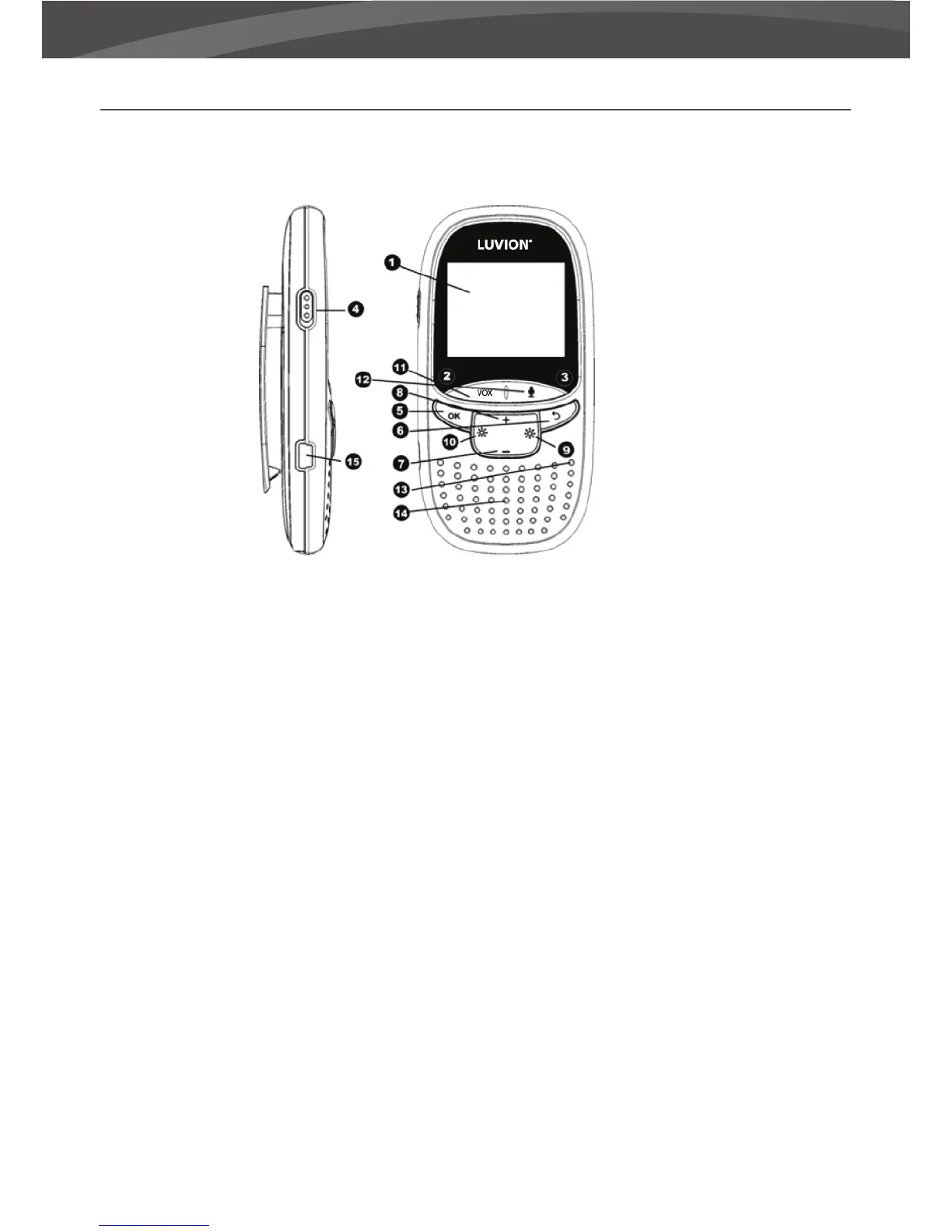
OVERVIEW OF PARENT UNIT MONITOR
1. LCD display - 2” LCD Screen.
2. Charging LED - indicates the unit is currently charging.
3. Power indicator LED - indicates whether the parent unit is switched on.
4. On/O button - Turns the parent unit ON or OFF.
5. Menu / OK button - Use the Menu / OK button to open the main menu or to con rm a selection.
6. Return / Undo button - Use the return button to return to the previous state or menu.
7. Decrease volume button - Press this button to decrease the volume of the monitor.
8. Increase volume button - Press this button to increase the volume of the monitor.
9. Increase brightness button - Press this button to increase the brightness of the monitor.
10. Decrease brightness button - Press this button to decrease the brightness of the monitor.
11. Vox button - Press this button to switch to VOX mode or to leave the VOX mode.
12. Talk button - Press this button to speak through the baby unit to your child.
13. Microphone - The sounds detected by this microphone will be transmitted to the baby unit (camera)
when the Talk button is pressed.
14. Loudspeaker - Produces the sound from the baby unit.
15. Power connector - Connect the included USB power adapter to power and/or charge the parent unit.















 To Next Page