Need help?
Do you have a question about the Luxul XMS-5248P and is the answer not in the manual?
The Luxul XMS-5248P is a 52-port Gigabit PoE+ L2/L3 managed switch designed for robust network installations. This quick install guide provides essential information for setting up, configuring, and maintaining the device, making it suitable for both rack-mount and desktop environments.
The XMS-5248P serves as a central component in a network, facilitating high-speed data transmission and power delivery over Ethernet. As a 52-port Gigabit PoE+ L2/L3 managed switch, it offers advanced capabilities for network management, traffic control, and power distribution to connected devices. The "L2/L3 managed" aspect signifies its ability to perform both Layer 2 (data link layer) and Layer 3 (network layer) functions, allowing for sophisticated network segmentation, routing, and quality of service (QoS) management.
The switch supports 10/100/1000 Mbps Ethernet, with ports 1-48 being PoE+ enabled by default, and ports 49 and 50 providing Gigabit Ethernet connectivity without PoE. This combination allows for flexible deployment, supporting a wide range of devices from standard network clients to power-hungry PoE-enabled equipment like IP cameras, wireless access points, and VoIP phones. The PoE+ capability ensures that devices requiring more power can be supported, simplifying cabling and power infrastructure.
Its managed nature means that network administrators have granular control over network traffic, security, and performance. This includes features like VLANs (Virtual Local Area Networks) for segmenting the network, Spanning Tree Protocol for preventing network loops, and various routing protocols for efficient data forwarding. The switch also supports redundant power supply (RPS) functionality, enhancing reliability by allowing an external power supply to take over in case of an internal power failure.
The XMS-5248P is designed for straightforward physical installation. It can be easily mounted in a standard 19-inch rack using the included mounting ears and screws. When rack-mounting, it's important to ensure the LEDs face outwards for easy status monitoring and that the switch is level and securely fastened. For desktop use, rubber feet are provided to ensure stability.
Connecting the switch to your network is simple. Any of the 50 Ethernet ports can be used to connect to Ethernet-enabled devices such as servers, routers, or other switches, and no crossover cable is required. For optimal performance and stable data transmission at 1000 Mbps, Luxul recommends using Category-6 shielded twisted pair cabling, although Category-5 or super Category-5 unshielded twisted pair (CAT5/CAT5e/CAT6 UTP) are also supported.
Powering the device involves connecting the included power cable to a surge-protected outlet. The internal power supply is versatile, supporting 100-240VAC at 50/60Hz. For enhanced reliability, the rear panel includes an RPS connector, allowing for the connection of an external power supply with an appropriate RPS cable.
Accessing the switch's web configuration interface is done through a standard web browser. The default IP address is 192.168.0.4, with the default username and password both being "admin." If your network uses a different IP address scheme, you may need to temporarily configure your computer's IP address to be within the 192.168.0.X range, setting the Gateway/Router address to 192.168.0.4, before accessing the switch. Once configured, your computer's IP settings can be reverted to "Obtain Automatically/DHCP."
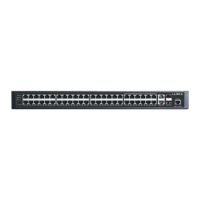
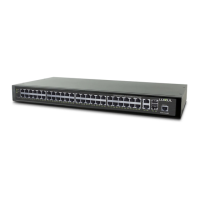
The front panel features 52 Gigabit Ethernet RJ-45 ports, two Gigabit SFP+ ports for high-speed fiber uplinks, status, link, and PoE LEDs, a Mode/Reset button, and an RJ-45 Console port for command-line interface access. The port LEDs provide visual feedback on link speed (Green for 1000Mbps, Yellow for 10/100Mbps) and data activity (Flashing). The Mode/Reset button allows for toggling the port indicator between displaying link speed and PoE status.
The XMS-5248P incorporates several features to aid in monitoring and maintaining network health. The LED indicators on the front panel provide crucial information about the switch's operational status and the status of each port. The System LED, for instance, flashes green for normal operation, glows solid green to indicate a malfunction (prompting a call to support), and turns red during power-on system initialization. If the System LED is off, it indicates the startup/initialization process is ongoing or that power is not on.
The Port Link/Act Status LEDs (1-50) show the connection speed and activity: Green for a 1000Mbps device, Yellow for a 10/100Mbps device, and Flashing when data is being received or transmitted. If a port LED is off, it means nothing is connected to that port.
For PoE-enabled ports, the Port PoE Status LEDs (1-50) indicate power delivery: Green means the switch is providing PoE power, Yellow signifies that PoE is off due to a fault or because the connected device is exceeding its power limit, and Off indicates a disconnected port or link failure. During startup, all port LEDs will briefly flash as part of a self-test.
The Mode/Reset button on the front panel also serves as a critical maintenance tool. A brief tap switches the port indicator display between link speed and PoE status. For more significant actions, the button can be used to reboot the switch or restore it to factory default settings. To reboot, press and hold the Reset button for approximately three seconds until both the Link/Act and PoE LEDs light up, then release. It's important not to hold the button for more than four seconds during a reboot, as this could erase all settings and restore factory defaults.
To restore the switch to its factory default settings, press and hold the Reset button for approximately eight seconds until both the Link/Act and PoE LEDs turn off. Releasing the button will cause the switch to automatically restore defaults and reboot. Once the System LED starts flashing again, the switch will be running with its factory settings. A crucial caution is provided: restoring default settings will remove any custom configuration, so this action should be performed with care.
The XMS-5248P has an internal 740W power supply, and users are advised not to exceed 25.5W per external PoE device or a combined consumption of 740W for all external PoE devices to ensure stable operation. Furthermore, a caution regarding network cabling highlights the importance of avoiding multiple uplink channels between switches or between the XMS-5248P and a router, as this can create loops and lead to network failure. Ensuring only one uplink channel exists is vital for network stability.
 General
| PoE Budget | 740W |
|---|---|
| Switching Capacity | 176 Gbps |
| Jumbo Frame Support | Up to 9KB |
| Operating Humidity | 10% to 90% non-condensing |
| Rack Mountable | Yes |
| Ports | 4 x 10G SFP+ Ports |
| MAC Address Table | 16K |
| Power Supply | Internal |
| Dimensions (W x D x H) | 440 x 260 x 44 mm |
| Operating Temperature | 0°C to 40°C |
| Management | CLI, SNMP |
| VLAN Support | Yes |

 To Next Page