3.2.1 Clock settings
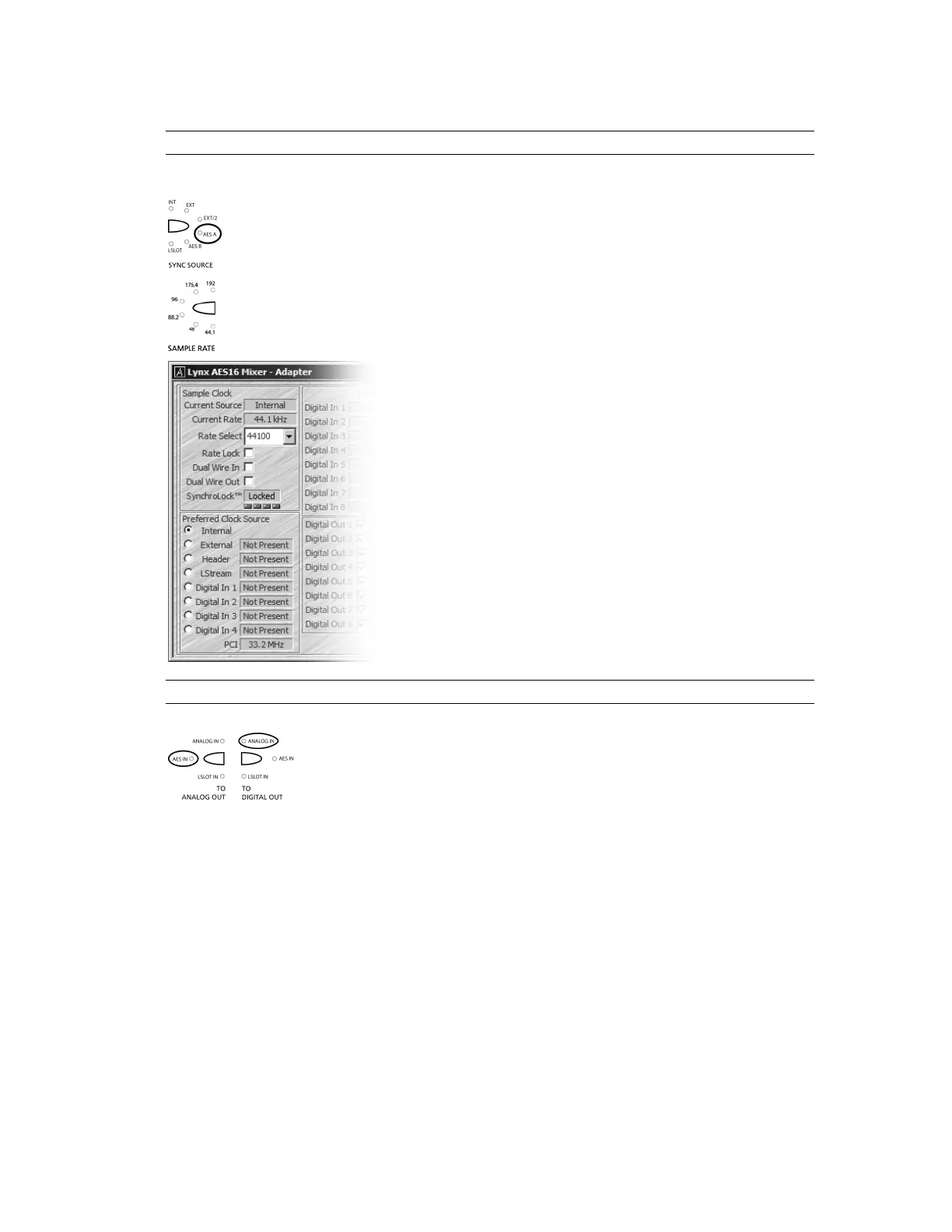
Clock settings should be established from the Lynx Mixer and the Aurora front panel.
The Aurora should be SYNC SOURCE set to “AES A”.
When a sample rate is chosen from the AES 16 Adapter page, or when playback or
recording is initiated from a software application, the corresponding SAMPLE RATE LED
on the Aurora front panel will illuminate.
The AES16 should be set to “Internal” in the AES16 Adapter
page.
3.2.2 Routing
In this instance, signals from the Aurora’s analog inputs should be routed to
the digital outputs for delivery to the AES16 inputs. Similarly, the digital
inputs providing signals from the AES16 should be routed to the Aurora’s
analog outputs, which will be connected to monitoring equipment. Select
“AES IN” for TO ANALOG OUT and “ANALOG IN” for TO DIGITAL
OUT from the Aurora front panel.
Page 17


 To Next Page