EasyManua.ls Logo

M-Audio Fast Track Ultra 8R - User Manual

M-Audio Fast Track Ultra 8R
25 pages
Print Icon
To Next Page IconTo Next Page
Loading...
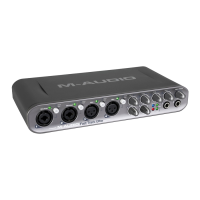
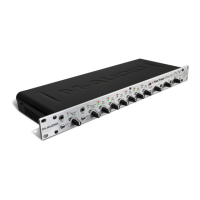
Fast Track Ultra 8R
User Guide
Rack-mountable 8 x 8 USB 2.0 Interface with MX Core DSP Technology
English

Other manuals for M-Audio Fast Track Ultra 8R

Questions and Answers

  • B
    Brandi StanleyJul 27, 2025
    How to troubleshoot no sound on M-Audio Recording Equipment?
    • K
      Keith AllenJul 27, 2025
      If you're not getting any sound with your M-Audio Recording Equipment, there are several things to check: * Ensure the power adapter is connected and the USB cable is properly connected. * Verify that the M-Audio Recording Equipment drivers are correctly installed. * Confirm your audio software is set up to use the M-Audio Recording Equipment. * Check the input selector switch to ensure the proper input is selected. * Examine your signal path to ensure your inputs are routed correctly. * Check all audio connections and cables to make sure they are correctly plugged in. * In the Control Panel, check that the output volume levels are turned up.
  • G
    Gabrielle MayerAug 9, 2025
    What to do if M-Audio Recording Equipment has no sound or clicks and pops when recording digital input?
    • T
      tammy17Aug 9, 2025
      If you're experiencing no sound or clicks and pops when recording a digital input to your M-Audio Recording Equipment, consider the following: 1. Ensure the input source on the Settings tab of the Control Panel is set to “External.” 2. Make sure your input levels are not too high. 3. Check the input level meters in your audio application. 4. Try using a larger buffer size (higher latency setting) in the Control Panel. 5. If you are using a USB hub, try connecting M-Audio Recording Equipment directly to your computer.

Summary

Fast Track Ultra 8 R Features

M-Audio Fast Track Ultra 8 R Key Features

Lists the key features and specifications of the Fast Track Ultra 8R audio interface.

Controls and Connectors

Front Panel Controls

Describes the controls and indicators located on the front panel of the Fast Track Ultra 8R.

Rear Panel Connectors

Details the various input and output connectors found on the rear panel of the device.

Hardware Connections

Connecting Microphones

Explains how to connect microphones to the Fast Track Ultra 8R for recording.

Using Fast Track Ultra 8 R

Setting Input Recording Levels

Instructions on how to set appropriate input gain and signal levels for recording.

The Software Control Panel

Accessing the Control Panel

Details how to open and access the M-Audio Fast Track Ultra 8R software control panel.

Monitor Mixing

Troubleshooting

Troubleshooting Audio Issues

Provides solutions for common problems like no sound or clicks and pops.

M-Audio Fast Track Ultra 8R Specifications

General IconGeneral
Audio Interface TypeUSB
Number of Mic Preamps8
Analog Inputs8 x XLR/TRS Combo
Analog Outputs8 x TRS
MIDI I/OIn/Out
Phantom PowerYes
Headphone Outputs2
Sample Rate96 kHz
Bit Depth24-bit
Digital Inputs1 x S/PDIF Coaxial
Digital Outputs1 x S/PDIF Coaxial
Software IncludedPro Tools SE

Related product manuals