www.m2tech.biz
accurate with regards to the fundamental steps necessary to its successful
completion.
NOTE: The
HIFACE Evo Two
HIFACE Evo TwoHIFACE Evo Two
HIFACE Evo Two
is designed to implement the HID interface for remote
control of the player running on a computer attached by USB (see chapter 9). This
could lead to compatibility problems with Windows XP. We strongly suggest
updating the operating system to a more recent version than Windows XP before
installing the driver.
9.3.1. Installing the Windows driver
First, it is necessary to download the driver from the M2Tech website at
(www.m2tech.biz/it/hifaceevotwo.html) Here you’ll find the compressed folder containing
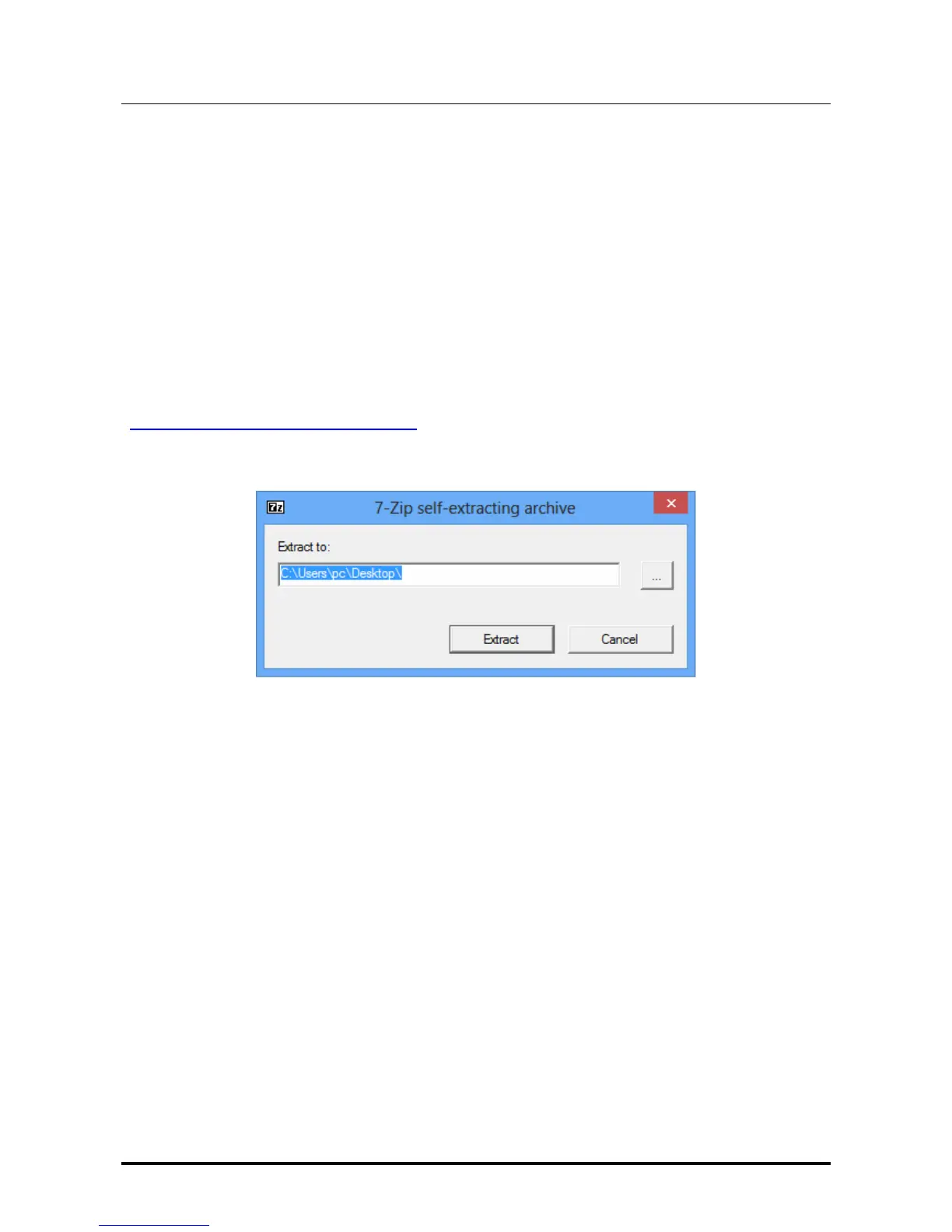
all installation files. It’s a self-extracting file: automatic extraction is launched by double-
clocking on its icon, as shown in Fig. 10.
Figure 10
NOTE: files are extracted in the folder displayed in the window, usually the desktop.
For a better handling of the installation operation, we suggest to create a temporary
folder and extract files into it, or into a folder you may want to keep. In this case,
just designate a new folder and direct the extraction process to that folder.
A window showing the extraction process appears for a while. When extraction is
complete, the application finishes automatically. In case of errors during extraction, a
diagnostic window is shown instead (Fig. 11), which remains open to show error
messages. After reading messages, close the application by clicking on the “close button”.


 To Next Page