EasyManua.ls Logo

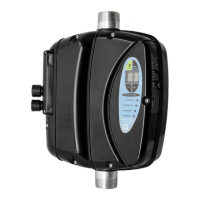
MAC3 HydroControllerHCW-MM Standard - User Manual

MAC3 HydroControllerHCW-MM Standard
32 pages
Print Icon
To Next Page IconTo Next Page
Loading...
HydroController
HCW-HCA MM/MT/TT/
Standard/Advanced
(vers. Piscine/Pool)
Guida Utente
User Manual
Made in Italy
Cod. /620100011 Rev.7

Questions and Answers

  • K
    Karen LynnAug 16, 2025
    What to do if MAC3 HydroController HCW-MM Standard Inverter shows 'No water'?
    • N
      Nicholas JohnsonAug 17, 2025
      If the MAC3 Inverter displays a 'No water' error, it indicates a lack of water. The system automatically attempts to reset, but if these attempts fail, the system may become permanently blocked. First, ensure there is water available. For the HCW model, inspect the check valve. Reset the pump priming function and ensure the filter isn't blocked. If the problem persists, disconnect and then reconnect the power supply.
  • C
    Carolyn HartAug 19, 2025
    What to do if MAC3 Inverter shows 'ShortC. f-f-gnd'?
    • D
      danielstanleyAug 19, 2025
      If your MAC3 Inverter displays 'ShortC. f-f-gnd', it means a Phase-Phase or Phase-Ground short circuit has been detected. The system automatically attempts to resolve this, but if it fails multiple times, it will lock. To fix this, eliminate the cause of the short circuit, verify the motor's absorption, and try power cycling the device.
  • P
    Philip Chase MDAug 21, 2025
    What causes high temperature on MAC3 HydroController HCW-MM Standard Inverter?
    • S
      scottromanAug 22, 2025
      If the MAC3 Inverter shows 'High temperature', it means the water temperature is above 75°C. This will automatically reset when the temperature drops below 60°C. Ensure the incoming water temperature is within the product specifications. For the HCA model, check the cooling fan's functionality and restore the correct pump priming action.
  • P
    Philip GambleAug 25, 2025
    Why is my MAC3 HydroController HCW-MM Standard Inverter I2t protected?
    • E
      Elizabeth DayAug 25, 2025
      If the MAC3 Inverter is 'I2t protected', it indicates excessive power consumption. Ensure the pump is operating within the manufacturer's specified conditions and that there are no impeller friction or locking issues. You may also need to adjust the pick current value on parameter 54.
  • A
    Adam PatrickAug 27, 2025
    How to fix Imax Fault on MAC3 HydroController HCW-MM Standard Inverter?
    • D
      Diana MooreAug 27, 2025
      If the MAC3 Inverter displays 'Imax Fault', it signifies an overcurrent in the pump. Check the current measurement output parameter to "LoadCurrent " and set the proper parameter “Max.MotorCurrent ". Also, verify that the pump is used under the conditions prescribed by its manufacturer and ensure there are no friction or locking issues with the impeller.
  • J
    Jon StewartAug 30, 2025
    What causes high voltage on MAC3 HydroController HCW-MM Standard?
    • A
      Amanda BakerAug 30, 2025
      If the MAC3 Inverter displays 'High voltage', it means the power voltage measured is too high (over 500 Vac and 270 Vac vers. MM/MT). Check the wiring system and set the values in the range prescribed for the HC.
  • K
    Kimberly MorrowSep 2, 2025
    What to do if MAC3 HydroController HCW-MM Standard Inverter shows 'Motor Unconnected'?
    • J
      Jamie MoodySep 2, 2025
      If the MAC3 Inverter displays 'Motor Unconnected', it means the pump isn’t connected to the inverter. Check that the power output cable from the inverter is properly connected to the pump.
  • T
    Tara WilsonSep 5, 2025
    Why is my MAC3 Inverter showing low voltage?
    • P
      pricejosephSep 5, 2025
      If the MAC3 Inverter displays 'Low Voltage', it indicates that the power voltage measured is too low (less than 300 Vac vers TT and 170 Vac vers MM/MT). Check the electric system and reset the values to within the range prescribed for the HC.
  • J
    Jamie BellSep 7, 2025
    What does Low CosPhi mean on MAC3 Inverter?
    • K
      Katrina MillerSep 7, 2025
      If the MAC3 Inverter displays 'Low CosPhi', the inverter detects a lower cosphi value than the value set at parameter COSPHI Min. Check for water presence. Set the value at parameter Cosphi Min Offset, to determine the correct value of COSPHI Min.
  • Q
    qgarciaSep 10, 2025
    How to remove Short Circ.Block from MAC3 Inverter?
    • H
      hernandezdouglasSep 10, 2025
      To remove lock status of MAC3 Inverter set to zero the number of shortcircuit parameter “Tot.ShortC.Done “. If the problem persists try to reset the drive unplugging the pump otherwise you have to replace the drive.

Summary

General Safety Warnings

Injury and Property Damage Risks

Risks of harm to people and property if requirements are not met.

Electrical Shock Hazard

Warning about the risk of electrical shock if requirements are not met.

Environmental Damage Risk

Risk of damage to property or the environment if requirements are not met.

Qualified Personnel Requirement

Installation and maintenance must be performed by qualified personnel.

Hydraulic System Precautions

Avoid pressure shocks and water infiltration in hydraulic systems.

Electromagnetic Interference

Warning on potential electromagnetic interference from incorrect installation.

Quick Start Guide - Initial Setup

Software Installation and Navigation

Guide to installing software and navigating the device interface.

Quick Start Guide - Configuration

Setting Motor Power and Current

How to set motor power and maximum current values.

Saving Configuration Settings

Procedure for saving configuration settings and exiting.

Quick Start Guide - Final Setup

Setting Pump Rotation Direction

How to check and set the pump's rotation sense.

General Product Information

Product Description and Operating Conditions

Overview of models, operating temperature, and humidity.

Important Usage Precautions

Warnings on installation environment and fluid types.

Technical Specifications - MM Model

MM Model Electrical and Physical Features

Specs for MM model including power, current, and dimensions.

Technical Specifications - MT Model

MT Model Electrical and Physical Features

Specs for MT model including power, current, and dimensions.

Technical Specifications - TT Model

TT Model Electrical and Physical Features

Specs for TT model including power, current, and dimensions.

Device Protections

Protection Types and Behavior

Details on how various protection mechanisms function.

Operation and Usage - Electrical

Electrical Connection Diagrams

Diagrams for TT, MT, and MM electrical connections.

Operation and Usage - HC Standard

HC Standard Floatswitch Input

Description of the floatswitch input on standard models.

HC Standard Configuration Details

Floatswitch and Relay Configuration

How to configure the floatswitch and relay inputs/outputs.

Operation and Usage - HC Advanced

HC Advanced Expansion Board Inputs

Inputs available on the HC Advanced expansion board.

HC Advanced Configuration Details

Advanced Floatswitch and Relay Setup

Configuration for floatswitch and relay on advanced models.

Operation and Usage - Backwashing

Backwashing Settings Procedure

Steps to set up and manage backwashing operations.

Maintenance Menu Overview

Accessing and Navigating Menu

How to enter and navigate the maintenance menu.

Maintenance Parameter Descriptions

Explanation of the parameters available in the maintenance menu.

Troubleshooting and Maintenance

Fault Message Diagnosis

Identifying faults based on displayed messages and required actions.

Troubleshooting and Maintenance - Fault Scenarios

Specific Fault Scenarios

Detailed solutions for various fault conditions like 12t, motor, temp.

Troubleshooting and Maintenance - Water Faults

Water Supply and Low CosPhi Faults

Troubleshooting for water supply issues and low power factor.

Extended Menu - Initial Parameters

Accessing Extended Menu

How to access the extended menu and request password.

Parameter Descriptions (00-37)

Descriptions for extended menu parameters 00 through 37.

Extended Menu - Intermediate Parameters

Parameter Descriptions (38-71)

Descriptions for extended menu parameters 38 through 71.

Extended Menu - Final Parameters

Parameter Descriptions (71-82)

Descriptions for extended menu parameters 71 through 82.

MAC3 HydroControllerHCW-MM Standard Specifications

General IconGeneral
BrandMAC3
ModelHydroControllerHCW-MM Standard
CategoryInverter
LanguageEnglish

Related product manuals