
 To Next Page
X
xwagnerSep 12, 2025
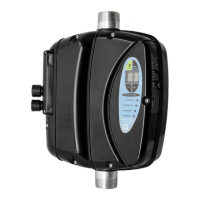
How to turn on MAC3 HydroController HCW-MM Standard Inverter if it is off?
- RRonald DiazSep 13, 2025
To solve 'System Off' issue on MAC3 Inverter, repeat the procedure for the startup, setting “System start” = ON.

How to turn on MAC3 HydroController HCW-MM Standard Inverter if it is off?
To solve 'System Off' issue on MAC3 Inverter, repeat the procedure for the startup, setting “System start” = ON.
Risks of harm to people and property if requirements are not met.
Warning about the risk of electrical shock if requirements are not met.
Risk of damage to property or the environment if requirements are not met.
Installation and maintenance must be performed by qualified personnel.
Avoid pressure shocks and water infiltration in hydraulic systems.
Warning on potential electromagnetic interference from incorrect installation.
Guide to installing software and navigating the device interface.
How to set motor power and maximum current values.
Procedure for saving configuration settings and exiting.
How to check and set the pump's rotation sense.
Overview of models, operating temperature, and humidity.
Warnings on installation environment and fluid types.
Specs for MM model including power, current, and dimensions.
Specs for MT model including power, current, and dimensions.
Specs for TT model including power, current, and dimensions.
Details on how various protection mechanisms function.
Diagrams for TT, MT, and MM electrical connections.
Description of the floatswitch input on standard models.
How to configure the floatswitch and relay inputs/outputs.
Inputs available on the HC Advanced expansion board.
Configuration for floatswitch and relay on advanced models.
Steps to set up and manage backwashing operations.
How to enter and navigate the maintenance menu.
Explanation of the parameters available in the maintenance menu.
Identifying faults based on displayed messages and required actions.
Detailed solutions for various fault conditions like 12t, motor, temp.
Troubleshooting for water supply issues and low power factor.
How to access the extended menu and request password.
Descriptions for extended menu parameters 00 through 37.
Descriptions for extended menu parameters 38 through 71.
Descriptions for extended menu parameters 71 through 82.
 General