EasyManua.ls Logo

MAC3 HydroController HCW-MM - User Manual

MAC3 HydroController HCW-MM
52 pages
Print Icon
To Next Page IconTo Next Page
Loading...
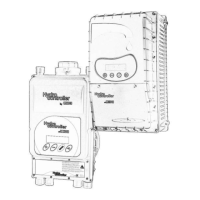
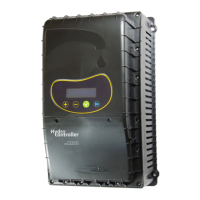
HydroController
HCW-HCA MM/MT/TT/
Standard/Advanced
Guida Utente
User Manual
Made in Italy
Cod. /620100006 Rev.11

Questions and Answers

  • C
    Carolyn JonesSep 7, 2025
    How to fix High Peak Current on MAC3 HydroController HCW-MM?
    • T
      Tasha TranSep 7, 2025
      If the MAC3 Controller detects a 'High Peak Current', it means the drive has measured excessive power consumption. Verify that the pump is used under the conditions prescribed by its manufacturer and ensure there are no conditions of friction or locking of the impeller. You can also change the peak current value on parameter 54.
  • L
    lisafisherAug 22, 2025
    What to do if my MAC3 Controller shows 'Acceso (perdite) Sys.On(LEAKAGE)'?
    • R
      rebeccasmithAug 22, 2025
      If your MAC3 Controller displays 'Acceso (perdite) Sys.On(LEAKAGE)', it indicates leakage. Eliminate any leaks to prevent continuous restarting of the electric pump, or adjust the time in parameter 58. You can also reset the number of leaks from the extended menu parameter 60.
  • G
    Gabrielle RobertsSep 4, 2025
    How to resolve Overcurrent on MAC3 Controller?
    • C
      Carla GonzalezSep 5, 2025
      If the MAC3 Controller detects 'Overcurrent', it means there is too much current in the pump. You should check the current measurement output parameter to 'LoadCurrent' and set the proper parameter 'Max.MotorCurrent'. Verify that the pump is used under the conditions prescribed by its manufacturer and make sure that there are no conditions of friction or locking of the impeller.
  • P
    prussellSep 3, 2025
    Why does my MAC3 HydroController HCW-MM show Pump Protection?
    • V
      Victoria NealSep 3, 2025
      If the MAC3 Controller indicates 'Pump Protection', it means the pump has been running continuously for the time set in parameter 40. Check the correct operation of the flow valve and inspect the system for leaks.
  • C
    crawfordstevenSep 2, 2025
    What to do if MAC3 HydroController HCW-MM Controller shows Dry Running error?
    • M
      Melanie TrevinoSep 2, 2025
      If the MAC3 Controller indicates 'Dry Running', it means there's a lack of water. In the HCW version, the check valve might be closed while the pump is running. In the HCA version, the measured power is below the value set on the 'Dry Run Power' parameter. Check for water presence. In the HCW model, verify the check valve. In the HCA model, verify the value of 'Dry Run Power'. Reset the correct pump priming function. Check that the filter is not blocked. Disconnect the power supply and wait for the display to switch off, then reconnect the power supply.
  • J
    jose21Aug 31, 2025
    How to fix High Temperature on MAC3 HydroController HCW-MM?
    • L
      lchavezSep 1, 2025
      If the MAC3 Controller is showing 'High Temperature', it means the internal temperature of the inverter is high (over 75 °C). Check that the ingoing water temperature is within the product specifications. In the HCA model, verify the correct functioning of the cooling fan. Also, check and restore the correct pump priming action.
  • D
    Dawn MillerAug 30, 2025
    What to do if MAC3 HydroController HCW-MM indicates Leakage?
    • T
      Tyler KingAug 30, 2025
      If the MAC3 Controller displays a 'Leakage' error, it means the pump hasn't turned off for the time specified in parameter 58, possibly indicating a leak. You should eliminate the leaks to prevent continuous pump restarts or adjust the time in parameter 58. Reset the leaks from the extended menu par.60.
  • R
    Raymond MccoyAug 29, 2025
    What to do if MAC3 HydroController HCW-MM shows Short Circuit?
    • A
      Amy WilkinsonAug 29, 2025
      If the MAC3 Controller detects a short circuit, the suggested solution is to remove the cause of the short circuit. Also, check the correct motor absorption. Disconnect the power supply, wait for the display to switch off, and then restore the power supply.
  • K
    Kathleen WadeAug 27, 2025
    How to fix a 'Spento.......... System Off' error on MAC3 HydroController HCW-MM Controller?
    • R
      randyolsonAug 27, 2025
      To resolve a 'Spento.......... System Off' error on your MAC3 Controller, repeat the start-up procedure, setting “Start Impianto” to ON.
  • D
    David RoblesAug 27, 2025
    What to do if MAC3 HydroController HCW-MM displays 'Tensione alta... High voltage...'?
    • R
      Richard PhillipsAug 27, 2025
      If your MAC3 Controller displays 'Tensione alta... High voltage...', examine the electrical system and restore the values to the range prescribed for HC.

Summary

HydroController HC User Manual

Safety and Warnings

Crucial safety warnings, dangers, electrical shock risks, and installation precautions.

Product Selection and Accessories

Information on choosing pumps, adapters, filters, and the Multipress system.

Installation Procedures

Covers package contents, hydraulic, electrical, and software installation.

HC Standard (Single Pump) Setup

Step-by-step configuration for single-pump HC Standard models.

HC Advanced (Multi Pump) Setup

Configuration for HC Advanced multipump systems, including Master/Slave.

General Information and Specifications

General remarks, product description, usage conditions, and technical specifications.

Device Protections and Safety Features

Details device protections like over/under voltage, short circuit, and pump protection.

Functioning and Usage

Covers electrical connections for different pump types and specific model features.

HC Standard Features and Connections

Standard HC features like pressure sensor input, ON/OFF, and relay configurations.

HC Advanced Features and Connections

Advanced HC features with expansion boards for alarms, multipump, etc.

Hydraulic Connection Guide

Instructions and warnings for hydraulic installation, expansion tanks, and filters.

Maintenance and Troubleshooting

Guide to maintenance menu, troubleshooting common issues, and error messages.

Extended Menu Parameters Reference

Detailed explanation of all parameters available in the extended menu.

Conformity Declaration and Product Disposal

Declaration of conformity with standards and instructions for product disposal.

MAC3 HydroController HCW-MM Specifications

General IconGeneral
BrandMAC3
ModelHydroController HCW-MM
CategoryController
LanguageEnglish

Related product manuals