DC16 Owner’s Manual
37
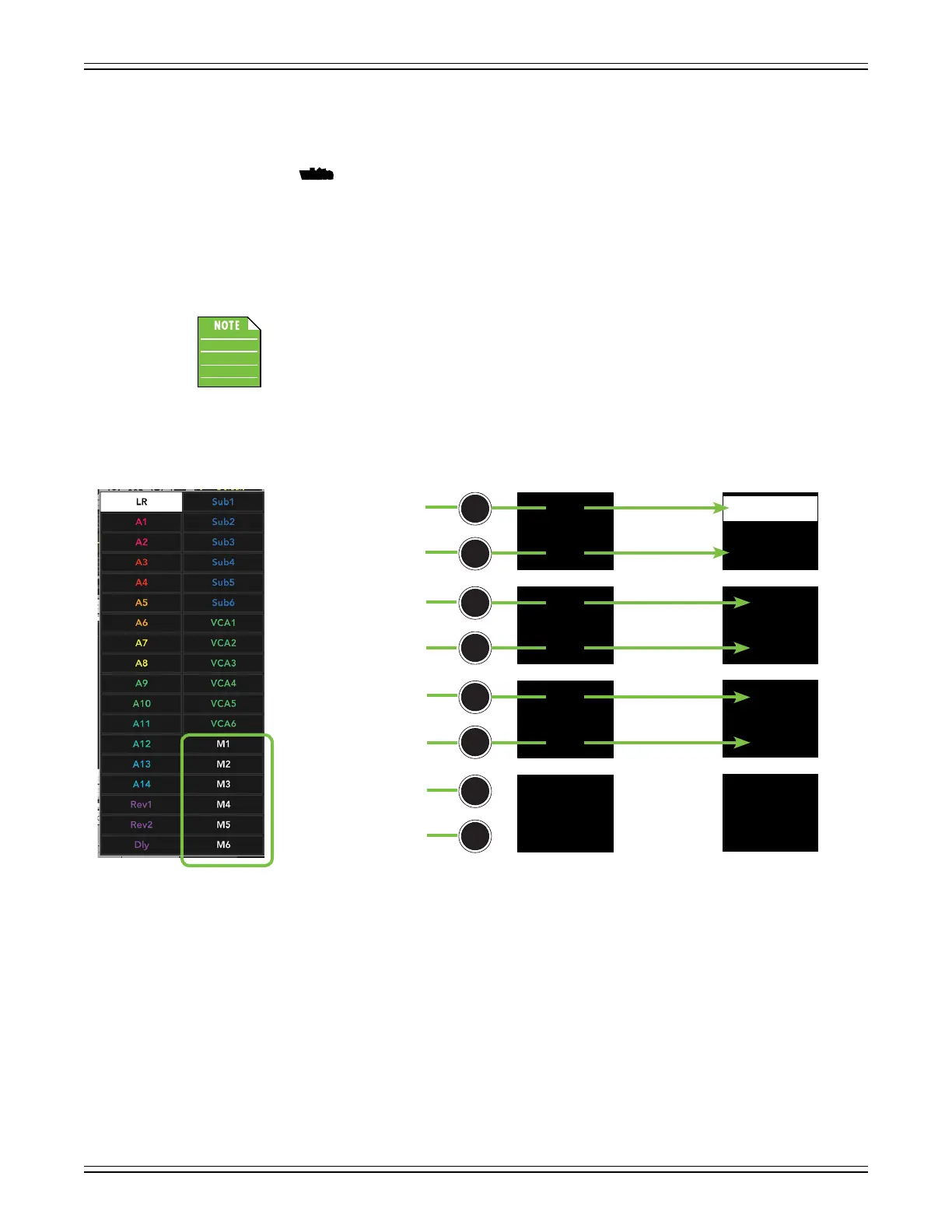
Last up are the matrices. Push the page down button to display all six. The customizations in this
example are naming and coloring. [Matrices may be linked, but aren’t in this example]. M1 retains
the same default white color, but was renamed to “Lobby”. The color of M2, though, was changed
from its default
white
to violet. Additionally, it was renamed to “Balcony”.
When a matrix is selected, the DC16 will display all subgroups, LR and auxes. The LR and auxes mix
selector LEDs are displayed in the color of the selected matrix [default is white], but the subs will
be displayed in the color of the sub [default is blue].
The faders now control the level of that subgroup, LR and aux to the selected matrix. As such, the master
fader now controls the level of the selected matrix. It’s the highlighted M1 Lobby in this example.
It’s important to remember that these aren’t the AUX, LR and Subgroup levels.
These are the sends from the the associated output to the selected matrix.
M5
M6
M3
M4
M1
M2
Lobby
Balcony
M5
M6
M3
M4
M1
M2
Master Fader DC16: Matrices [Page 6]
DefaultDefault Customized
M1
M5
M3
N/A
M2
M6
M4
N/A


 To Next Page