EasyManua.ls Logo

Mackie ProFX6v3 - Page 31

Mackie ProFX6v3
42 pages
Print Icon
To Next Page IconTo Next Page
To Previous Page IconTo Previous Page
Loading...
31
Owners Manual
Owner’s Manual
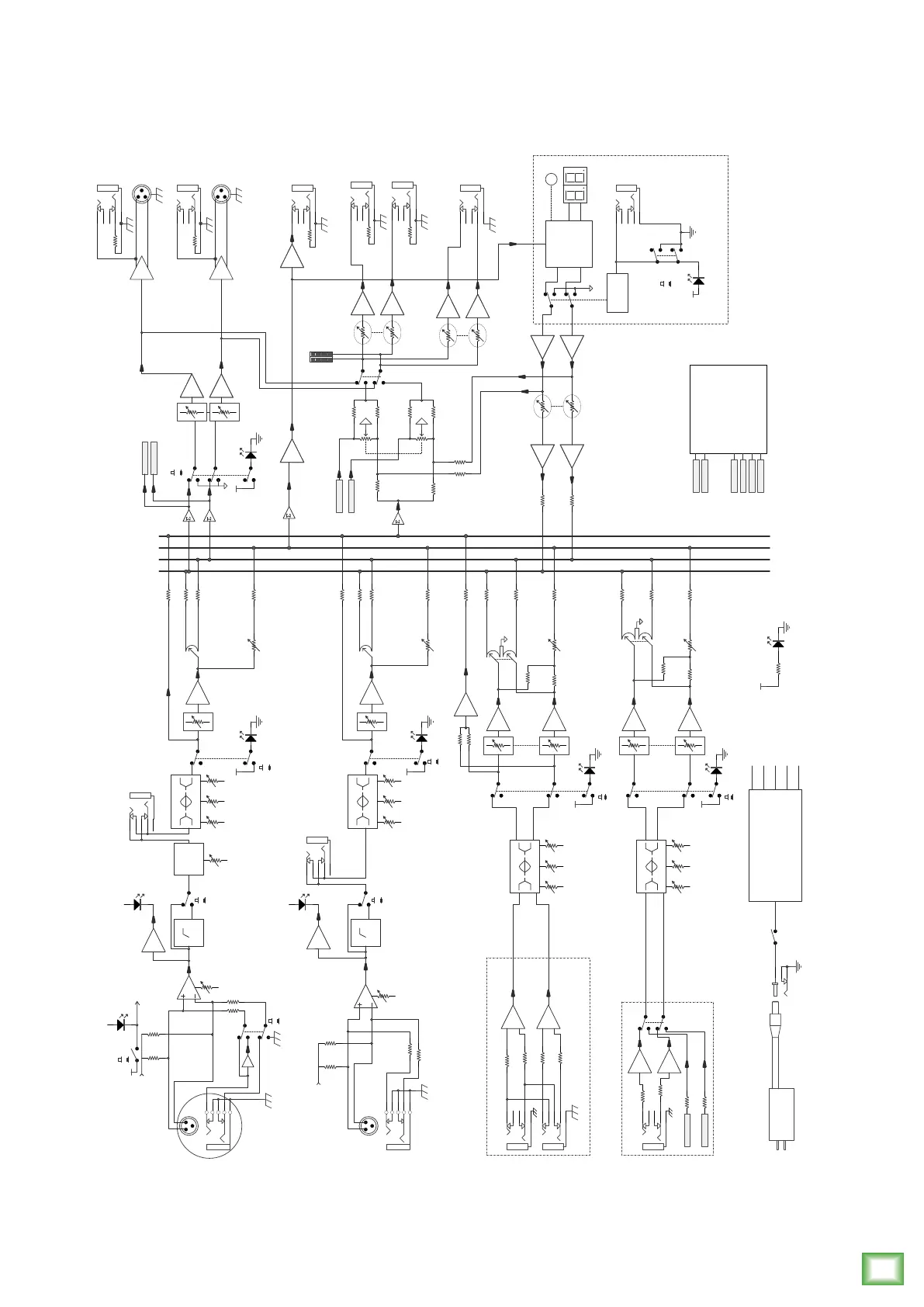
ProFX10v3 Block Diagram
Main L
FX
FX module
Out L
Out R
In
Lo Hi
80 12k
4
3
1
5
2
4
3
1
5
2
Stereo Channel
L
R
Gain
Mic: 0 to +60dB
Line: -20 to +40dB
Phantom Power
Mic/Line/Line-Hi-Z
Mono Channel
Line
Hi-Z
1-2CH
5-8CH
TRS 1/4"
Main R
4
3
1
5
2
Main Meters
DC TO DC POWER BOARD
Lo Hi
80 12k
4
3
1
5
2
Stereo Channel
select
9-10CH
TRS 1/8"
Combo
Preset Select
FX
Display
4
3
1
5
2
Footswitch
FX Bypass
Logic
Preset Select
3-Band EQ
Mid
2.5k
3-Band EQ
Mid
2.5k
Lo Hi
80 12k
3-Band EQ
Mid
2.5k
low cut
100Hz
COMP
4
3
1
5
2
INSERT
DIRECT MON
CH LEVEL
CH FX
Phantom Power
(To All Mics)
Phantom Power
Gain
Lo Hi
80 12k
3-Band EQ
Mic /Line
Mono Channel
3-4CH
OFF
ON
Mid
2.5k
Mic: 0 to +60dB
Line: -20 to +40dB
low cut
100Hz
4
3
1
5
2
INSERT
CH FX
PAN
USB3
USB4
PAN
Break switch
Main Output
USB2
DIRECT MON TO PHONES/CR
DIRECT MON BLEND
CR LEVEL
4
3
1
5
2
Left
4
3
1
5
2
Right
4
3
1
5
2
PHONES LEVEL
OFF
ON
FX MUTE
USB AUDIO
Out
In
USB3
USB4
USB1
USB2
USB_in_L
USB_in_R
USB in L
USB in R
Level set
Level set
up to 192k/24bit
+15V
-15V
+48V
+5V
GND
POWER ADAPTER
Power Led
Switch/LED
Global 48v
CH FX
CH FX
Main LEVEL
Control Room
Out
FX Send
Phones
FX LEVEL
Note: Switch are shown in the default (out) position.
Mute Switch/LED
low cut in
Mute Switch/LED
Mute Switch/LED
Mute Switch/LED
low cut in
Line
Mic
XLR
Line
Mic
POWER SWITCH
1
2
3
AC 100-240V
POWER JACK
Main L
FX
Main R
DIRECT MON
PAN
PAN
CH LEVEL
CH LEVEL
CH LEVEL
CH 1-8
USB1
Left
4
3
1
5
2
4
3
1
5
2
Right
TRS

Other manuals for Mackie ProFX6v3

Related product manuals