ProFXv3 Professional Effects Mixer with USB
ProFXv3 Professional Effects Mixer with USB
8
4. Main Outputs
The main outputs provide a line-level signal
that represents the end of the mixer chain, where
the fully mixed stereo signal enters the real world.
Connect these to the lef and right inputs of your
main power amplifiers, powered speakers, or
serial eects processor (like a graphic equalizer
or compressor/limiter).
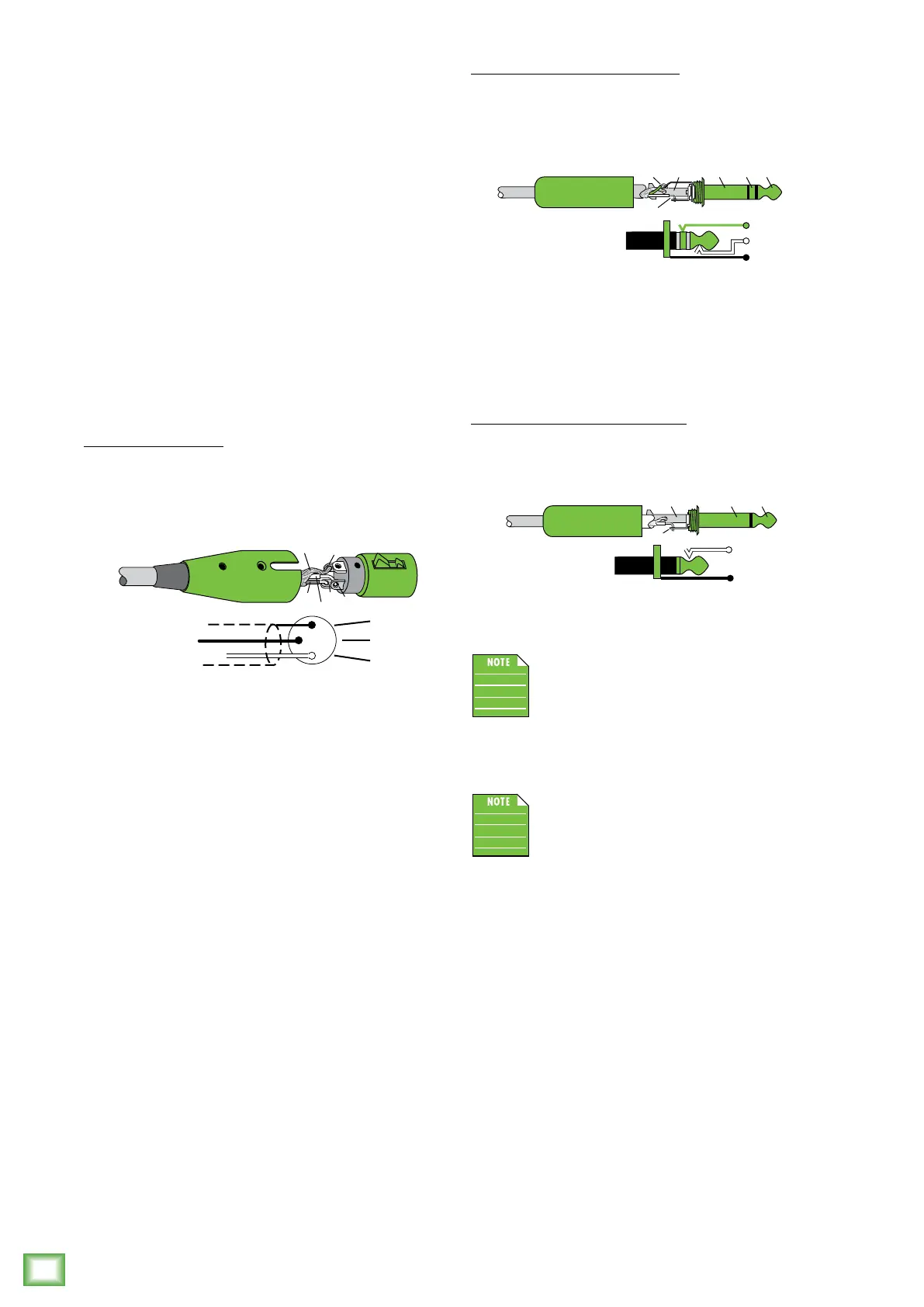
The male XLR connectors provide a balanced
line-level signal and is wired as follows, according
to standards specified by the AES (Audio Engineering
Society):
XLR Balanced Wiring:
Pin = Shield (ground)
Pin 2 = Positive (+ or hot)
Pin 3 = Negative (– or cold)
In addition to accepting balanced XLR connectors,
the main outputs may also accept /4" connectors
driven by balanced or unbalanced sources.
To connect balanced lines to these outputs, use
a /4" Tip-Ring-Sleeve (TRS) plug. “TRS” stands
for Tip-Ring-Sleeve, the three connection points
available on a stereo /4" or balanced phone jack
or plug. TRS jacks and plugs are used for balanced
signals and are wired as follows:
2
1
SHIELD
COLD
HOT
3
SHIELD
COLD
HOT
3
2
1
/4" TRS Balanced Mono Wiring:
Sleeve = Shield
Tip = Hot (+)
Ring = Cold (–)
To connect unbalanced lines to these outputs,
use a /4" mono (TS) phone plug, wired as follows:
/4" TS Unbalanced Mono Wiring:
Sleeve = Shield
Tip = Hot (+)
The main outputs are located on the front
panel of the ProFX6v3, ProFX0v3 and
ProFX2v3 and on the rear panel of the
ProFX6v3, ProFX22v3 and ProFX30v3.
The XLR outputs are 6 dB hotter than
the TRS outputs. When the meters read “0”,
the TRS outputs are at 0 dBu.
SLEEVE
TIPSLEEVE
TIP
RING
RING
TIP
SLEEVERING
SLEEVE
TIP
TIPSLEEVE
TIP
SLEEVE



 To Next Page