30 © 2014 MacroAir Technologies Toll Free: 866 668 3247 Fax: 909 890 2313 www.macroairfans.com Rev. Date 111714
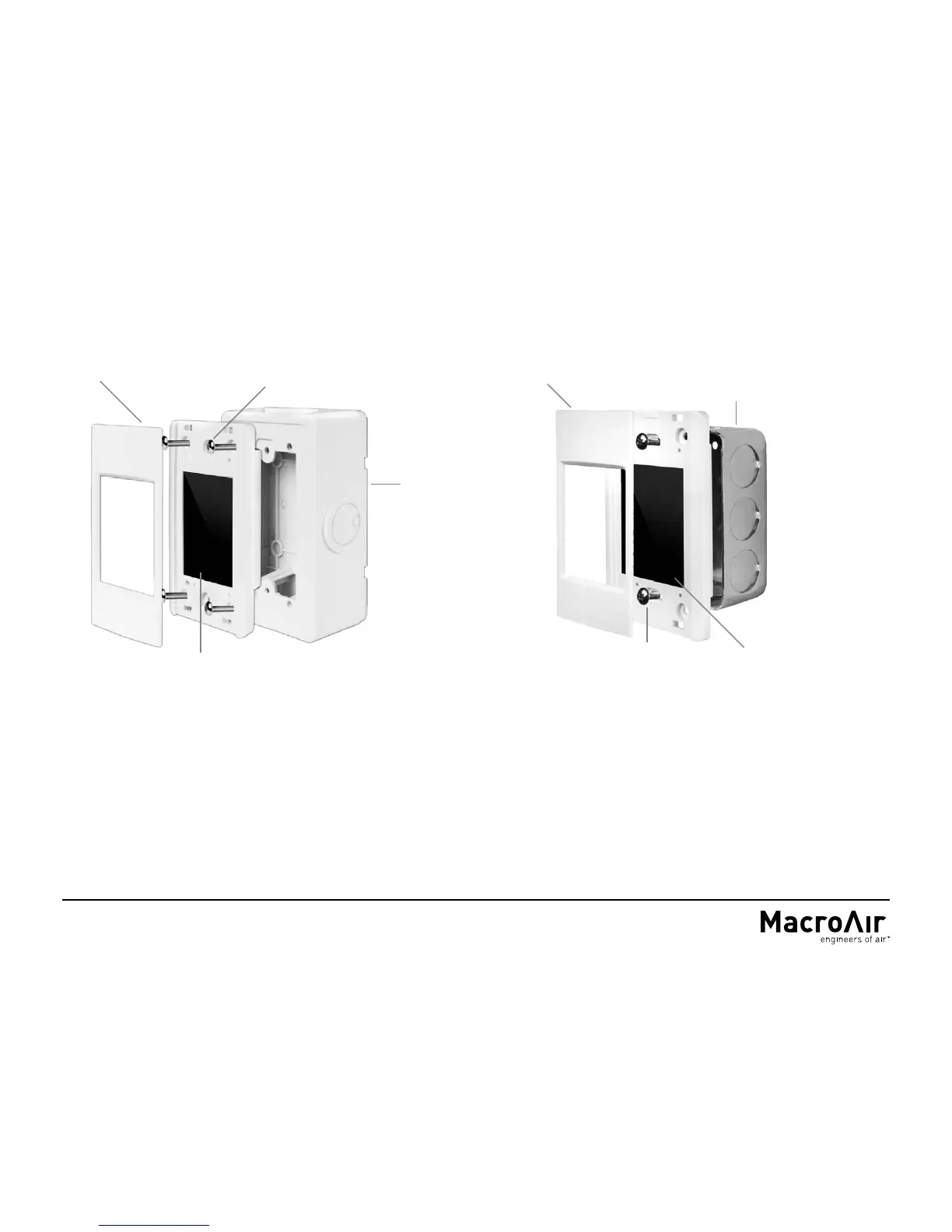
TOUCHPAD REMOTE INSTALLATION
Bezel
Touch Screen
Wall Mount
Enclosure
Wall Mount Screws
(4 Provided)
Flush Mount Screws
(2 Provided)
Single Gang Electrical
Box
Flush Mounting (Not Provided)
1. Install the single gang electrical box (not provided).
2. Run the provided CAT5E cable from the fan into the single
gang electrical box.
3. Plug the remote cable into the pre-wired CAT5E cable
from the screen using the provided RJ45 coupler.
4. Secure the touch screen to the enclosure using the 2
provided screws.
5. Lock the provided bezel into place via the plastic tabs.
Touch Screen
Bezel
Wall Mounting (Provided)
1. Mount the base plate of the enclosure to the wall using the 4
provided wall anchors and screws.
2. Snap the front of the enclosure to the base plate.
3. Plug in the pre-wired CAT5E cable from the screen into the RJ45
coupler inside the enclosure.
4. Secure the touch screen to the enclosure using the 4 provided
screws.
5. Lock the provided bezel into place via the plastic tabs.
6. Plug the provided CAT5E cable from the fan into the RJ45 on the
outside of the enclosure.


 To Next Page