- 7 -
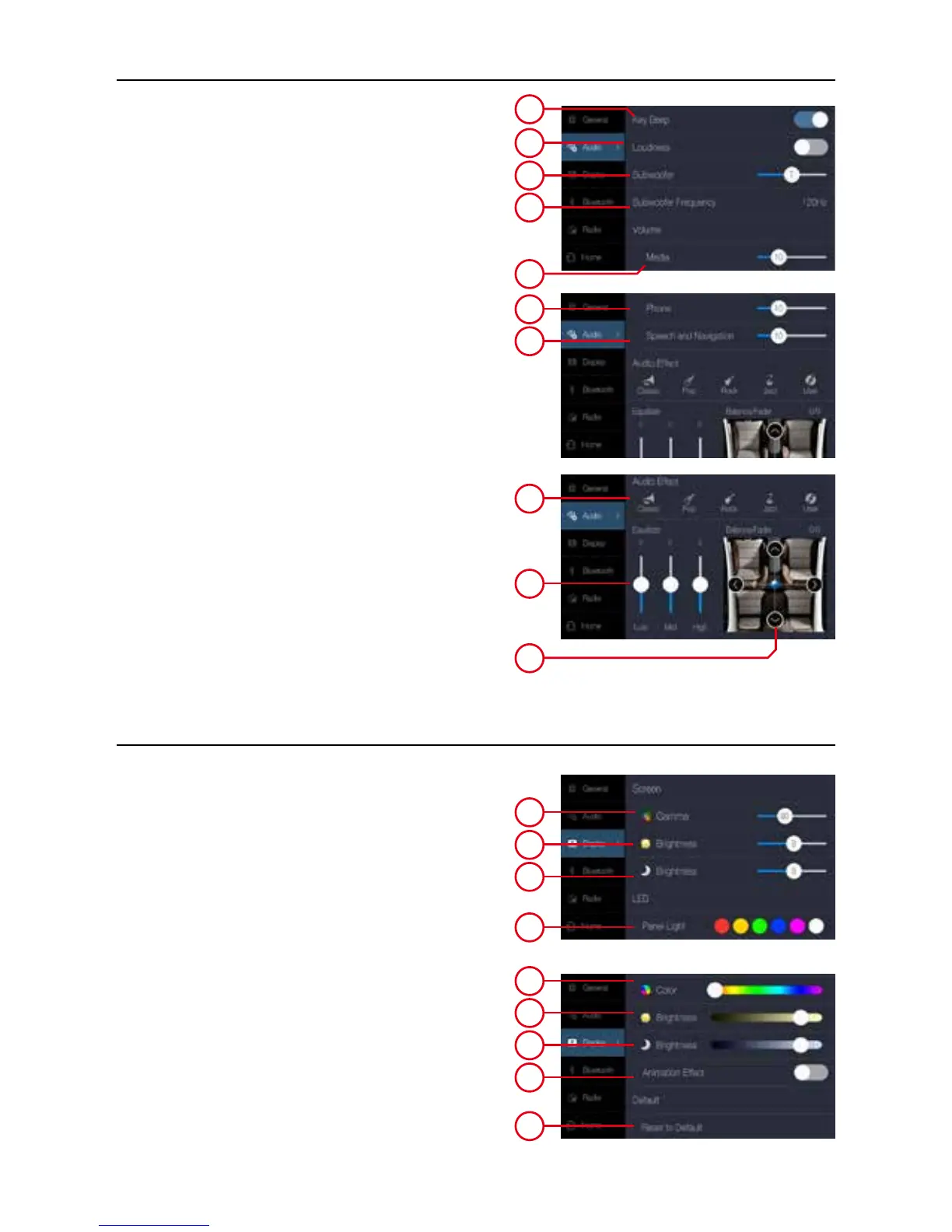
Audio settings
Audio
1. On/Off beep, one touch one beep.
2. On/Off loudness effect.
3. Subwoover volume level.
4. Subwoofer frequency cutting (low pass)
80Hz - 120Hz - 160Hz
Volume
5. Adjust the volume of multimedia (music, video
and radio).
6. Adjust the volume of phone.
7. Adjust the volume of assistant /navigation.
Audio Effect
8. Select the sound effect, choose it directly.
Classic, pop, rock, jazz sound effect,
9. Sliding progress Equalizer bar to custom sound
effect.
10. Move original point to adjust the speaker output
balance.
1
2
3
5
4
6
7
8
9
10
Display settings
Screen
1. Adjust the Gamma contrast range of the LCD
screen.
2. Adjust the brightness of the screen in daylight
mode.
3. Adjust the brightness of the screen in night mode.
LED
5. Choose the color of LED illumination keys.
6. Adjust the brightness of the LED in daylight
mode.
7. Adjust the brightness of the LED in night mode.
8. On/Off animation effect of LED.
Default
9. Recover to default setting value.
1
2
3
4
5
6
7
8
9


 To Next Page