5-11
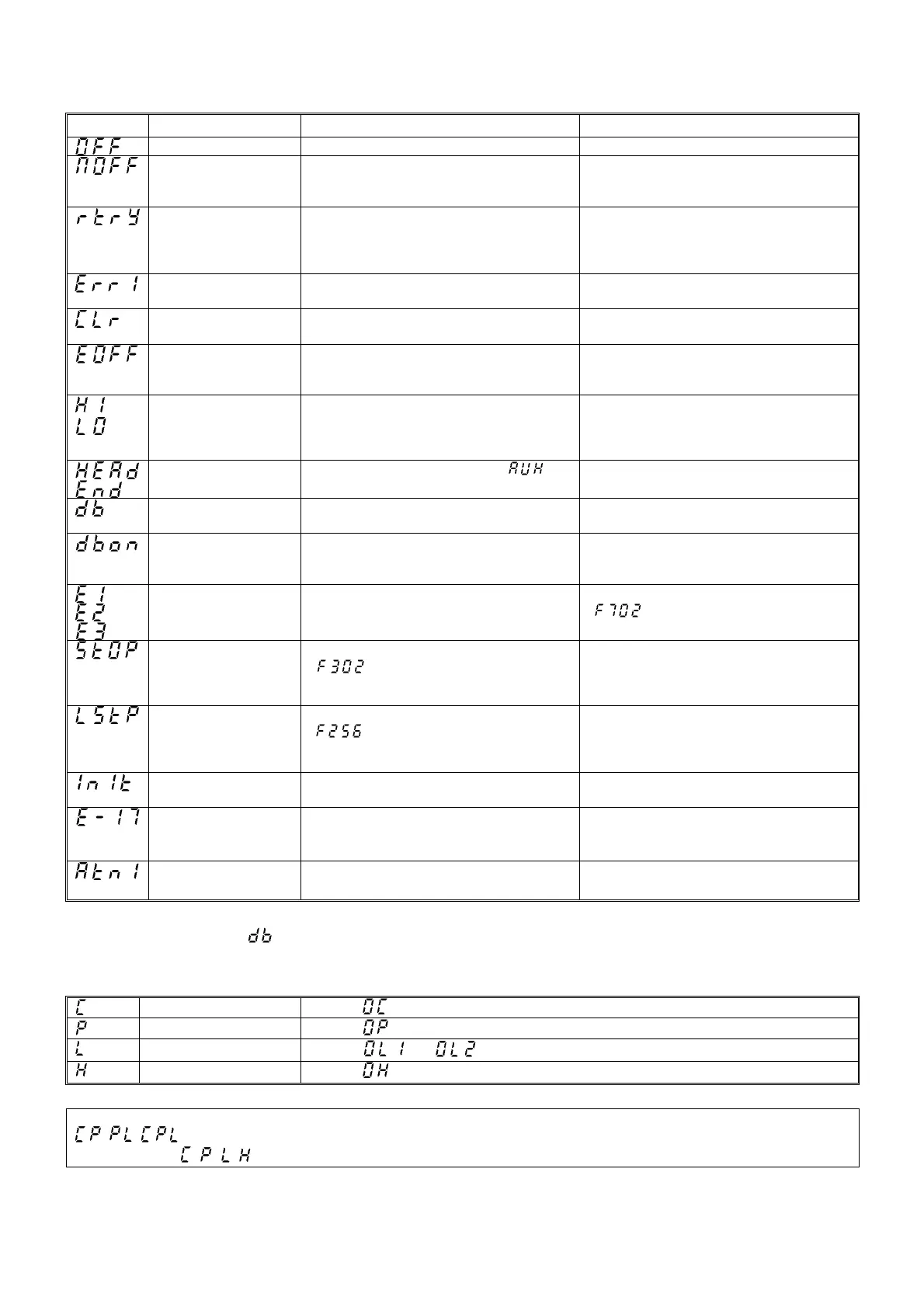
[ALARM INFORMATION]
Each message in the table is displayed to give warning but does not cause the inverter to trip.
Error code Problem Possible cause Remedies
ST terminal OFF
・ The ST-CC circuit is opened. ・Close the ST-CC circuit.
Under-voltage in main
circuit
・The supply voltage between R, S and T is
under voltage.
・Measure the main circuit supply voltage.
If the voltage is at a normal level, the inverter
requires repairing.
Retry in process
・The inverter is in the process of retry.
・A momentary stop occurred.
・The inverter is normal if it restarts after several
tens of seconds.
The inverter restarts automatically. Be careful of
the machine because it may suddenly restart.
Frequency point setting
error alarm
・The frequency setting signals at points 1 and 2
are set too close to each other.
・Set the frequency setting signals at points 1 and
2 apart from each other.
Clear command
acceptable
・This message is displayed when pressing the
STOP key while an error code is displayed.
・Press the STOP key again to clear the trip.
Emergency stop
command acceptable
・ The operation panel is used to stop the
operation in automatic control or remote control
mode.
・Press the STOP key for an emergency stop.
To cancel the emergency stop, press any other
key.
/
Setting error alarm / An
error code and data are
displayed alternately
twice each.
・An error is found in a setting when data is
reading or writing.
・Check whether the setting is made correctly.
Display of first/last data
items
・The first and last data item in the
data
group is displayed.
・Press MODE key to exit the data group.
DC braking
・DC braking in process ・ The message goes off in several tens of
seconds if no problem occurs. See Note).
Shaft fixing control
・Motor shaft fixing control is in process. ・Normal if the message disappears when a stop
command is entered (or the operation
command is canceled).
Flowing out of excess
number of digits
・The number of digits such as frequencies is
more than 4. (The upper digits have a priority.)
・Lower the frequency free unit magnification
.
Momentary power failure
slowdown stop
prohibition function
activated.
・The slowdown stop prohibition function set with
(momentary power failure
ride-through operation) is activated.
・To restart operation, reset the inverter or input
an operation signal again.
Auto-stop because of
continuous operation at
the lower-limit frequency
・ The automatic stop function selected with
was activated.
・ To deactivate the automatic stop function,
increase the frequency command above the
lower-limit frequency (LL) + 0.2 Hz or turn off the
operation command.
Parameters in the
process of initialization
・ Parameters are being initialized to default
values.
・Normal if the message disappears after a while
(several seconds to several tens of seconds).
Operation panel key fault
・The RUN or STOP key held down for more
than 20 seconds.
・The RUN or STOP key is faulty.
・Check the operation panel.
Auto-turning
・Auto-turning in process ・Normal if the message disappears after a few
seconds.
Note) When the ON/OFF function is selected for DC braking (DB), using the input terminal selection parameter, you can judge the
inverter to be normal if “
” disappears when operating the circuit between the terminal and CC.
[PREALARM DISPLAY]
Over-current alarm
Same as
(over-current)
Over-voltage alarm
Same as
(over-voltage)
Over-load alarm,
Same as
and (over-load)
Over-heat alarm
Same as
(over-heat)
If two or more problems arise simultaneously, one of the following alarm appears and blinks.
, , L
The blinking alarm
, , , are displayed in this order from left to right.
197



 To Next Page