- 9 -
3.2 TRAVELLING OPERATION
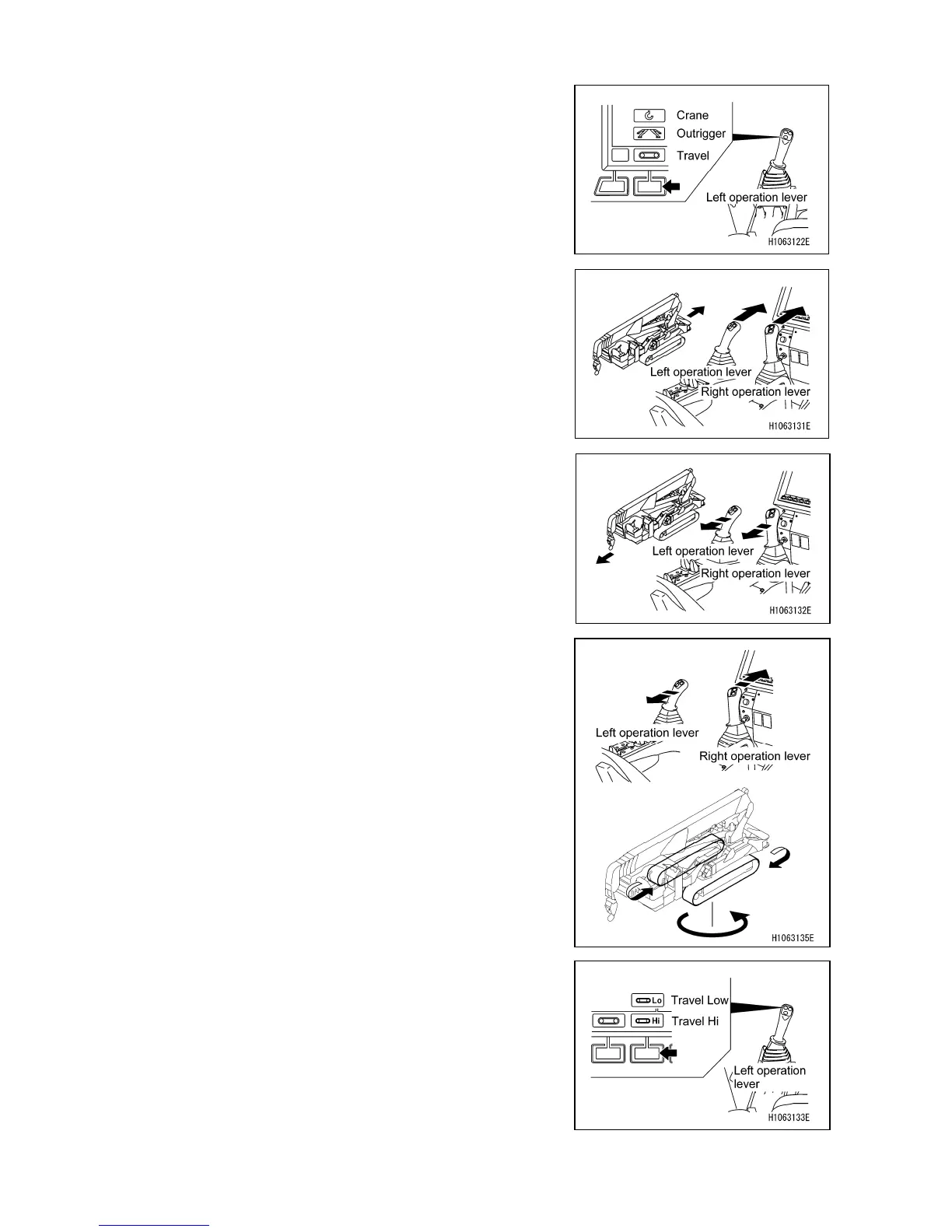
1. Slowly and surely shift the lock lever (1) into a free (F)
position.
2. Change the mode to Travel with the mode selector switch
(1) (Travel/Outrigger/Crane) on the monitor, or with the
left control lever.
[ MOVING FORWARD ]
Operate the left and right control levers at the same time.
• Push the left and right control levers slowly forward to start
moving forward.
[ MOVING BACKWARD ]
Operate the left and right control levers at the same time.
• Pull the left and right control levers toward you slowly to
start moving backward.
[ LEFT TURN ]
Pushing the right control lever forward causes the machine
to turn left in the forward direction.
Pulling the right control lever toward you causes the machine
to turn left in the backward direction.
[ RIGHT TURN ]
Pushing the left control lever forward causes the machine to
turn right in the forward direction.
Pulling the left control lever toward you causes the machine
to turn right in the backward direction.
[ CHANGING TRAVELING SPEED MODE ]
Change the traveling mode with the mode selector switch (2)
(Traveling Hi/Low) on the monitor, or with the left control
lever.
• Each touch of the mode selector switch (2) (Traveling
Hi/Low) toggles the mode between “Traveling Hi” and
“Traveling Low”, and the monitor indication changes
accordingly.



 To Next Page