Installation
Choose a Location. The Magellan RoadMate receiver needs a clear
view
of
the sky to receive signals from the GPS satellites so choose a
location with
an
unobstructed view of the sky, commonly
on
or near the
windshield.
Clean the Surface. Clean the area on the windshield and allow the
surface to dry before attaching the mount.
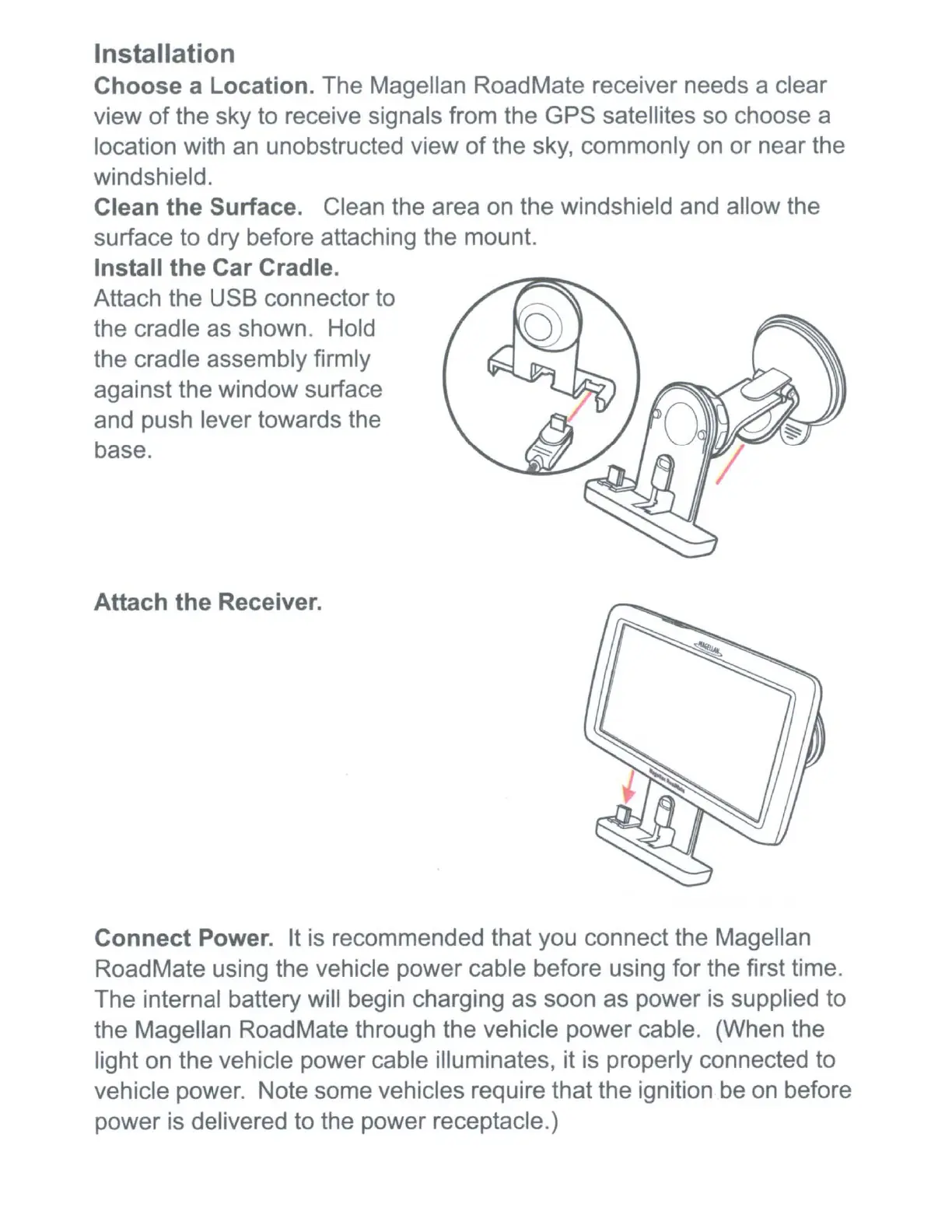
Install the Car Cradle.
Attach the USB connector to
the cradle as shown. Hold
the cradle assembly firmly
against the window surface
and push lever towards the
base.
Attach the Receiver.
Connect Power.
It
is recommended that you connect the Magellan
RoadMate using the vehicle power cable before using for the first time.
The internal battery will begin charging as soon as power
is
supplied to
the Magellan RoadMate through the vehicle power cable. (When the
light on the vehicle power cable illuminates, it
is
properly connected to
vehicle power. Note some vehicles require that the ignition
be
on before
power is delivered to the power receptacle.)











 To Next Page