General Information
Please refer to this handbook for questions on using the Magellan
RoadMate receiver. If you are still unable to answer your question,
check our technical support web page at: http://www.magellanGPS.com/
support!.
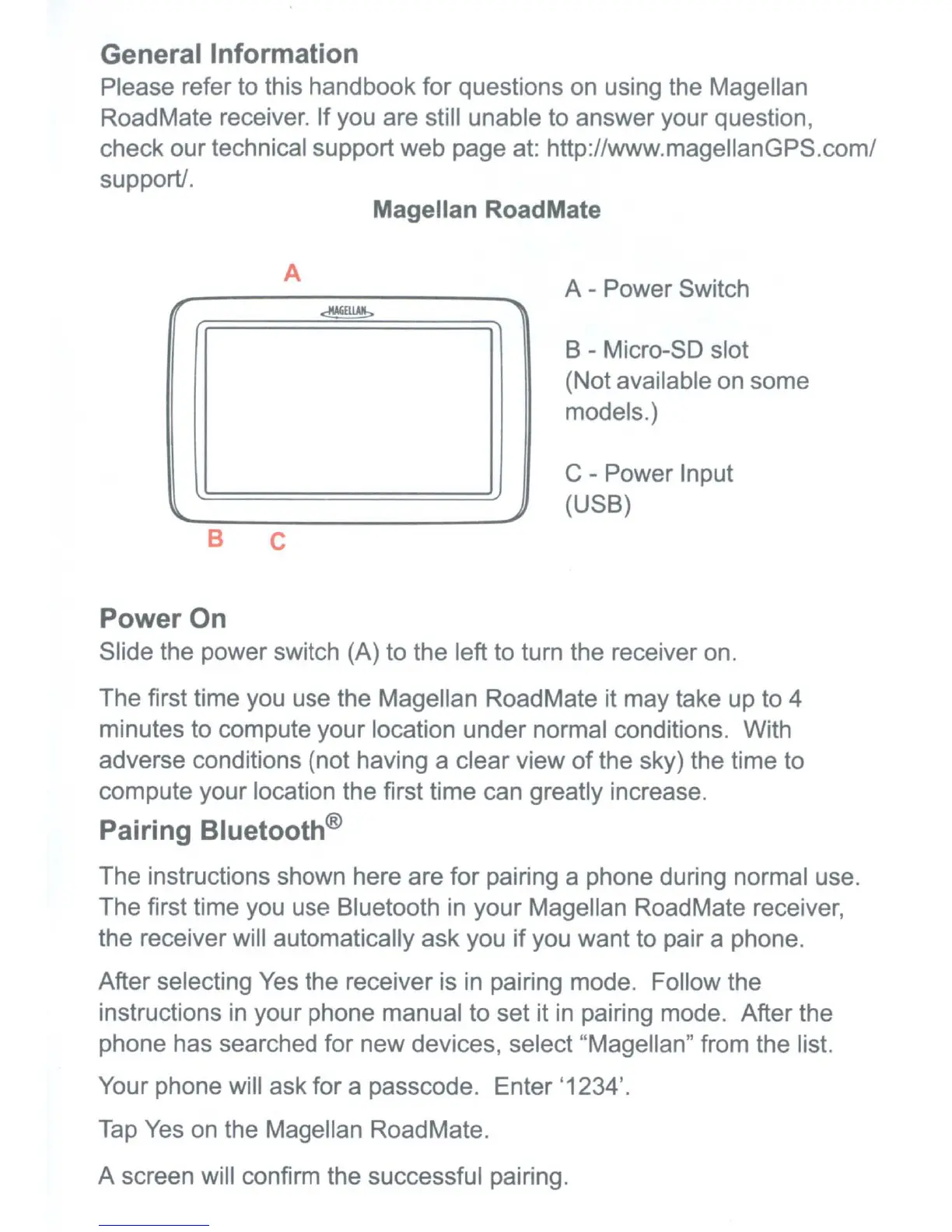
Magellan RoadMate
A
B C
A - Power Switch
B - Micro-SD slot
(Not available on some
models.)
C - Power Input
(USB)
Power On
Slide the power switch (A) to the left to turn the receiver on.
The first time you use the Magellan RoadMate it may take up to 4
minutes to compute your location under normal conditions. With
adverse conditions (not having a clear view
of
the sky) the time to
compute your location the first time can greatly increase.
Pairing Bluetooth®
The instructions shown here are for pairing a phone during normal use.
The first time you use Bluetooth
in
your Magellan RoadMate receiver,
the receiver will automatically ask you if you want to pair a phone.
After selecting
Yes
the receiver is
in
pairing mode. Follow the
instructions
in
your phone manual to set it
in
pairing mode. After the
phone has searched for new devices, select "Magellan" from the list.
Your phone will ask for a passcode. Enter '1234'.
Tap
Yes on the Magellan RoadMate.
A screen will confirm the successful pairing.











 To Next Page