[
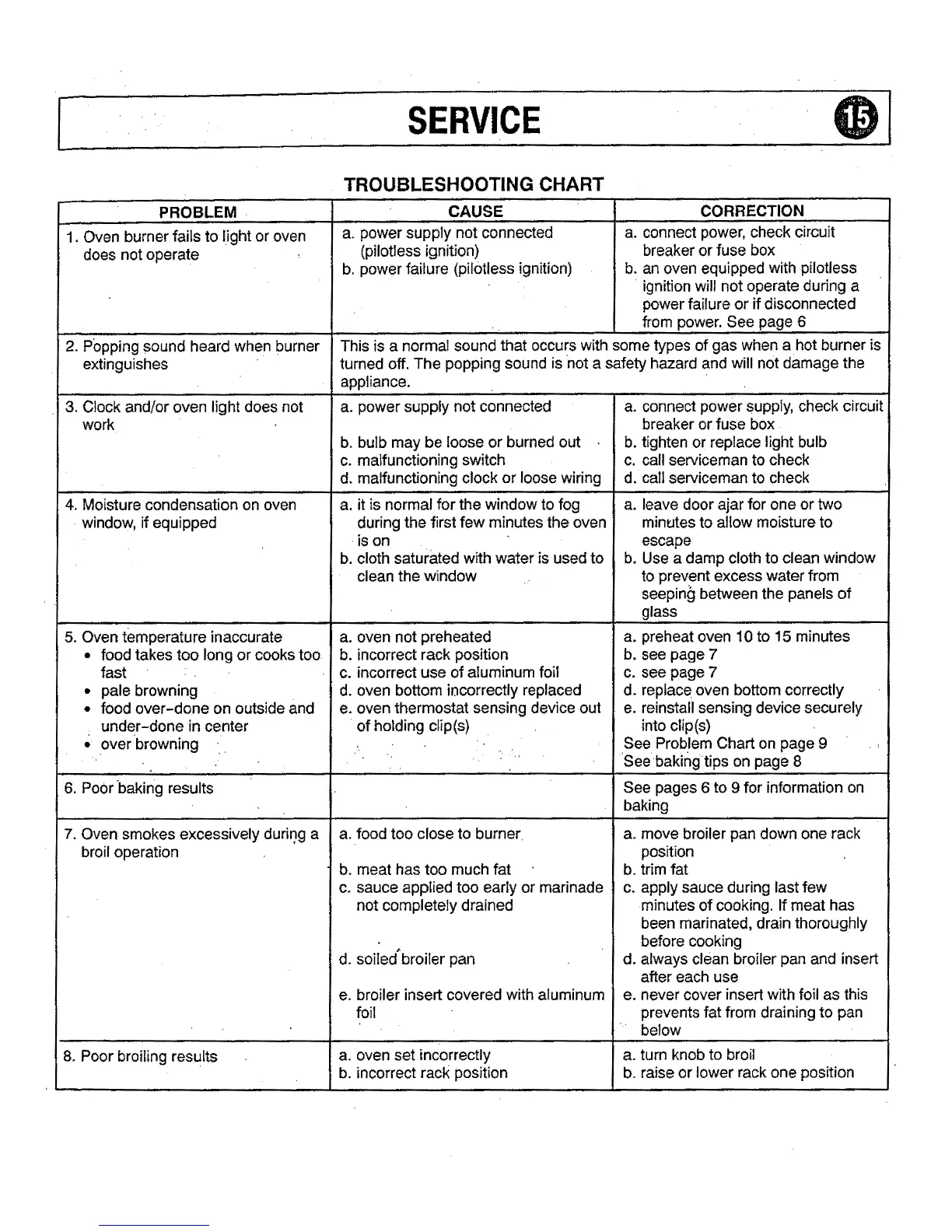
SERVICE
TROUBLESHOOTING CHART
PROBLEM
1. Oven burner fails to light or oven
does not operate
CAUSE
a. power supply not connected
(pilotless ignition)
b. power failure (pilotless ignition)
2. Popping sound heard when burner
extinguishes
3. Clock and!or oven light does not
work
4. Moisture condensation on oven
window, if equipped
5. Oven temperature inaccurate
• food takes too long or cooks too
fast
• pale browning
• food over-done on outside and
under-done in center
over browning
6. Poor baking results
7. Oven smokes excessively during a
broil operation
8. Poor broiling results
CORRECTION
a. connect power, check circuit
breaker or fuse box
b. an oven equipped with pilotless
ignitionwill not operate during a
powerfailure or if disconnected
from power. See page 6
This is a normal sound that occurs with some types of gas when a hot burner is
turned off. The popping sound is not a safety hazard and will not damage the
appliance.
a. power supply not connected
b. bulb may be loose or burned out
c. malfunctioning switch
d. malfunctioning clock or loose wiring
a. it is normal for the window to fog
during the first few minutes the oven
is on
b. cloth saturated with water is used to
clean the window
a. connect power Supply, check circuit
breaker or fuse box
b. tighten or replace light bulb
c. call serviceman to check
d. call serviceman to check
a. leave door ajar for one or two
minutes to allow moisture to
escape
b. Use a damp cloth to clean window
to prevent excess water from
seepin_ between the panels of
glass
a. oven not preheated a.
b. incorrect rack position b.
c. incorrect use of aluminum foil c.
d. oven bottom incorrectly replaced d.
e. oven thermostat sensing device out e.
of holding clip(s)
a. food too close to burner
preheat oven 10 to 15 minutes
see page 7
see page 7
replace oven bottom correctly
reinstall sensing device securely
into clip(s)
See Problem Chart on page 9
Seebakirlgtips on page 8
See pages 6 to 9 for information on
baking
a. move broiler pan down one rack
position
b. meat has too much fat b.
c. sauce applied too early or marinade c.
not completely drained
d. soiled'broiler pan
e. broiler insert covered with aluminum
foil
a. oven set incorrectly
b. incorrect rack position
d,
e.
trim fat
apply sauce during last few
minutes of cooking. If meat has
been marinated, drain thoroughly
before cooking
always clean broiler pan and insert
after each use
never cover insert with foil as this
prevents fat from draining to pan
below
a. turn knob to broil
b. raise or lower rack one position



 To Next Page