12 MAINTENAN( ;E
OVEN BOTTOM
Protect the oven bottom against excessive spiltovers, Beforereplacingthe lightbulb,DISCONNECTPOWERTO
especiallyacidorsugaryspiltovers,astheymaydiscolorthe RANGE.
porcelain.Use the correctsize cookingutensilto avoid
boilovers.Neverplaceutensilsoraluminumfoildirectlyon To turn on oven light: Pushthe switchlocatedonthe
the ovenbottom, manifoldpanel.
To replace oven light: Besurethe bulbis cool.Use a dry
_; : i_ 1 potholder,to prevent possible harm to hands, and very
"_ clothCarefullYastheUnScreWbulbmaybUlb'break.D°nottouch ahot bulbwith adamp
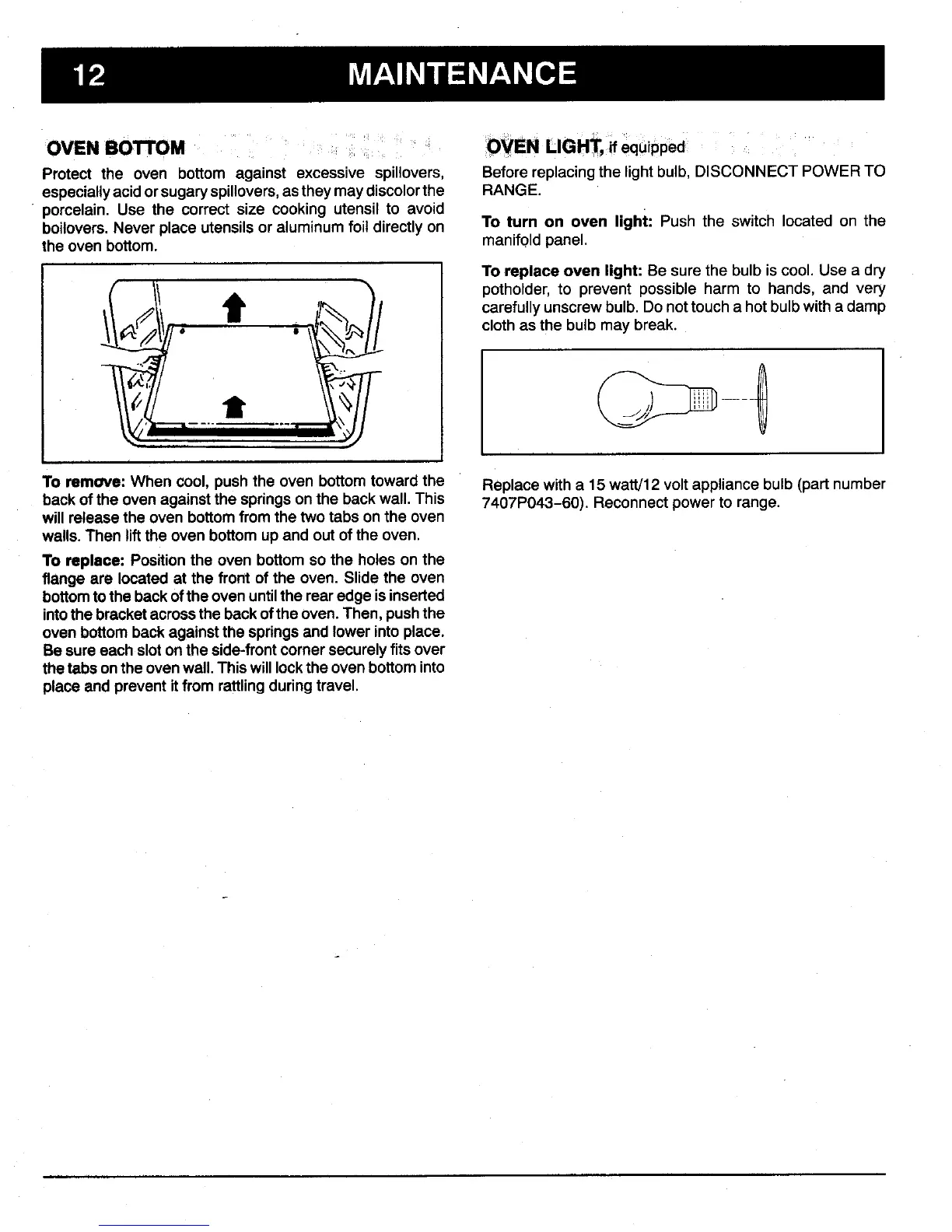
To remove: When cool, pushthe oven bottomtoward the Replacewith a 15 watt/12 voltappliancebulb (part number
back of the ovenagainstthe springson the back wall.This 7407P043-60). Reconnectpower to range.
willreleasethe oven bottomfromthe twotabs on the oven
walls.Then lift the ovenbottom up andout of the oven.
To replace: Positionthe oven bottomso the holes on the
flangeare locatedat the front of the oven. Slidethe oven
bottomtothe backofthe ovenuntilthe rearedgeis inserted
intothe bracketacrossthe backofthe oven. Then,pushthe
ovenbottom backagainstthe springsand lower into place.
Besureeach sloton the side-frontcornersecurelyfits over
thetabsonthe ovenwall.Thiswill lockthe ovenbottominto
placeandprevent itfrom rattlingduring travel.



 To Next Page