magicleap.com Copyright © 2024 Magic Leap Inc.
Learn how to deploy and manage Magic Leap 2
Setup Requirements
Hardware
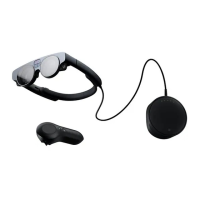
Magic Leap 2
Lens Kits and/or Prescription Inserts (Optional)
Software Application (Required)
The Hub
MDM Solution (Recommended)
Inventory/Asset Management Systems (Recommended)
License Activation (Optional)
Single Sign-On (Optional)
Network Conguration (Optional)
Let’s get started with pre-deployment
Magic Leap 2 Unboxing
Magic Leap 2 Product Box
Inventory Devices
Serial Number (or device ID)
Labeling
Provision Devices
Mobile Device Management (MDM)
Types of MDM Setups
MDM Serial Number
Device setup
License Activation
Device Identity Management Setup
Third-Party Software Application
Shared versus personal devices scenarios
Magic Leap 2 Accessories
Controllers (optional)
Prescription Inserts: Lens Kit and Prescription Inserts (optional)
Third-party Accessories
Employee Device Training
Magic Leap 2 Maintenance
Software Maintenance and Best Practices:
Developer Portal
MDM Best Practices
Application Management
File management
Hardware Maintenance and Best Practices
Charging Magic Leap 2
Magic Leap 2 Settings and Congurations for Battery Optimization
Managing heat/thermals
Regulatory information
Environmental Considerations
Lighting
Cleaning Protocol
Magic Leap 2 Device Troubleshooting Best Practices
Customer Support
Magic Leap 2 Warranty
Magic Leap 2 Disposal
03
04
05
06
07
08
09
10
11
Contents


 To Next Page