E
NG
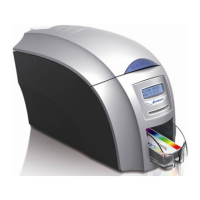
Thank you for choosing the Magicard Enduro
printer as your secure ID card printer.
Before setting up your Enduro printer using
the Ultra Driver CD–ROM, please follow the
simple steps in this guide on installing your
printer. This guide helps you make your
printing experience more enjoyable and
secure.
FR
Thank you for choosing the Magicard Enduro
p
rinter as your secure ID card printer.
Before setting up your Enduro printer using
the Ultra Driver CD–ROM, please follow the
simple steps in this guide on installing your
printer. This guide helps you to make your
printing experience more enjoyable and
secure.
ES
Thank you for choosing the Magicard Enduro
printer as your secure ID card printer.
Before setting up your Enduro printer using
the Ultra Driver CD–ROM, please follow the
simple steps in this guide on installing your
printer. This guide helps you to make your
printing experience more enjoyable and
secure.
PT
Thank you for choosing the Magicard Enduro
printer as your secure ID card printer.
Before setting up your Enduro printer using
the Ultra Driver CD–ROM, please follow the
simple steps in this guide on installing your
printer. This guide helps you to make your
printing experience more enjoyable and
secure.
IT
Thank you for choosing the Magicard Enduro
printer as your secure ID card printer.
Before setting up your Enduro printer using
the Ultra Driver CD–ROM, please follow the
simple steps in this guide on installing your
printer. This guide helps you to make your
printing experience more enjoyable and
secure.
D
E
Thank you for choosing the Magicard Enduro
printer as your secure ID card printer.
Before setting up your Enduro printer using
the Ultra Driver CD–ROM, please follow the
simple steps in this guide on installing your
printer. This guide helps you to make your
printing experience more enjoyable and
secure.
CN
谢谢谢谢选选择择MMaaggiiccaarrdd EE nndduurroo
打打印印机机作作为为您您的的安安全全身身份份证证看看板板卡卡
打打印印机机。。
在设置您的Enduro 打印机之前使用超
驱动器CD-ROM, 请跟随简单步骤在这个
指南在安装您的打印机。这个指南帮助您使您
打印的经验更加令人愉快和安全
RU
Thank you for choosing the Magicard Enduro
printer as your secure ID card printer.
Before setting up your Enduro printer using
the Ultra Driver CD–ROM, please follow the
simple steps in this guide on installing your
printer. This guide helps you to make your
printing experience more enjoyable and
secure.
PL
Thank you for choosing the Magicard Enduro
printer as your secure ID card printer.
Before setting up your Enduro printer using
the Ultra Driver CD–ROM, please follow the
simple steps in this guide on installing your
printer. This guide helps you to make your
printing experience more enjoyable and
secure.
NL
Thank you for choosing the Magicard Enduro
printer as your secure ID card printer.
Before setting up your Enduro printer using
the Ultra Driver CD–ROM, please follow the
simple steps in this guide on installing your
printer. This guide helps you to make your
printing experience more enjoyable and
secure.
Enduro QSG multi language V3 - 07:Enduro QSG multi language V2- 07 29/1/08 14:10 Page 3


 To Next Page
 Loading...