6. Preparation
If necessary, remove the protective foils from the colour monitors and the lens, and attach the
carry strap. The included carry strap is attached to the corresponding bracket on the side of the
camera. First, pull the short loop of the strap through the eyelet and then the band through the
loop.
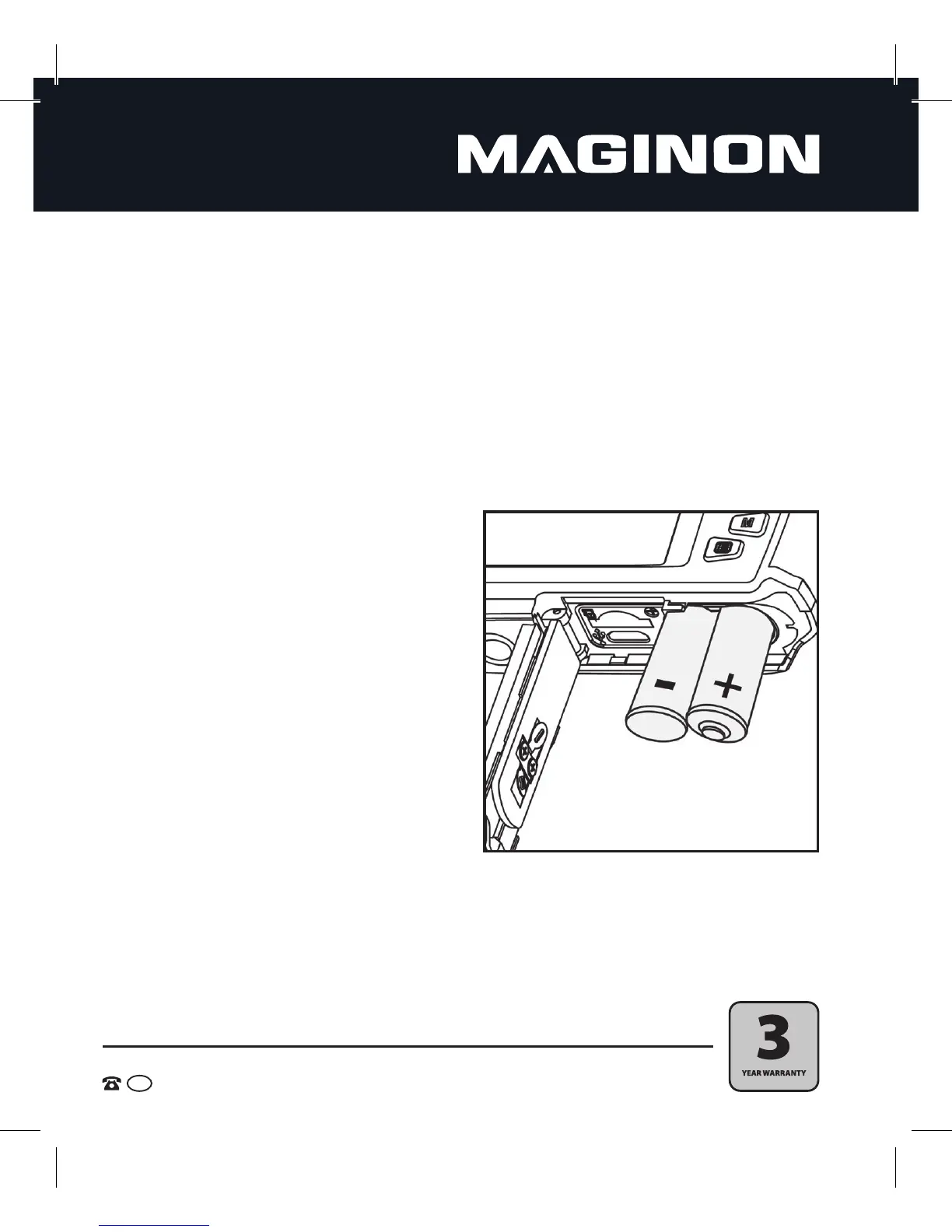
At the bottom side of the camera there is a compartment to insert the batteries and the memory
card. Open the compartment by holding the lock button to the side and then sliding the cover
outwards. The cover will then open automatically.
6.1. Inserting the batteries
1. Open the battery compartment as described
above.
2. Insert the 2 Activ Energy batteries included or
2 batteries type LR03 (AAA). Pay attention to
the correct polarity of the batteries as indicated
on the contacts inside the battery compartment
cover.
3. After inserting the batteries, slide the cover
towards the tripod thread with gentle pressure.
The cover will lock into place and close tightly.


 To Next Page