To Next Page


T
Theresa HallSep 3, 2025
Why is there no sound or distorted sound on my Magnavox TV DVD Combo?
- LLisa BriggsSep 4, 2025
Adjust the volume of the TV. Ensure that you select stereo output on your disc (except multichannel).

Why is there no sound or distorted sound on my Magnavox TV DVD Combo?
Adjust the volume of the TV. Ensure that you select stereo output on your disc (except multichannel).
Why can't menu items be selected on my Magnavox TV DVD Combo?
Press STOP twice before pressing SYSTEM MENU. Note that some menu items may be unselectable depending on the disc's availability.
Why can't I play DivX movies on my Magnavox TV DVD Combo?
Ensure that the DivX file is encoded in ‘Home Theater’ mode with a DivX certified encoder.
Why do PC modes not work on my Magnavox TV DVD Combo?
Check whether the connections are correct. Ensure the source is correctly selected by pressing the SOURCE button. Verify that you have configured the computer to a compatible display resolution.
What to do if the picture freezes momentarily during playback on my Magnavox TV DVD Combo?
Check the disc for fingerprints or scratches and clean it with a soft cloth, wiping from the center to the edge.
Why does my Magnavox TV DVD Combo show a completely distorted picture or black/white picture with DVD?
Make sure the disc is compatible with the DVD player and that the DVD player’s TV Type setting matches that of the Disc and your TV.
What to do if my Magnavox TV DVD Combo has no picture and power switched on?
Your TV might be in protective mode due to excessive heat. Make sure there's enough space around the device's vents, so no walls or cabinets are blocking airflow.
What to do if there is good sound but poor color or no picture on my Magnavox TV DVD Combo?
Adjust the contrast, color, tint, and brightness settings. You might also try another auto picture setting to see if that improves the image.
What to do if my Magnavox TV DVD Combo has a snowish picture and noise?
Check the antenna connection to ensure it is properly connected.
What to do if my Magnavox TV DVD Combo has no power?
First, ensure the AC power cord is securely plugged into the mains socket. If it is, unplug the TV, wait 60 seconds, then plug it back in and turn the television on again.
Explains different connection types like HDMI, Component, S-Video, Composite, and RF for optimal signal.
Provides essential safety guidelines for operating the television, covering electrical safety, placement, and usage.
Details additional safety measures, proper TV placement, ventilation, and recycling procedures.
Guides on initial TV setup, including wall mounting considerations and basic cable connections.
Explains the functions of various buttons on the TV remote control for channel selection, volume, and menus.
Details the buttons on the DVD remote for disc playback, menu navigation, and special features.
Describes the basic controls located on the TV's top panel and the DVD player's front panel.
Provides an introduction to the TV's menu system and how to navigate through settings.
Guides users through the TV installation process, including language selection and channel tuning.
Explains how to configure features such as closed captions, caption service, and digital caption options.
Details settings for picture enhancements like Smart Picture, contrast, brightness, and sound modes.
Covers parental control functions like channel lock, TV ratings lock, movie ratings lock, and PIN management.
Covers DVD setup options like language selection and general disc operations.
Explains playback of various disc types including DVDs, CDs, MP3s, DivX, and JPEG files.
Details DVD-specific settings for picture adjustments and sound modes.
Explains parental control features for DVD playback, including movie ratings lock.
Covers DVD installation settings such as language, source selection, and DivX VOD code.
Guides on PC input settings including language, source, picture adjustment, and factory reset.
Instructions on how to record TV programs using an external recorder.
How to select different input sources like TV, DVD, AV, HDMI, and PC.
Provides solutions for common TV issues like picture problems, power, remote control, and connectivity.
Offers solutions for common DVD playback errors, including picture distortion, sound issues, and disc compatibility.
Defines technical terms and acronyms used throughout the user manual.
Provides guidelines for cleaning the TV screen and cabinet, and precautions for stationary images.
Contains FCC compliance notices and other regulatory statements for the device.
Lists the technical specifications of the TV, including display, sound, connectivity, dimensions, and power.
Outlines the terms and conditions of the Magnavox limited warranty, coverage, and service information.
 General
| Comb filter | 3D |
|---|---|
| Response time | 8 ms |
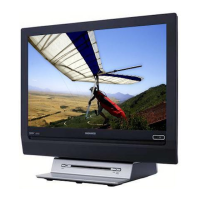
| Display diagonal | 31.5 \ |
| Progressive scan | Yes |
| Display brightness | 500 cd/m² |
| Display resolution | 1366 x 768 pixels |
| Display technology | LCD |
| Native aspect ratio | 16:9 |
| Native refresh rate | 60 Hz |
| Supported video modes | 480i, 480p, 720p, 1080i |
| Contrast ratio (typical) | 1200:1 |
| Display diagonal (metric) | 81 cm |
| Screen format adjustments | 4:3, 14:9, Zoom |
| Viewing angle, horizontal | 176 ° |
| Supported graphics resolutions | 640 x 480 (VGA), 720 x 480, 800 x 600 (SVGA), 1024 x 768 (XGA), 1280 x 768 (WXGA) |
| Operating temperature (T-T) | 5 - 40 °C |
| Package depth | 223.01 mm |
| Package width | 975.1 mm |
| Package height | 648.9 mm |
| Package weight | 19558.9 g |
| Teletext function | No |
| Audio formats supported | MP3, PCM, WAV |
| Image formats supported | JPG |
| Video formats supported | DIVX, MPEG1, MPEG2 |
| Audio (L/R) in | 3 |
| SCART ports quantity | 0 |
| USB 2.0 ports quantity | USB 2.0 ports have a data transmission speed of 480 Mbps, and are backwards compatible with USB 1.1 ports. You can connect all kinds of peripheral devices to them. |
| Digital audio coaxial out | 1 |
| Component video (YPbPr/YCbCr) out | 2 |
| Product color | Black |
| Panel mounting interface | 400 x 200 mm |
| Playback modes | Rotation, Slideshow, Zoom |
| Disc types supported | CD, CD-R, CD-RW, DVD, DVD+R, DVD+RW, DVD-R, DVD-RW |
| Headphone connectivity | 3.5 mm |
| Cables included | AC |
| Tuner type | Analog |
| Supported TV bands | Hyperband, S Band, UHF, VHF |
| Analog signal format system | NTSC |
| Audio decoders | Dolby Digital, Dolby Digital AC3 |
| RMS rated power | 10 W |
| AC input voltage | 90 - 240 V |
| AC input frequency | 50 - 60 Hz |
| Power consumption (standby) | 1 W |
| Power consumption (typical) | 150 W |
 Weight and Dimensions
| Depth (with stand) | 252.22 mm |
|---|---|
| Width (with stand) | 790.7 mm |
| Height (with stand) | 582.67 mm |
| Weight (with stand) | 16329.32 g |
| Depth (without stand) | 154.17 mm |
| Height (without stand) | 544.57 mm |
| Weight (without stand) | 14288.15 g |