2726
Figure 42
Figure 43
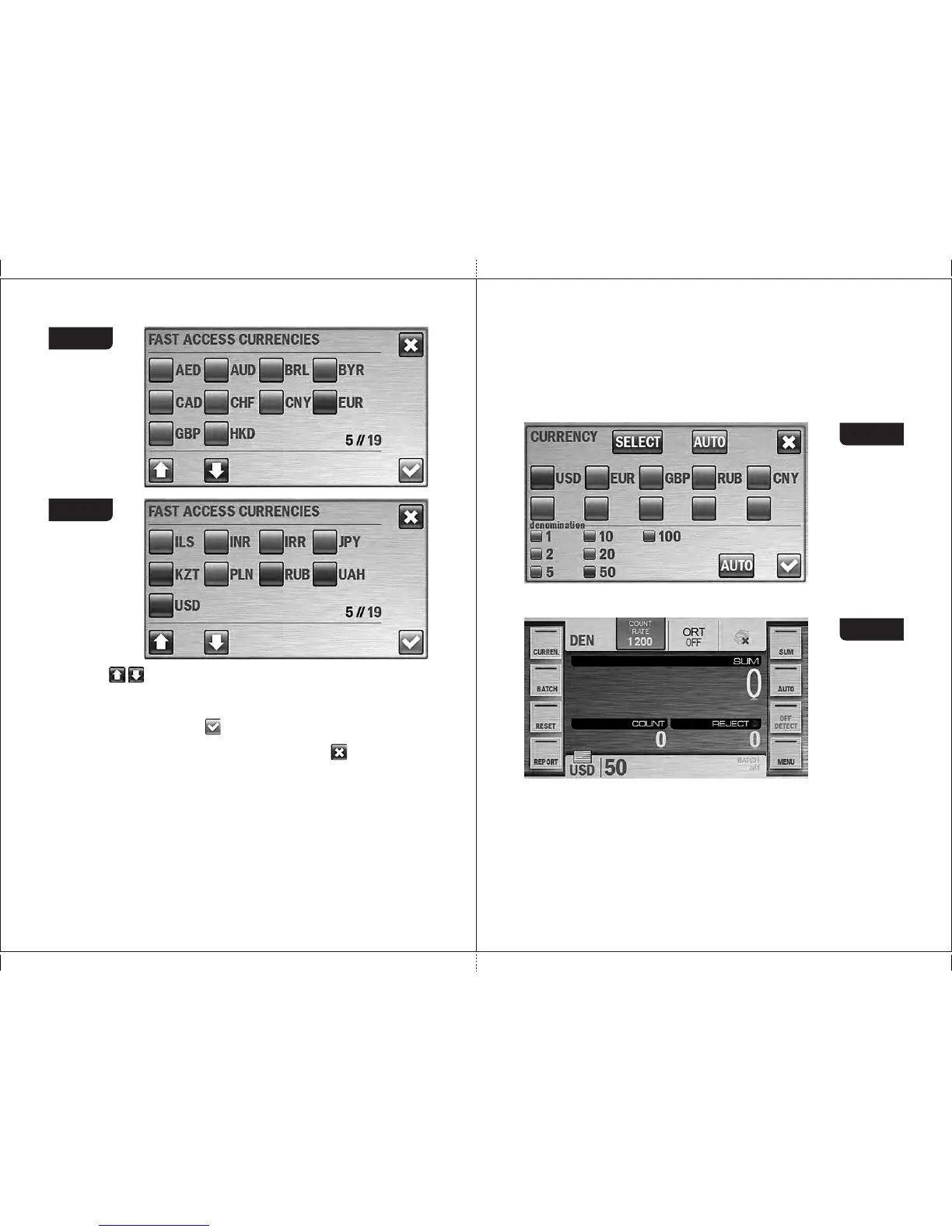
Keys allow scrolling of the list of available currencies. If scrolling
is available these keys are blue, otherwise they are grey.
To create a currencies set, press one by one the check-boxes at the left
of the required currencies (the color of the boxes will become blue), then
press the confirmation key, after that you come back to the
«Currency» submenu. If it is required to cancel selection and exit
the submenu without saving the changes, press the key.
3.3 In the «DEN» mode it is possible to count banknotes of the selected
currency with a manually chosen denomination value. In submenu
«CURRENCY», all possible denominations of the selected currency
are shown below the the list of hot currencies (Figure 41). By default the
«auto denomination» mode is activated, i. e. a denomination is detected
by the first note in the batch; in this case the check-boxes at the left of
denominations are highlighted in blue. If it's required that the banknotes
o f t he c e rta i n deno mina tion g e t into t h e stac k er, pres s the
the required denomination; in this case, the check-box at the left of
selected value become blue while the other check-boxes become grey
(see Figure 44). For the user’s convenience, the selected value of
denomination in mode «DEN» is shown on the main screen at the right
of the selected currency (see Figure 45). To return to automatic
denomination mode, press the «AUTO» key at the right of the
denominations list (see Figure 44).
Figure 44
Figure 45
The indicator of the selected currency (or the AUTO mode) is in the
bottom left corner of the main screen (see Figure 13, Figure 45).
This indicator is also a hot key for submenu «CURRENCY» (it's useful
for extended visual mode where side buttons are hidden). To the right of
the indicator the couples of (denomination - number of counted notes)
are presented (available for MIX and DEN modes); the counted
denominations are marked by bold text (see Figure 46).
MAGNER PRB VALUE COUNTERMAGNER PRB VALUE COUNTER



 To Next Page