2928
Figure 46
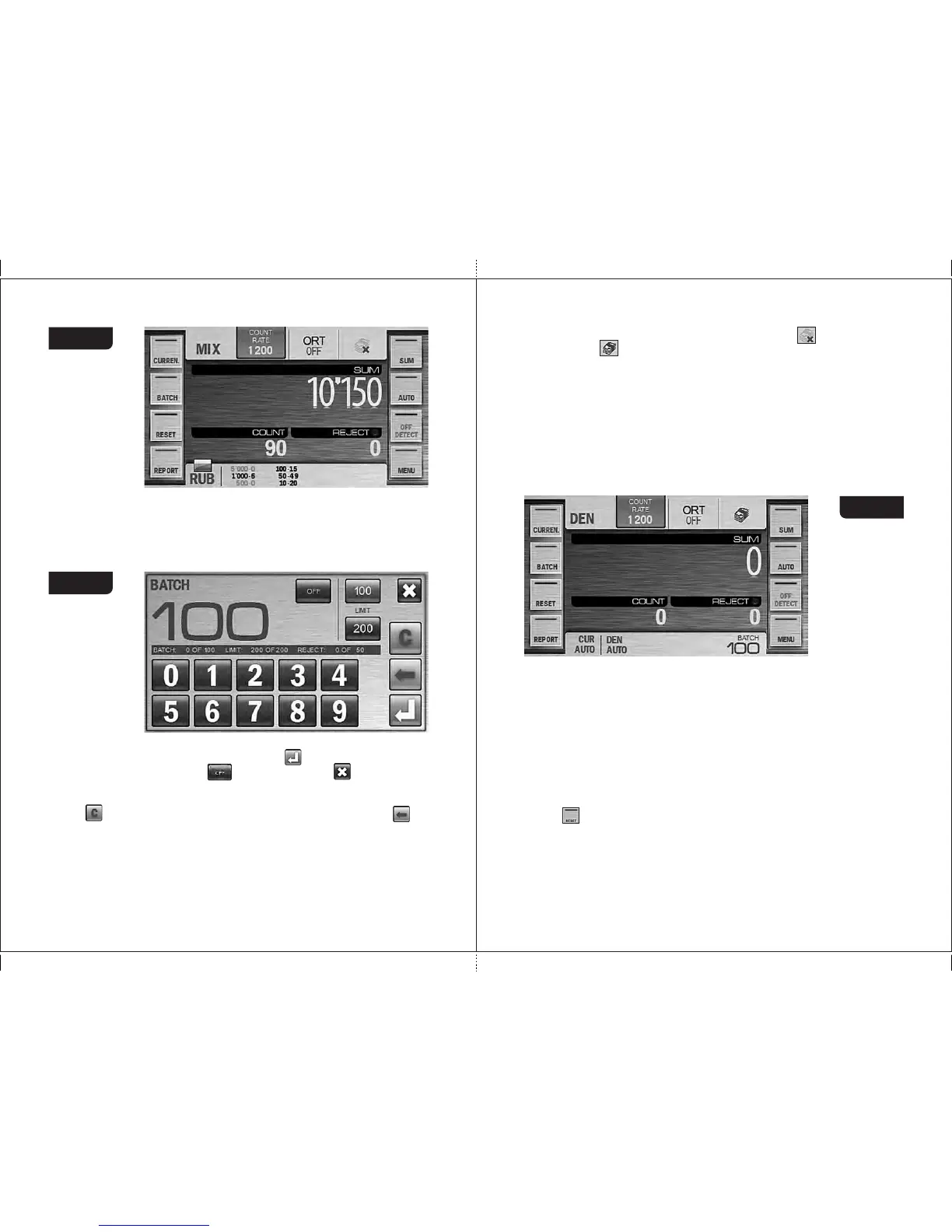
4 Key «BATCH»
Press the «BATCH» key to call the BATCH submenu that is available for
modes «DEN» and «COUNT» (and unavailable in mode «MIX») (see
Figure 47) which provides possibility to select the batch size and the
stacker limit.
Figure 47
You can enter BATCH mode by pressing the key (for the batch size >0)
and disabled by pressing the key. By pressing the key you cancel
the unsaved changes and exit to the main menu. The batch size is
set with the numerical keys. Any batch size since 1 until 999 is available.
Key is used to clear the current batch size. Single pressing of the key
deletes the digit from the right to the left.
There is an information bar below the batch size which contains the main
information from the main screen (the number of the counted banknotes,
the current batch size (if it was selected), the stacker capacity, the reject
pocket capacity). The fast access key to BATCH mode is available on the
main screen in the top right corner (see Figure 13). means that batch
mode is off. means that batch mode is on.
The batch size is indicated on the main screen in the bottom right
corner (see Figure 48). Once the batch size is reached, the indicator is
started to blink, and in 10 seconds message «BATCH IS READY» is
appeared on the screen. If the number of the banknotes in the stacker is
less than the batch size, the message is: «add X», where X is the number of
banknotes required for the batch of the selected size, in 10 seconds
message «ADD BANKNOTES» is appeared on the screen.
Note : The batch size indicator is also the hot key for a quick access to the
«BATCH» submenu.
Figure 48
In the BATCH submenu a user can change the stacker capacity. The
current value of the stacker capacity is highlighted in blue(see Figure 47).
To change the setting, it is sufficient to press the required value (new value
become highlighted in blue).
In the middle of the screen (see Figure 47) there is the information bar
which contains info on the counted and rejected banknotes, the current
batch size and the stacker capacity.
5 Key «RESET»
Key is used to clear the counting results of the stacker after it has been
emptied (the reject pocket shall also be empty). To avoid an accidental data
reset, confirmation is required. (see Figure 49).
A long pressing (about two seconds) on the center of main menu is cleared
the results without confirmation (the function is the most useful for the
extended visual mode).
MAGNER PRB VALUE COUNTERMAGNER PRB VALUE COUNTER



 To Next Page