BAZ72501-en
Pos: 19 /Techn ische Dokument ation/Alle Ger äte/Übersc hriften/ Überschrifte n 1.1/G/Übersc hrift 1.1: Ger ät anschließe n @ 31\mod_1365774714290_75.docx @ 1747653 @ 2 @ 1
Pos: 2 0 /Tec hn ische Dokum ent ation/ Leist ungs prüfs tänd e, Diag nos e-/Abgas geräte/ Z7 Z ubehör a llgem ein/250 1 MAHA PTI T ool/BA/ Inhalt: Z 725 G erät ans chli eßen ( Text) @ 39\mod_1408611910827_75.docx @ 2078195 @ @ 1
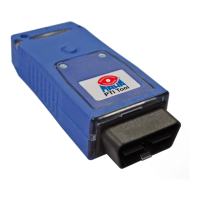
1 Connect the MAHA PTI Tool male OBD connector (G) and the vehicle female
OBD connector (J). The blue LED (C) lights up.
Pressing the button (H) causes an LED in the male OBD connector to light up.
The MAHA PTI tool can therefore easily adapt to dark locations.
2 Establish Bluetooth connection with the PC. Refer to the "Operation" section.
Alternatively, you can connect the MAHA PTI Tool to the PC using a USB cable
(I). To do this, open the cover (B) and connect the USB cable to the female
USB connector (A).
If there is a connection to the PC, the green/red/yellow LED (D) displays a
green light.
Pos: 21 /Techn ische Dokument ation/Alle Ger äte/Übersc hriften/ Überschrifte n 1.1/A/Übersc hrift 1.1: Anze ige @ 31\mod_1364296539126_75.docx @ 1732301 @ 2 @ 1
Pos: 2 2 /Tec hn ische Dokum ent ation/ Leist ungs prüfs tänd e, Diagnos e-/A bgasgerä te/Z7 Zubehör allgemein/2501 MAHA PTI Tool/BA/Inhalt: Z725 Anzeigeelemente und Signalgeber @ 31\mod_1364295810474_75.docx @ 1732157 @ @ 1
LED Status Meaning
Blue
Off
Device not powered (female OBD connector in the
vehicle)
On
Device is powered (female OBD connector in the
vehicle)
Green/red/
yellow
Solid green light Connection to PC (Bluetooth/USB) established
Flickering green
light
Connection to PC (Bluetooth/USB) established, data
being transferred
3 x flashing red
light; 3 x sensor
beeps
Device is powered, but no connection to PC for
more than 20 secs ("loss protection")
Flickering orange
light
Updating firmware: Please wait
1 x flashing green
light and 2 x
flashing red light
Failed to update firmware or no firmware loaded:
Repeat update
Pos: 23 /Techn ische Dokument ation/Alle Ger äte/Übersc hriften/ Überschrifte n 1.1/U/Über schrift 1.1: Upda te @ 7\mod_ 11897 6093 3537_7 5.doc x @ 10552 6 @ 2 @ 1
Pos: 2 4 /Tec hn ische Dokum ent ation/ Leist ungs prüfs tänd e, Diagnos e-/A bgasgerä te/Z7 Z ubeh ör a ll gem ein/ 250 1 MAH A P TI T ool/ BA /Inh al t: Z 725 Upda te @ 31\ mod_1364301928535_75.docx @ 1732433 @ @ 1
Firmware cannot be updated via Bluetooth; only with a USB cable.
Pos: 25 /----- Form at-----/ MAN UE LLE R UM BR UCH Se iten umb ruc h @ 0\mod_1134403577687_0.docx @ 1277 @ @ 1


 To Next Page