Continuity Measurements
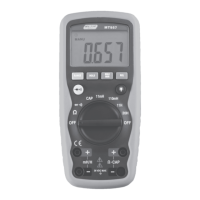
1. Insert the black test lead into the negative COM
terminal and the red test lead into the positive V/
terminal.
2. Set the function switch to the position
3. Use SELECT Button to select . The display icons will
change when the SELECT button is pressed.
4. Touch the Test Probe tips across the circuit or
component under test.
5. If the resistance is < 50Ω, the buzzer tone will sound.
Diode Measurements
1. Insert the black test lead into the negative COM
terminal and the red test lead into the positive V/
terminal
2. Set the function switch to position
3. Use SELECT Button to select . The display icons
will change when the SELECT button is pressed.
4. Touch the test probe tips to the diode or
semiconductor junction under test. Note the meter
reading
5. Reverse the test lead polarity by reversing the red and
black leads. Note the reading
6. The diode or junction can be evaluated as follows:
• If one reading displays a value (typically 0.400V to
0.900V) and the other reading displays OL, the
diode is good.
• If both readings display OL device is open
• If both readings are very small or “0”, the device is
shorted


 To Next Page