2
EN
Controls And Functions
Remote Control
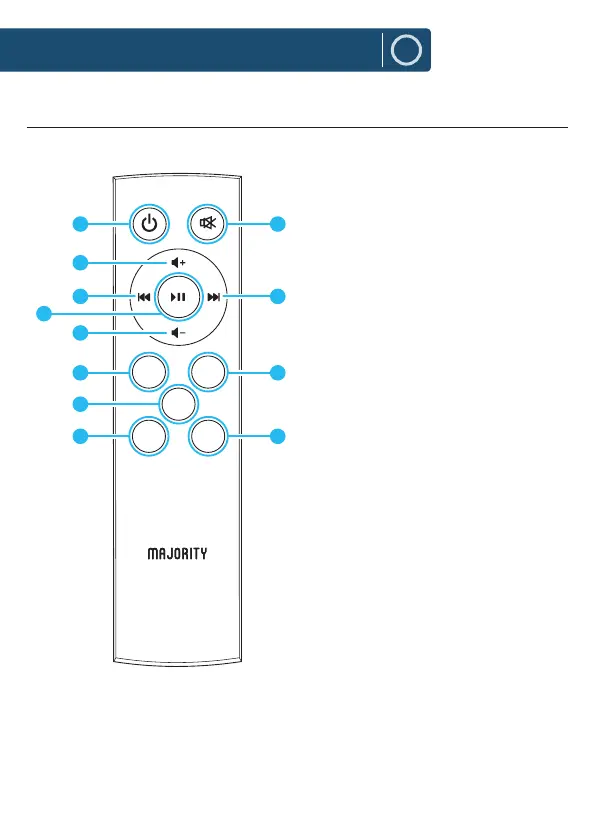
11. Power On/O: Switch the unit
between on and Standby mode.
12. Volume +: Press to increase the
volume.
13. Back Step: Use in Bluetooth and
USB modes to go back a track.
14. Play/Pause: In Bluetooth mode,
press to pause/play media.
15. Volume -: Press to decrease the
volume
16. PAIR: In Bluetooth mode, press to
pair with your device. Press again
to disconnect.
17. FLAT: Press button to restore to
default sound settings.
18. ROCK: Press the remote control
ROCK button to set the ROCK
mode sound eect.
19. MUTE: Press to mute and unmute
sound.
20. Forward Step: Use in Bluetooth
mode to go forward a track.
21. MODE: Press repeatedly to switch
between modes.
22. JAZZ: Press the remote control
JAZZ button to set the JAZZ mode
sound eect.
PAIR
MODE
FLAT
ROCK JAZZ
11
12
14
13
15
16
17
18
19
20
21
22



 To Next Page