26
6. Troubleshooting and performance of product
The following messages are the information that users would find on UPS when it
meets some problems. Users can judge if the fault is caused by external factors and
know how to deal with it by making full use of the information.
1. Fault indicator on, indicates that the UPS has detected some faults.
2. Buzzer beeps, indicates that UPS need to be paid attention to, if beeps for a long
time, it means that there is something wrong with the machine.
3. If you need help, contact our service department, the following messages should
be provided for analysis:
◆UPS MODEL NO. and SERIAL NO.
◆Date of fault happened
◆Detailed description of the problem (include indicator statements on panel)
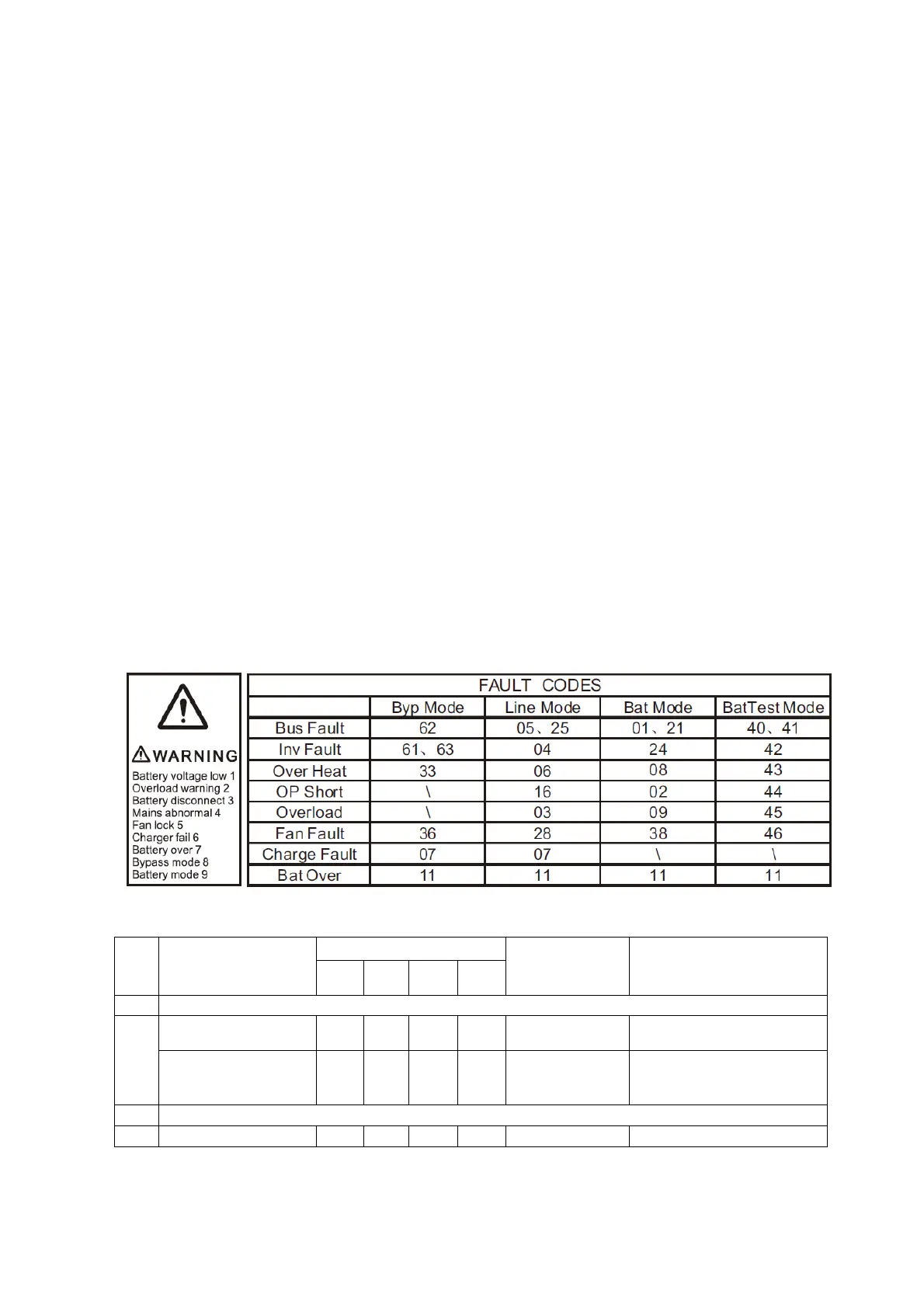
6.1 LED indication and warning table
Appendix1:Warning and Fault Codes
Appendix 2:The corresponding working status of indications
NO Working status
Indication
Warning Remarks
Nor Bat Bps Fau
1 Line mode
Normal voltage ● None
High/low voltage
protection, turn to
battery mode
● ●
★
Once every
four seconds
2 Battery mode
Normal voltage ● ●
★
Once every









 To Next Page