8 ENGLISH
Installing or removing stay / HEPA
lter
Optional accessory
For the stay and sponge lter
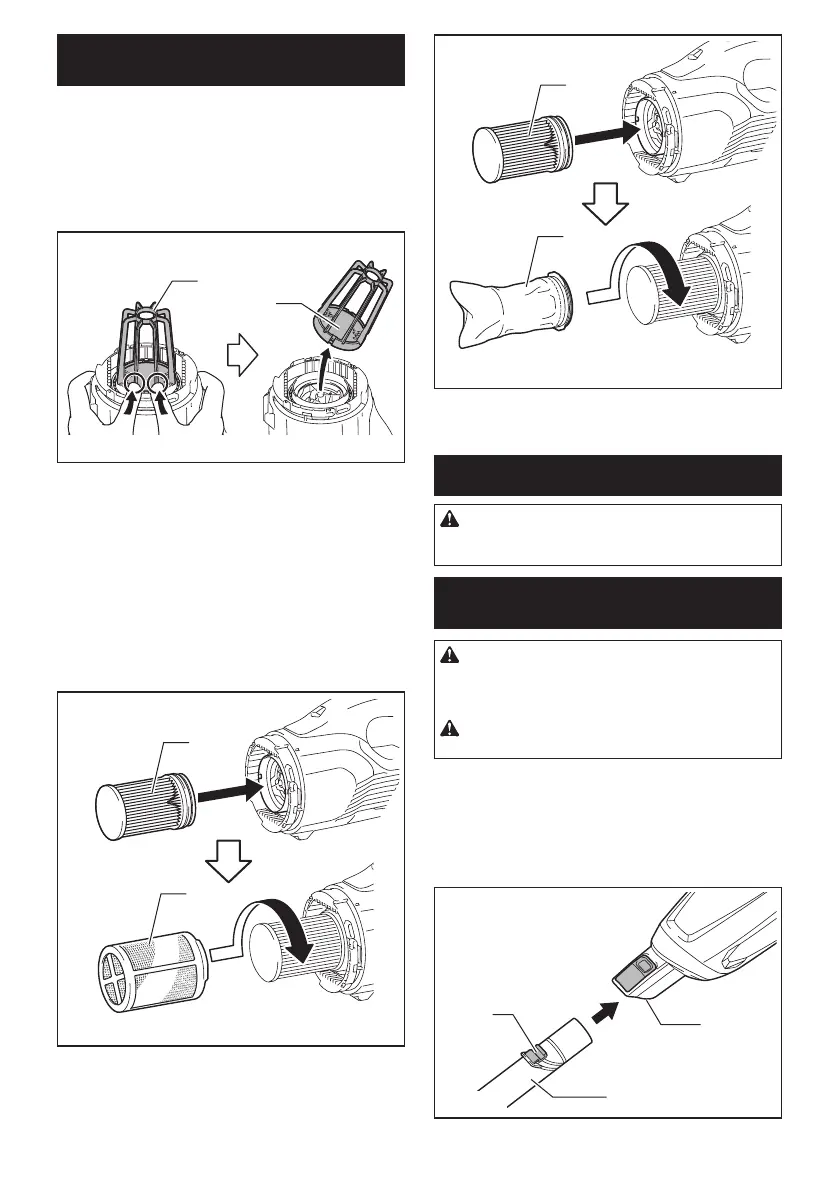
To remove the stay, push up the bottom part of pillars
ofthestaywithyourngersandreleaseitsgroovefrom
the protrusion on the cleaner. After that, remove the
spongelter.
1
2
►1. Stay 2.Spongelter
To install, align the grooves on the stay with the protru-
sion on the cleaner and push until it clicks.
Insertthespongelterbetweenthepillarsandsetitin
the original position.
For the HEPA lter
WheninstallingtheHEPAlter,tthegrooveofthe
HEPAlterwiththeprotrusiononthecleaner.Then,put
theprelterorthehighperformancelterontheHEPA
lterandtwistittosecure.Toremove,followtheinstal-
lation procedure in reverse.
1
2
►1.HEPAlter2.Prelter
1
2
►1.HEPAlter2.Highperformancelter
OPERATION
CAUTION:
Do not move your face close to the
air vent when operating the cleaner.Ifforeignobjects
areblownintoeyes,itmayresultinpersonalinjury.
Installing or removing the cleaner
attachment
CAUTION: After installing attachment,
check if it is securely installed. If the attachment
is installed imperfectly, it may come off and cause
personalinjury.
CAUTION: Be careful not to hit your hand on
the wall etc. when removing the attachment.
When using the extension wand with
lock function
To install the extension wand, insert it to the suction
inlet of the cleaner until it clicks. Make sure that the
extension wand is locked.
1
2
3
►1. Suction inlet 2. Extension wand 3. Hook



 To Next Page
 Loading...