Need help?
Do you have a question about the Makita DWR180Z and is the answer not in the manual?
Lists compatible battery cartridges and chargers for the tool.
Explains the meaning of various symbols used in the manual.
Details noise level measurements and safety precautions.
States the primary purpose of the tool for fastening.
General safety guidelines for operating power tools.
Safety measures for the work environment.
Precautions for safe electrical operation of the tool.
Guidelines for operator safety and protective equipment.
Instructions for using and caring for battery cartridges.
Guidelines for tool maintenance and repair.
Specific safety advice for operating the cordless ratchet wrench.
Critical safety precautions when handling battery cartridges.
Recommendations for prolonging the battery's lifespan and performance.
Mechanism that stops the tool when it overheats.
System that protects battery from low charge levels.
How to check the remaining charge on the battery.
Integrated system to extend tool and battery life.
Protection against excessive current draw during operation.
How to operate the tool's switch and lock lever.
Operation of the tool's integrated work light.
How to change the tool's rotation direction.
Steps for attaching and detaching the socket adaptor.
Steps for attaching and detaching the socket.
How to use the tool manually as a ratchet wrench.
List of recommended accessories for the tool.
Instructions for inspecting and maintaining the tool.
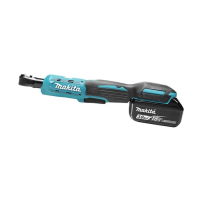
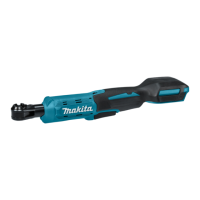
The Makita Cordless Ratchet Wrench DWR180 is a versatile power tool designed for fastening bolts and nuts. This instruction manual provides essential information for its safe and effective operation, maintenance, and handling.
The DWR180 is a cordless ratchet wrench that operates on an 18V D.C. battery. It features a square drive for attaching sockets and a switch lever for controlling the tool's speed and operation. The tool is equipped with a tool/battery protection system that automatically cuts off power under certain conditions to extend tool and battery life. This system includes overload protection, overheat protection, and overdischarge protection.
The tool's operation is straightforward: pull the switch lever to start, and release it to stop. The speed can be increased by applying more pressure to the switch lever. A lock lever is provided to prevent accidental pulling of the switch lever; when in the lock position, the switch lever cannot be actuated. The tool also features a front lamp that illuminates when the switch lever is pulled, staying on for approximately 10 seconds after release. This lamp blinks if the tool overheats, signaling the need for cooling.
A reversing lever allows for changing the direction of rotation. Turning the lever to the 'A' side enables clockwise rotation, while turning it to the 'B' side enables counterclockwise rotation. It's crucial to ensure the reversing lever is fully turned with a click and that the tool comes to a complete stop before changing the direction of rotation to prevent damage.
The DWR180 can be used with a socket adaptor and various sockets. The socket adaptor is installed by pushing it into the adaptor hole until it locks, and removed by inserting a stick-like screwdriver into the backside and gently tapping. Sockets are installed by pushing them onto the socket adaptor until they lock and removed by simply pulling them off. The tool can also fasten M8 (5/16") bolts/nuts directly into the adaptor hole, functioning as a 13mm socket.
Battery Cartridge Installation and Removal: To install the battery cartridge, align the tongue on the cartridge with the groove in the housing and slide it in until it locks with a click. A red indicator on the upper side of the button should not be visible when fully inserted. To remove, slide the button on the front of the cartridge and pull it out. Always ensure the battery cartridge is fully installed to prevent accidental detachment and potential injury.
Indicating Remaining Battery Capacity: For battery cartridges with an indicator, pressing the check button will light up indicator lamps for a few seconds, showing the remaining battery capacity. Different lamp patterns (lighted, off, blinking) correspond to various capacity ranges (75%-100%, 50%-75%, 25%-50%, 0%-25%). If the battery needs charging, the lamps will indicate this. A blinking first (far left) indicator lamp signifies that the battery protection system is active.
Fastening Bolts and Nuts: When operating the tool, hold it firmly, especially as the bolt/nut reaches its seating position. The socket will stop rotating automatically once the desired torque is reached, and the motor reaction will generate instant backlash. Always point the tool straight at the bolt/nut for optimal performance.
Using as a Hand Tool: The DWR180 can also function as a hand ratchet wrench. For stiff bolts or nuts, it is recommended to loosen them manually first before using the power tool. This helps prevent excessive fastening torque that could damage the bolt/nut, socket, or the tool itself.
General Maintenance: Before performing any inspection or maintenance, always ensure the tool is switched off and the battery cartridge is removed. This prevents accidental startup and potential injury.
Cleaning: Never use gasoline, benzine, thinner, alcohol, or similar solvents for cleaning, as these can cause discoloration, deformation, or cracks. For the front lamp, use a dry cloth to wipe off dirt from the lens, being careful not to scratch it, as this could reduce illumination.
Product Safety and Reliability: To maintain the product's safety and reliability, all repairs, maintenance, or adjustments should be performed by Makita Authorized or Factory Service Centers. Always use genuine Makita replacement parts to ensure the tool functions correctly and safely.
Battery Life Maintenance: To maximize battery life, charge the battery cartridge before it is completely discharged. Stop tool operation and charge the battery when you notice reduced power. Avoid overcharging a fully charged battery, as this shortens its service life. Charge the battery cartridge at room temperature (10 °C - 40 °C / 50 °F - 104 °F) and allow hot battery cartridges to cool down before charging. When not in use for extended periods (more than six months), remove the battery cartridge from the tool or charger and charge it.
 General
| Motor type | Brushless |
|---|---|
| Product type | Air ratchet wrench |
| Product color | Green |
| Built-in light | - |
| Adjustable speed | Yes |
| Drive size | - \ |
| Torque (max) | 47.5 N⋅m |
| Idle speed (max) | 800 RPM |
| Power source | Battery |
| Battery included | No |
 Weight and Dimensions
| Depth | 87 mm |
|---|---|
| Width | 79 mm |
| Height | 369 mm |
| Weight | 1.2 g |

 To Next Page