7 ENGLISH
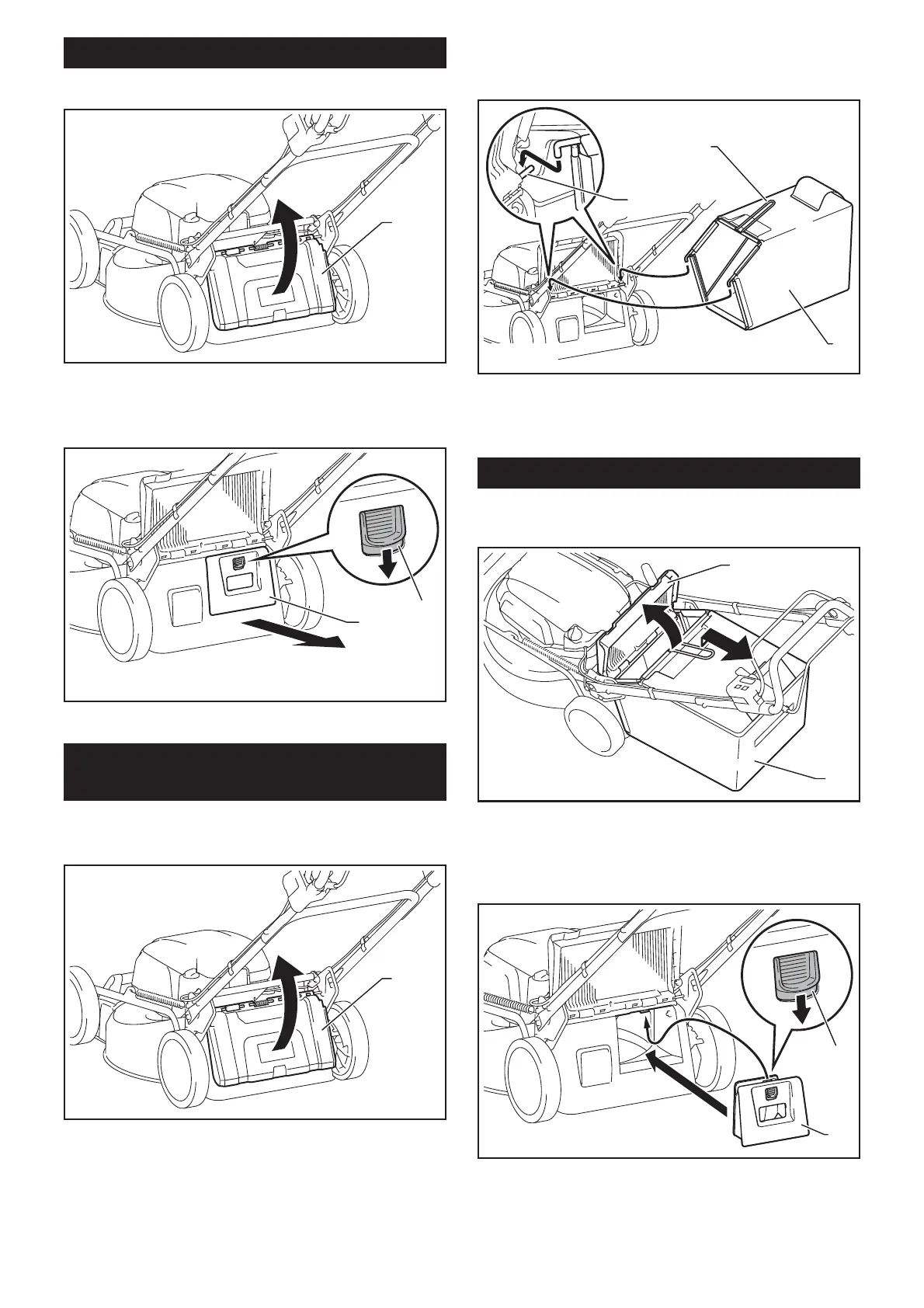
Removing the mulching plug
1. Open the rear cover.
1
Ź1. Rear cover
2. Remove the mulching plug while holding down the
lever.
1
2
Ź1. Lever 2. Mulching plug
Installing or removing the grass
basket
To install the grass basket, follow the steps below.
1. Open the rear cover.
1
Ź1. Rear cover
2. Hold the handle of the grass basket, and then
KRRNWKHJUDVVEDVNHWRQWKHURGRIWKHPRZHUERG\DV
VKRZQLQWKH¿JXUH
1
2
3
Ź1. Rod 2. Handle 3. Grass basket
To remove the grass basket, open the rear cover, and
WKHQUHPRYHWKHJUDVVEDVNHWE\KROGLQJWKHKDQGOH
Attaching the mulching plug
1. Open the rear cover, and then remove the grass
basket.
1
2
Ź1. Rear cover 2. Grass basket
2. Attach the mulching plug while holding down the
lever, and then release the lever to lock the mulching
plug.
1
2
Ź1. Lever 2. Mulching plug


 To Next Page
 Loading...