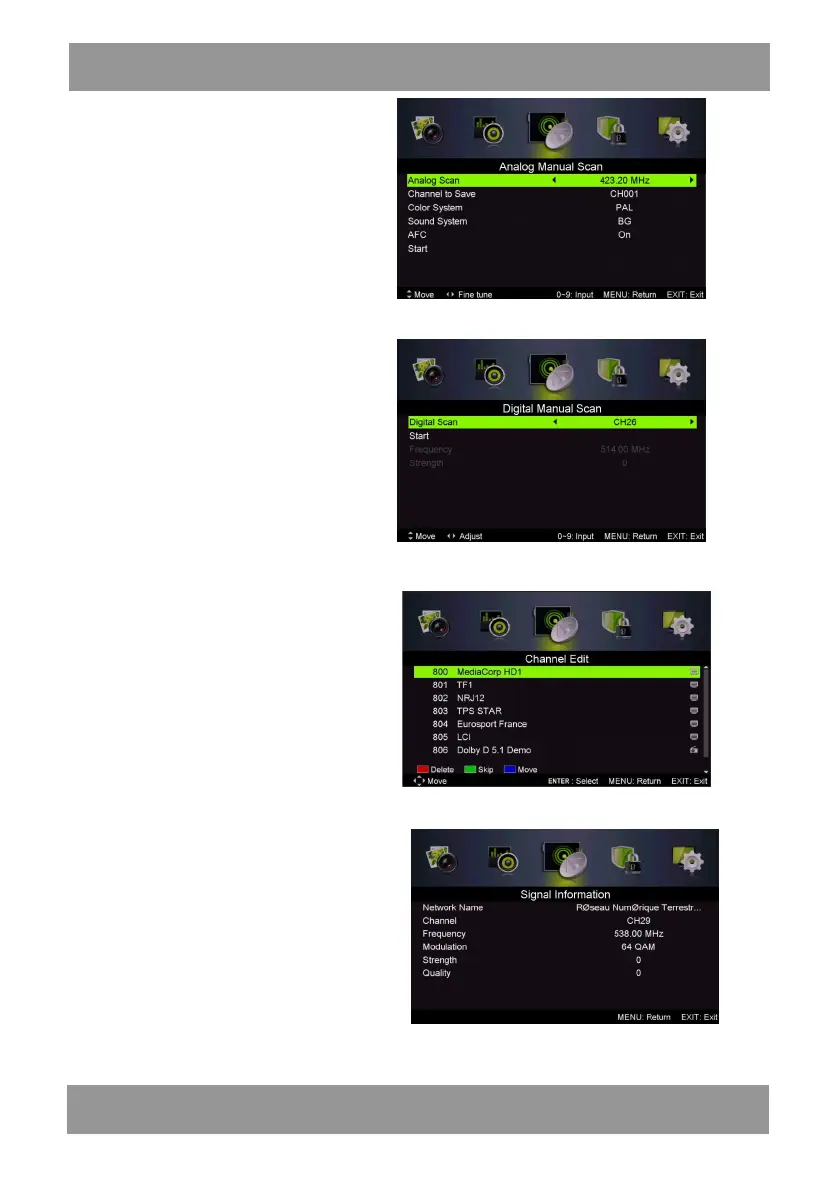
2.Analog Manual Scan
Press “/” button to select “Manual
scan” and press the “” button to Analog
manual scan.
Press “MENU” button to return the
previous menu. Press “EXIT” button to exit
the menu.
3
.Digital Manual Tuning
Press “/” button to select “Diigital
Manual Scan” and press the “” button to
start.
Press “MENU” button to return the
previous menu.
Press “EXIT ” button to exit the menu.
c. MOVE
Press “/” button to select the
channel and press the “BLUE” button to
move . Then press the “/” button to
select the channel with which you want to
move. Press “BLUE” button again to
confirm.
5. Signal information (only use in DTV)
Press “/” button to select “Signal
information” and press the “ENTER”
button . Press “MENU” button to return
the previous menu. Press “EXIT” button
to exit the menu.
4. Channel Edit
Press “/” button to select “Channel Edit” and press the “ENTER” button to enter.
a. DELETE
Press “/” button to select the
program and press “RED” button once to
delete the program.
b. SKIP
Press “/” button to select the channel
which you want to skip and press the
“GREEN” button to skip . Press “GREEN”
button again to cancel the setting.
ENLED1905



 To Next Page