PICTURE
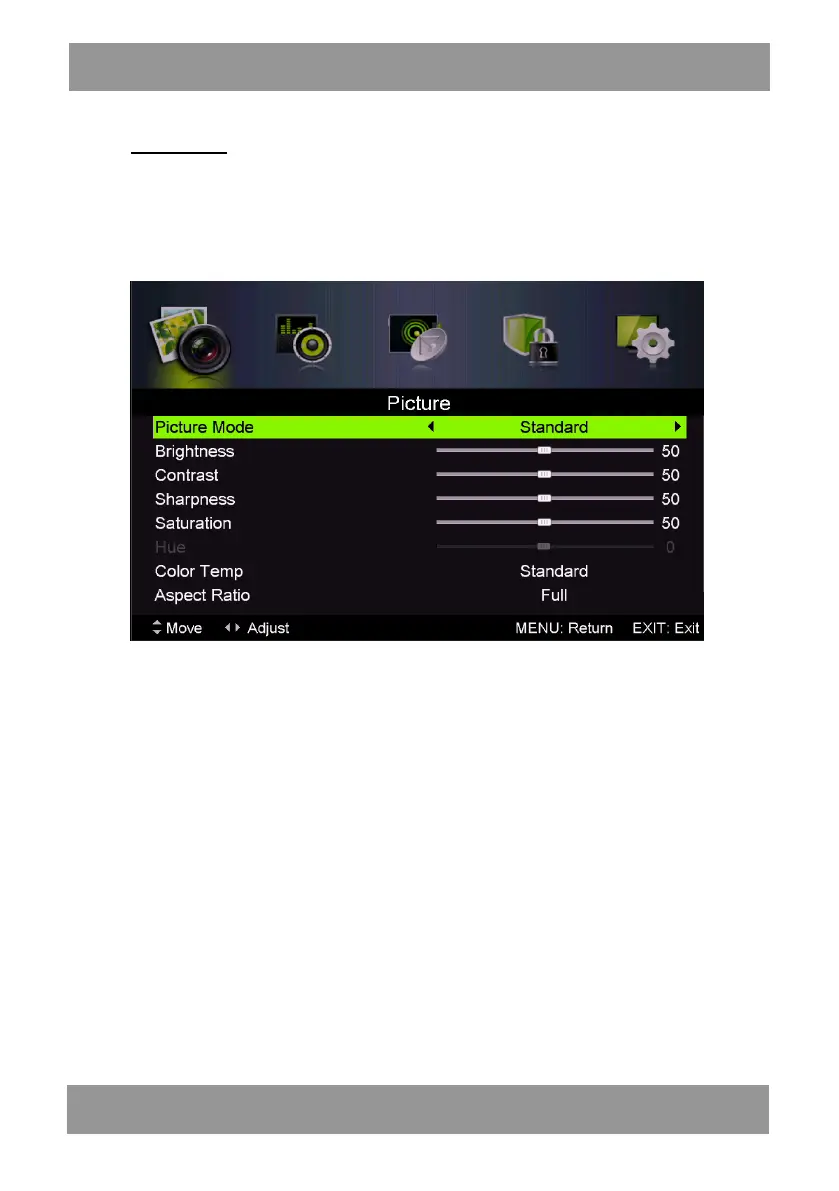
You can select the type of picture, which best corresponds to your viewing.
Press the “MENU” button to enter the OSD menu. Then press “/” button to select the
“PICTURE” menu. Press “/” button to select “Picture Mode” and press the “/” button to
select.
1. Press “/” button to select “Brightness” and press the “/” button to enter brightness
adjustment menu to adjust brightness.
2. Press “/” button to select “Contrast” and press the “/” button to enter contrast
adjustment menu to adjust contrast.
3. Press “/” button to select “Sharpness” and press the “/” button to enter sharpness
adjustment menu to adjust sharpness.
4. Press “/” button to select “Saturation” and press the “/” button to enter Saturation
adjustment menu to adjust saturation.
5. Press “/” button to select “Hue’’ and press the “/” button to enter hue adjustment menu
to adjust hue.
Note: The 'hue' item is used in NTSC mode only.
6. Press “/” button to select “Color Temp” and press the “/” button to select mode:
Standard,Cool,Warm..
7. Press “/” button to select “Aspect Ratio” and press the “/” button to select.
8. Press “/” button to select “Screen Mode” and press the “/” button to select.
Note: The 'Screen Mode' item is used in HDMI mode only.
9. Press “/” button to select “Advanced Settings” and press the “” button to enter Advanced
Settings adjustment menu to adjust.
ENLED1905



 To Next Page