98
Working Modes
EVENT MODE (weekly schedule mode)
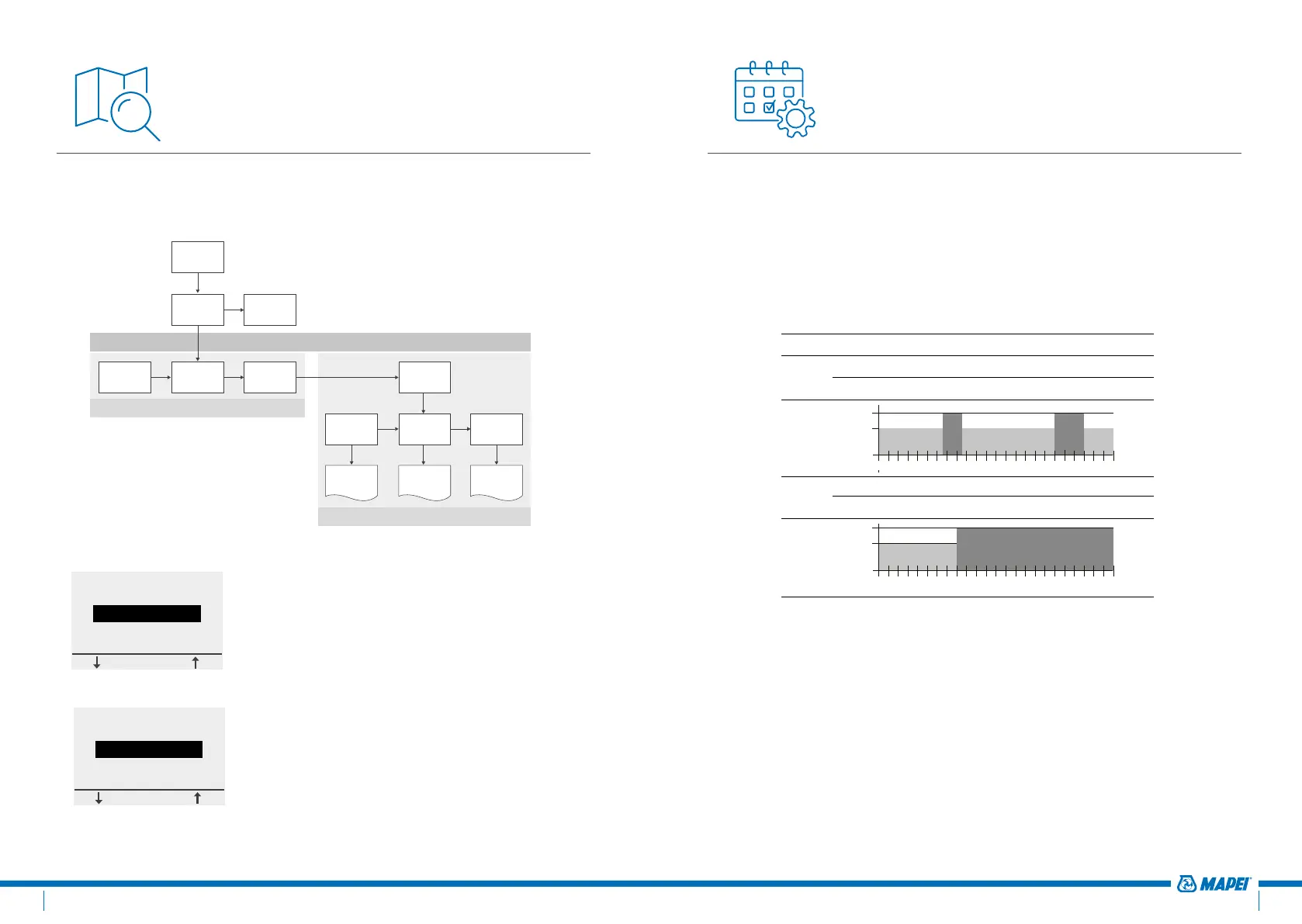
The Event Mode is the Energy efficient mode. In this mode a weekly
schedule has been set-up and can easily be adapted to your needs.
The weekly schedule in the Event Mode is based on a 7 days schedule where
each day can be defined as 1 to 6 events. Events are a combination of a
duration (From – To) and a temperature.
The Event Mode is pre-programmed as follows:
Schedule Period 1 Period 2 Period 3 Period 4 Period 5 Period 6
Mon-Fri
00:00-06:30 06:30-08:30 08:30-18:00 18:00-21:00 21:00-24:00
N/A
+16°C +23°C +16°C +23°C +16°C
N/A
Sat-Sun
00:00-08:00 08:00-24:00
N/A N/A N/A N/A
16°C 23°C
N/A N/A N/A N/A
00
06
12
18
24
02 04 16
14
10 08
20 22
00
06
12
18
24
02 04 16
14
10 08
20 22
+23°C
+16°C
00
06
12
18
24
02 04 16
14
10 08
20 22
00
06
12
18
24
02 04 16
14
10 08
20 22
+16°C
To program the weekly schedule (see Event settings).
Remark: You can temporarily step away from the weekly schedule by
activating the Boost Mode
(see Boost Mode)
Navigation Structure
In the Mapeheat Thermo Basic, it is very easy to navigate in the Menu
structure to activate working modes or to change settings.
Standby
Home Boost Mode
Event Mode
Constant
Mode
Boost Mode Settings
User
settings
Engineer
settings
Event
settings
List of
user
settings
List of
advanced
settings
Programming
the events
CHANGING/CONSULTING SETTINGS
MENU
WORKING MODES
Direct access to
BOOST is only active
in Event Mode using
the + and - button
When entering the MENU, you can directly
activate the working modes (Boost Mode, Event
Mode or Constant Mode) or enter the Settings.
...
Constant Mode
Event Mode
Boost Mode
...
SELECT
...
Engineering Mode
User settings
Event settings
...
SELECT
...
Event Mode
Boost Mode
Exit
...
SELECT
21.0°C
Stop
MONDAY 11:40
23.0°C
Menu
MONDAY 11:42
...
Mon-Fri
Sat-Sun
...
SELECT
SELECT DAY(S)
From To
07:00 09:00
OK
Mon-Fri, Period 2
From To
00:00 07:00
OK
Mon-Fri, Period 1
OK
Mon-Fri, Period 1
16.0°C
OK
Mon-Fri, Period 2
23.0°C
23.0°C
Menu
MONDAY 14:22
23.0°C
MONDAY 14:00
23.0°C
Menu
23.0°C
MONDAY 14:30
23.0°C
Menu
MONDAY 14:22
...
Constant Mode
Event Mode
Boost Mode
...
SELECT
23.0°C
Menu
MONDAY 14:32
The settings are divided in 3 categories:
• Event settings = program the weekly schedule
(see Event settings)
•
User settings = for users to make small changes
(see User settings)
• Engineer settings = for installers or experienced
users (see Engineer settings)
...
Constant Mode
Event Mode
Boost Mode
...
SELECT
...
Engineer settings
User settings
Event settings
...
SELECT
...
Event Mode
Boost Mode
Exit
...
SELECT
21.0°C
Stop
MONDAY 11:40
23.0°C
Menu
MONDAY 11:42
...
Mon-Fri
Sat-Sun
...
SELECT
SELECT DAY(S)
From To
07:00 09:00
OK
Mon-Fri, Period 2
From To
00:00 07:00
OK
Mon-Fri, Period 1
OK
Mon-Fri, Period 1
16.0°C
OK
Mon-Fri, Period 2
23.0°C
23.0°C
Menu
MONDAY 14:22
23.0°C
MONDAY 14:00
23.0°C
Menu
23.0°C
MONDAY 14:30
23.0°C
Menu
MONDAY 14:22
...
Constant Mode
Event Mode
Boost Mode
...
SELECT
23.0°C
Menu
MONDAY 14:32


 To Next Page
 Loading...