18 HMI5000L Installation Guide
1010-1018 Rev 12 www.maplesystems.com
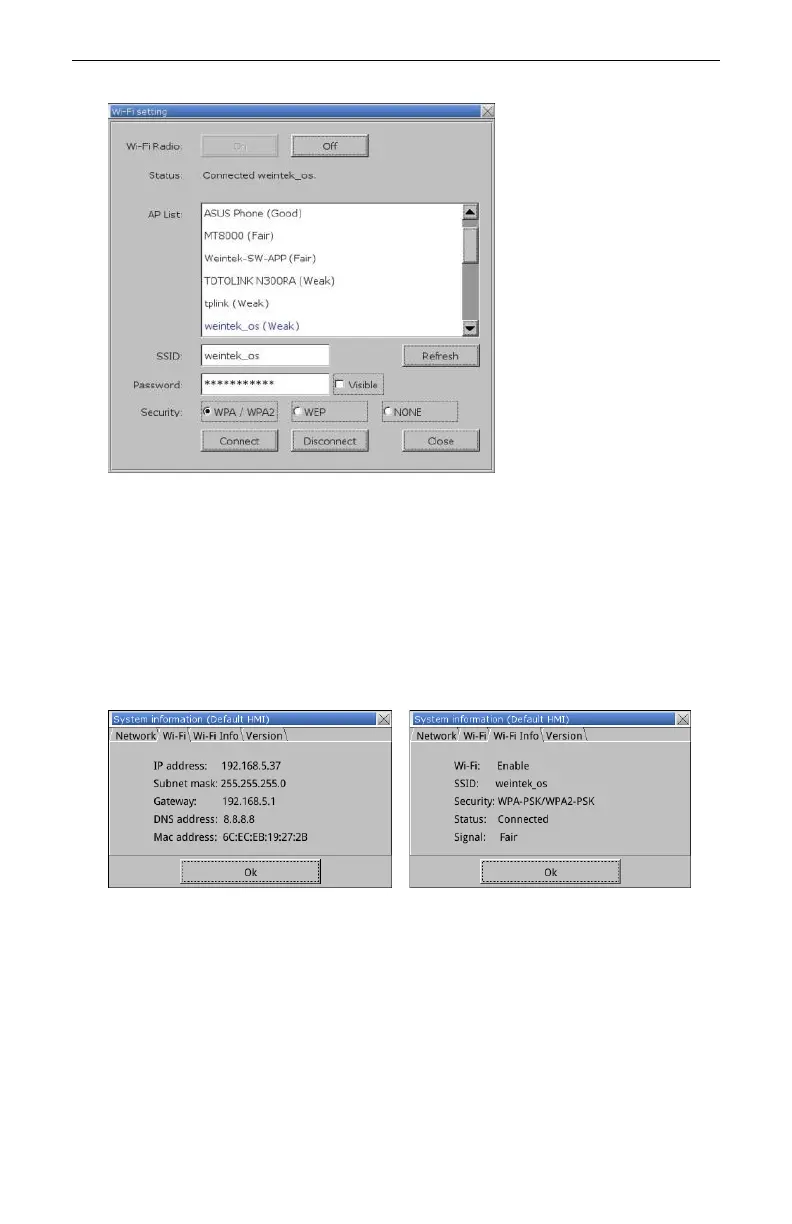
5. Tap the On button to turn Wi-Fi radio on.
6. Choose an available Wi-Fi Network to connect to.
7. Enter the password for the selected network.
8. Select the encryption mode (note this must match the Wi-Fi Router
encryption settings).
9. Tap the Connect button.
10. Tap Close to exit the Wi-Fi setting window.
11. Click Apply to save the changes, and OK to exit the system settings
menu.
12. The updated IP addressing will appear in the Wi-Fi tabs of the
System Information window, also accessed via the arrow icon.
Note: When using the Wi-Fi simultaneously with the wired Ethernet port,
ensure that the connections are on different subnets. Detailed
instructions of the HMI5103L Wi-Fi capabilities are provided in Tech
Note 5121, available from the Support Center of the Maple Systems
website.



 To Next Page