3
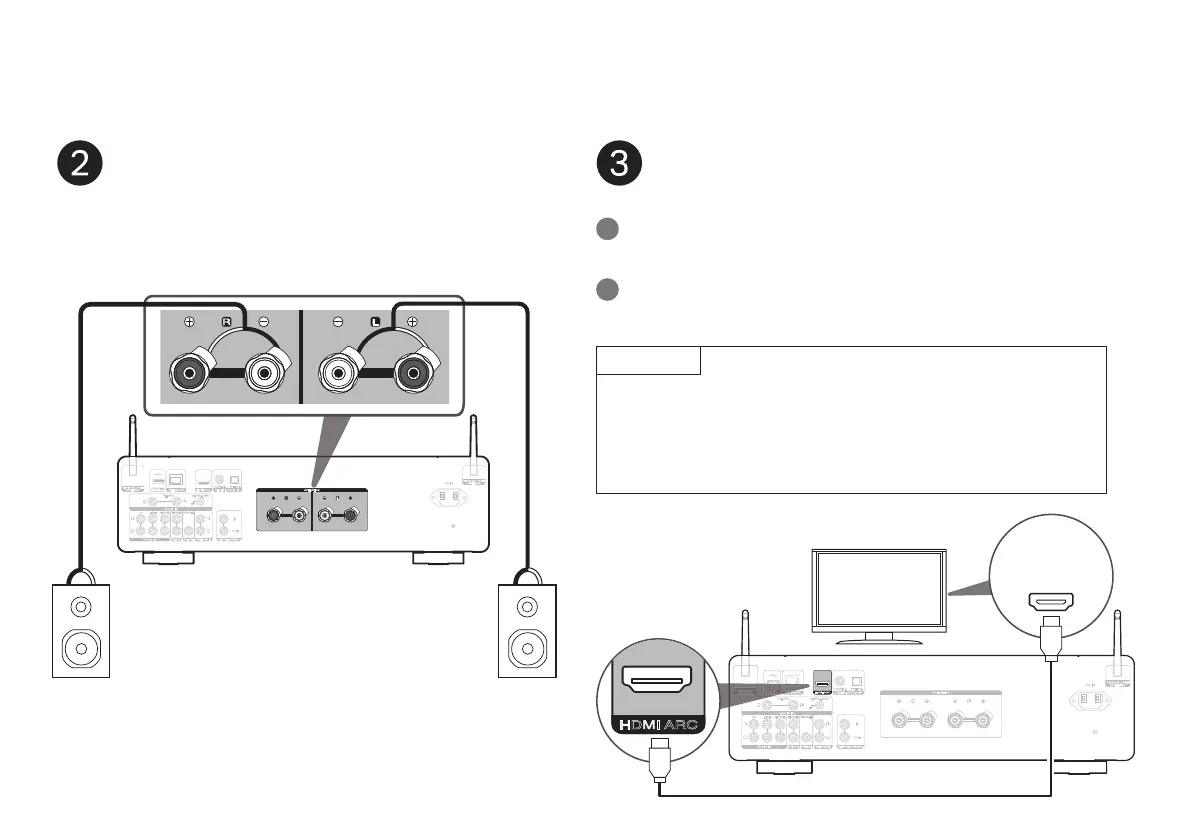
Connect your speakers
AUDIO IN
AUDIO IN
AUDIO OUT
PRE OUT POWER AMP IN
HDMI ARCNETWORK
CD LINE
PHONO SIGNAL GND
RECORDERRECORDER
SUBWOOFER
5V/1A
IN
REMOTE CONTROL
OUT
SPEAKERS
AC IN
Bluetooth / Wi-Fi
ANTENNA
Bluetooth / Wi-Fi
ANTENNA
DIGITAL AUDIO IN
OPTICALCOAXIAL
w q
w q
(R) (L)
Connect your speaker cables between the MODEL 40n and
your speakers.
Connect TV audio (optional)
NOTE
• The TV connection is used to pass audio to the MODEL 40n from your TV's
built-in sources (tuner, smart TV apps, etc.) and HDMI devices connected
to your TV. The MODEL 40n does not generate any video output.
• Make sure your TV is set to output only 2ch PCM audio. Dolby Digital and
DTS audio are not supported.
AUDIO IN
AUDIO IN
AUDIO OUT
PRE OUT
POWER AMP IN
HDMI ARCNETWORK
CD LINE
PHONO SIGNAL GND
RECORDERRECORDER
SUBWOOFER
5V/1A
IN
REMOTE CONTROL
OUT
SPEAKERS
AC IN
Bluetooth / Wi-Fi
ANTENNA
Bluetooth / Wi-Fi
ANTENNA
DIGITAL AUDIO IN
OPTICALCOAXIAL
HDMI
IN
(ARC)
Connect one end of the HDMI cable to the TV port labeled
“ARC”.
1
Connect the other end of the HDMI cable to the HDMI ARC
port on the back of the MODEL 40n.
2


 To Next Page