EasyManua.ls Logo

Marantz CD-17 - Page 12

Marantz CD-17
16 pages
Print Icon
To Next Page IconTo Next Page
To Previous Page IconTo Previous Page
Loading...
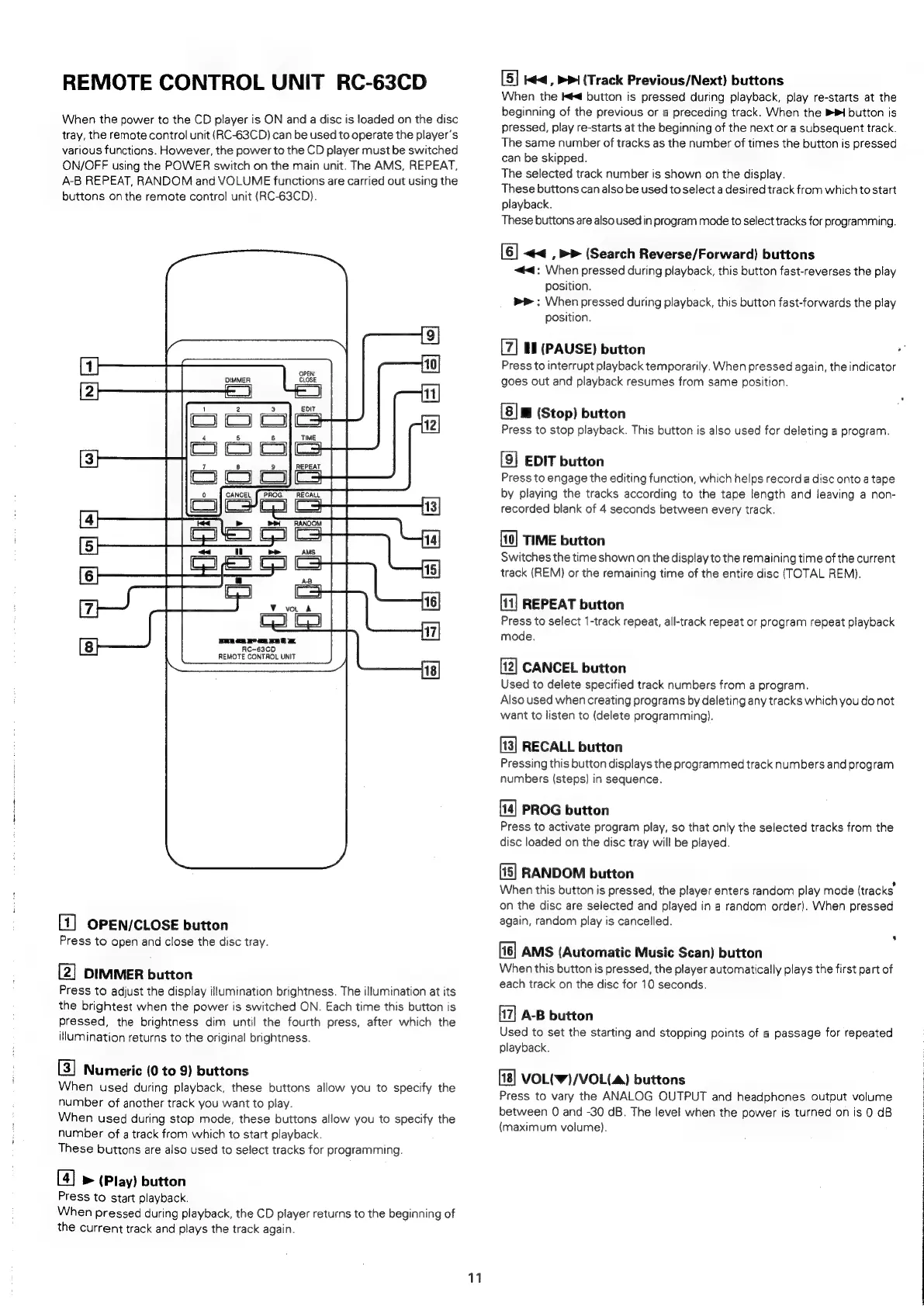
REMOTE
CONTROL
UNIT
RC-63CD
When
the
power
to
the
CD
player
is
ON
and
a
disc
is
loaded
on
the
disc
tray,
the
remote
control
unit
(RC-63CD)
can
be
used
to
operate
the
player's
various
functions.
However,
the
power
to
the
CD
player
must
be
switched
ON/OFF
using
the
POWER
switch
on
the
main
unit.
The
AMS,
REPEAT,
A-B
REPEAT,
RANDOM
and
VOLUME
functions
are
carried
out
using
the
buttons
on
the
remote
control
unit
(RC-63CD).
Ss]
[]
fe]
~]
[o>]
[ol
[|
=)
f=]
&)
E)
fl
RC-63CD
REMOTE
CONTROL
UNIT
=|
[1]
OPEN/CLOSE
button
Press
to
open
and
close
the
disc
tray.
[2]
DIMMER
button
Press
to
adjust
the
display
illumination
brightness.
The
illumination
at
its
the
brightest
when
the
power
is
switched
ON.
Each
time
this
button
is
pressed,
the
brightness
dim
until
the
fourth
press,
after
which
the
illumination
returns
to
the
original
brightness.
[3]
Numeric
(0
to
9)
buttons
When
used
during
playback,
these
buttons
allow
you
to
specify
the
number
of
another
track
you
want
to
play.
When
used
during
stop
mode,
these
buttons
allow
you
to
specify
the
number
of
a
track
from
which
to
start
playback.
These
buttons
are
also
used
to
select
tracks
for
programming.
[4]
>
(Play)
button
Press
to
start
playback.
When
pressed
during
playback,
the
CD
player
returns
to
the
beginning
of
the
current
track
and
plays
the
track
again.
11
[5]
Kd
,
PP
(Track
Previous/Next)
buttons
When
the
Kd
button
is
pressed
during
playback,
play
re-starts
at
the
beginning
of
the
previous
or
a
preceding
track.
When
the
BH
button
is
pressed,
play
re-starts
at
the
beginning
of
the
next
or
a
subsequent
track.
The
same
number
of
tracks
as
the
number
of
times
the
button
is
pressed
can
be
skipped.
The
selected
track
number
is
shown
on
the
display.
These
buttons
can
also
be
used
to
select
a
desired
track
from
which
to
start
playback.
These
buttons
are
also
used
in
program
mode
to
select
tracks
for
programming.
[6]
<<
_,
>>
(Search
Reverse/Forward)
buttons
<4:
When
pressed
during
playback,
this
button
fast-reverses
the
play
position.
bmp
:
When
pressed
during
playback,
this
button
fast-forwards
the
play
position.
tl
(PAUSE)
button
Press
to
interrupt
playback
temporarily.
When
pressed
again,
the
indicator
goes
out
and
playback
resumes
from
same
position.
(Stop)
button
Press
to
stop
playback.
This
button
is
also
used
for
deleting
a
program.
[9]
EDIT
button
Press
to
engage
the
editing
function,
which
helps
record
a
disc
onto
a
tape
by
playing
the
tracks
according
to
the
tape
length
and
leaving
a
non-
recorded
blank
of
4
seconds
between
every
track,
TIME
button
Switches
the
time
shown
on
the
display
to
the
remaining
time
of
the
current
track
(REM)
or
the
remaining
time
of
the
entire
disc
(TOTAL
REM).
[11]
REPEAT
button
Press
to
select
1-track
repeat,
all-track
repeat
or
program
repeat
playback
mode.
[12]
CANCEL
button
Used
to
delete
specified
track
numbers
from
a
program.
Also
used
when
creating
programs
by
deleting
any
tracks
which
you
do
not
want
to
listen
to
(delete
programming).
[13]
RECALL
button
Pressing
this
button
displays
the
programmed
track
numbers
and
program
numbers
(steps)
in
sequence.
PROG
button
Press
to
activate
program
play,
so
that
only
the
selected
tracks
from
the
disc
loaded
on
the
disc
tray
will
be
played.
(15)
RANDOM
button
When
this
button
is
pressed,
the
player
enters
random
play
mode
(tracks
on
the
disc
are
selected
and
played
in
a
random
order).
When
pressed
again,
random
play
is
cancelled.
AMS
(Automatic
Music
Scan)
button
When
this
button
is
pressed,
the
player
automatically
plays
the
first
part
of
each
track
on
the
disc
for
10
seconds.
A-B
button
Used
to
set
the
starting
and
stopping
points
of
a
passage
for
repeated
playback.
VOL(W)/VOL(4)
buttons
Press
to
vary
the
ANALOG
OUTPUT
and
headphones
output
volume
between
0
and
-30
dB.
The
level
when
the
power
is
turned
on
is
0
dB
(maximum
volume).

Related product manuals