EasyManua.ls Logo

Marantz CD-17 - Page 11

Marantz CD-17
16 pages
Print Icon
To Next Page IconTo Next Page
To Previous Page IconTo Previous Page
Loading...
EDITING
When
recording
from
a
compact
disc
to
a
tape,
use
this
function
to
match
the
tape
length
to
the
playing
time
of
the
tracks
to
be
recorded
and
to
create
4-second
intervals
between
the
tracks.
Auto
peak
level
search
If
the
cassette
deck
recording
level
is
adjusted
in
relation
to
the
peak
level
on
the
disc,
itis
possible
to
avoid
distortion
and
noise
in
recording.
This
facility
allows
the
peak
over
the
entire
disc
or
in
the
programmed
to
be
detected
tracks
before
proceeding
to
editing.
Simple
edit
This
operation
fits
tracks
into
a
specified
tape
length
while
keeping
the
tracks
in
their
original
order.
1.
Press
the
CEBIT)
button
in
stop
mode
to
light
up
the
EDIT
indicator.
The
tape
recording
time
display
(90)
appears.
Flashes
Lights
up.
T2345
6
78
9
1011
1213
14
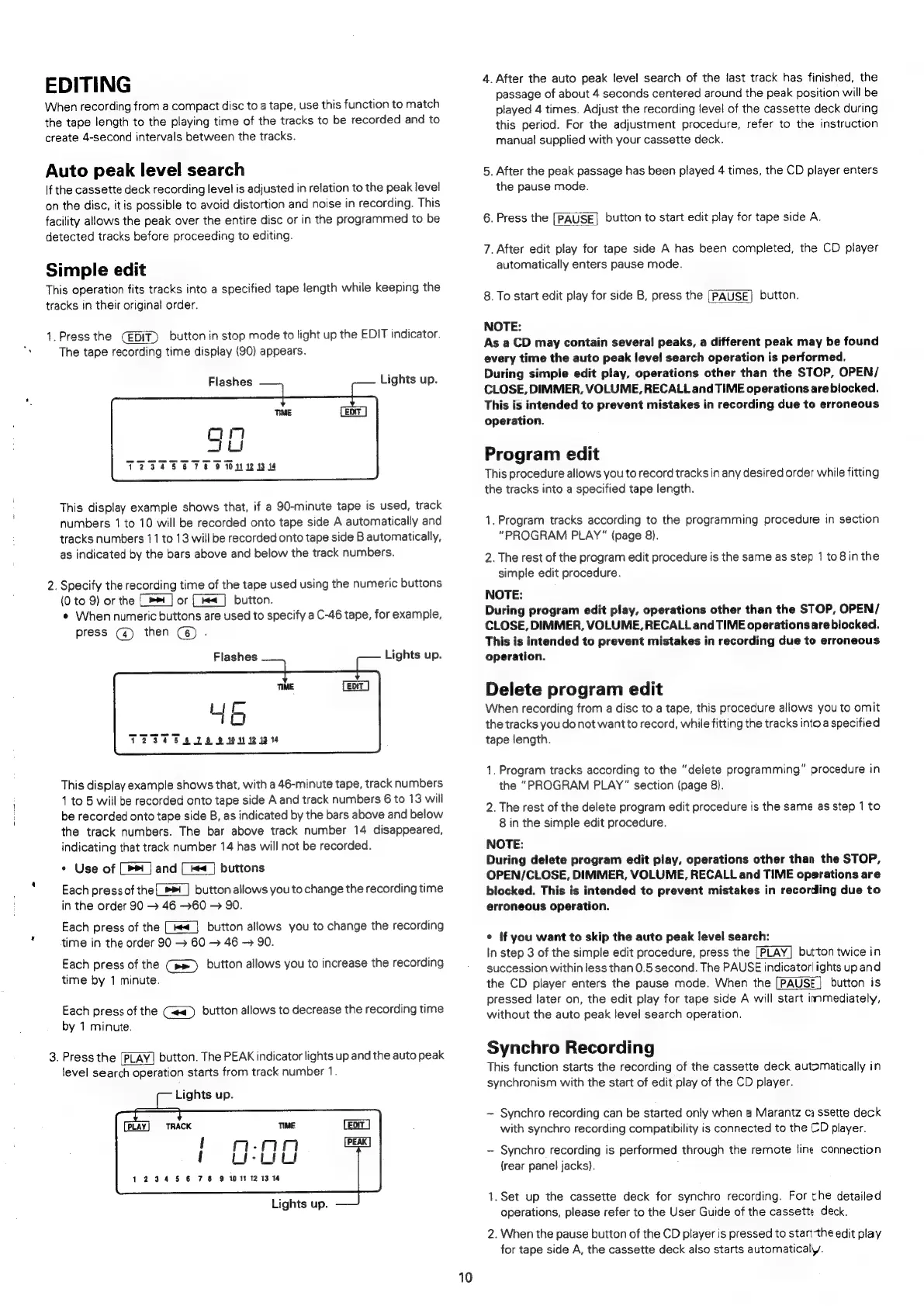
This
display
example
shows
that,
if
a
90-minute
tape
is
used,
track
numbers
1
to
10
will
be
recorded
onto
tape
side
A
automatically
and
tracks
numbers
11
to
13
will
be
recorded
onto
tape
side
B
automatically,
as
indicated
by
the
bars
above
and
below
the
track
numbers.
NO
.
Specify
the
recording
time
of
the
tape
used
using
the
numeric
buttons
(0
to
9)
or
the
[>]
or
(<]
button.
¢
When
numeric
buttons
are
used
to
specify
a
C-46
tape,
for
example,
press
(@)
then
(6)
.
Flashes
Lights
up.
This
display
example
shows
that,
with
a
46-minute
tape,
track
numbers
1
to
5
will
be
recorded
onto
tape
side
A
and
track
numbers
6
to
13
will
be
recorded
onto
tape
side
B,
as
indicated
by
the
bars
above
and
below
the
track
numbers.
The
bar
above
track
number
14
disappeared,
indicating
that
track
number
14
has
will
not
be
recorded.
Pi
¢
Use
of
and
kea_|
buttons
Each
press
of
the_»™_]
button
allows
you
to
change
the
recording
time
in
the
order
90
46
60
>
90.
Each
press
of
the
[|
button
allows
you
to
change
the
recording
time
in
the
order
90
>
60
46
-
90.
Each
press
of
the
(pe)
button
allows
you
to
increase
the
recording
time
by
1
minute.
Each
press
of
the
(~«_)
button allows
to
decrease
the
recording
time
by
1
minute.
3.
Press
the
[PLAY]
button.
The
PEAK
indicator
lights
up
and
the
auto
peak
level
search
operation
starts
from
track
number
1.
Lights
up.
TIME
{
mWsAn
{
Li-Liu
12345678
9
011121314
Lights
up.
10
4.
After
the
auto
peak
level
search
of
the
last
track
has
finished,
the
passage
of
about
4
seconds
centered
around
the
peak
position
will
be
played
4
times.
Adjust
the
recording
level
of
the
cassette
deck
during
this
period.
For
the
adjustment
procedure,
refer
to
the
instruction
manual
supplied
with
your
cassette
deck.
5.
After
the
peak
passage
has
been
played
4
times,
the
CD
player
enters
the
pause
mode.
6.
Press
the
[PAUSE]
button
to
start
edit
play
for
tape
side
A.
7.
After
edit
play
for
tape
side
A
has
been
completed,
the
CD
player
automatically
enters
pause
mode.
8.
To
start
edit
play
for
side
B,
press
the
[PAUSE]
button.
NOTE:
As
a
CD
may
contain
several
peaks,
a
different
peak
may
be
found
every
time
the
auto
peak
level
search
operation
is
performed.
During simple
edit
play,
operations
other
than
the
STOP,
OPEN/
CLOSE,
DIMMER,
VOLUME,
RECALL
and
TIME
operations
are
biocked.
This
is
intended
to
prevent
mistakes
in
recording
due
to
erroneous
operation.
Program
edit
This
procedure
allows
you
to
record
tracks
in
any
desired
order
while
fitting
the
tracks
into
a
specified
tape
length.
1,
Program
tracks
according
to
the
programming
procedure
in
section
“PROGRAM
PLAY”
{page
8).
2.
The
rest
of
the
program
edit
procedure
is
the
same
as
step
1
to
8in
the
simple
edit
procedure.
NOTE:
During
program
edit
play,
operations
other
than
the
STOP,
OPEN/
CLOSE,
DIMMER,
VOLUME,
RECALL
and
TIME
operationsare
blocked.
This
is
intended
to
prevent
mistakes
in
recording
due
to
erroneous
operation.
Delete
program
edit
When
recording
from
a
disc
to
a
tape,
this
procedure
allows
you
to
omit
the
tracks
you
do
not
want
to
record,
while
fitting
the
tracks
into
a
specified
tape
length.
1.
Program
tracks
according
to
the
“delete
programming”
procedure
in
the
“PROGRAM
PLAY"
section
(page
8).
2.
The
rest
of
the
delete
program
edit
procedure
is
the
same
as
step
1
to
8
in
the
simple
edit
procedure.
NOTE:
During
delete
program
edit
play,
operations
other
than
the
STOP,
OPEN/CLOSE,
DIMMER,
VOLUME,
RECALL
and
TIME
operations
are
blocked.
This
is
intended
to
prevent
mistakes
in
recording
due
to
erroneous
operation.
¢
if
you
want
to
skip
the
auto
peak
level
search:
In
step
3
of
the
simple
edit
procedure,
press
the
[PLAY]
button
twice
in
succession
within
less
than
0.5
second.
The
PAUSE
indicator
ights
up
and
the
CD
player
enters
the
pause
mode.
When
the
[PAUSE]
button
is
pressed
later
on,
the
edit
play
for
tape
side
A
will
start
immediately,
without
the
auto
peak
level
search
operation.
Synchro
Recording
This
function
starts
the
recording
of
the
cassette
deck
automatically
in
synchronism
with
the
start
of
edit
play
of
the
CD
player.
-
Synchro
recording
can
be
started
only
when
a
Marantz
ca
ssette
deck
with
synchro
recording
compatibility
is
connected
to
the
CD
player.
-
Synchro
recording
is
performed
through
the
remote
line
connection
{rear
panel
jacks).
1.Set
up
the
cassette
deck
for
synchro
recording.
For
the
detailed
operations,
please
refer
to
the
User
Guide
of
the
cassette
deck.
2.
When
the
pause
button
of
the
CD
player
is
pressed
to
startthe
edit
play
for
tape
side
A,
the
cassette
deck
also
starts
automatically.

Related product manuals